936LE005550A
Starting, commissioning, operation
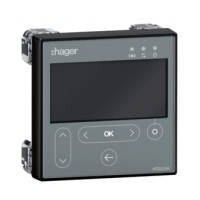
4.6 Start-up and configuration via the HTD210H display
4.6.1
Overview of the
HTD210H display
HTD210H display
Component Description
1
Screen LCD type
2
Signalling LED Alarm – communication - Ready
3
RJ9 jack At the rear of the display
4
Context-sensitive key Function dependent on the menu displayed
5
Left/OK/Right keys
Left and Right keys to navigate to the left and
right in the menus.
OK key: Confirm an action.
6
Back key
Go back or exit menu.
Return to Live mode by pressing and holding
7
Up/Down keys Up and Down keys to navigate up and down the menus


 To Next Page