856LE005550A
Starting, commissioning, operation
4.2 Starting and configuring the circuit breaker
4.2.5
Configuring Live mode
Live mode is deactivated by default.
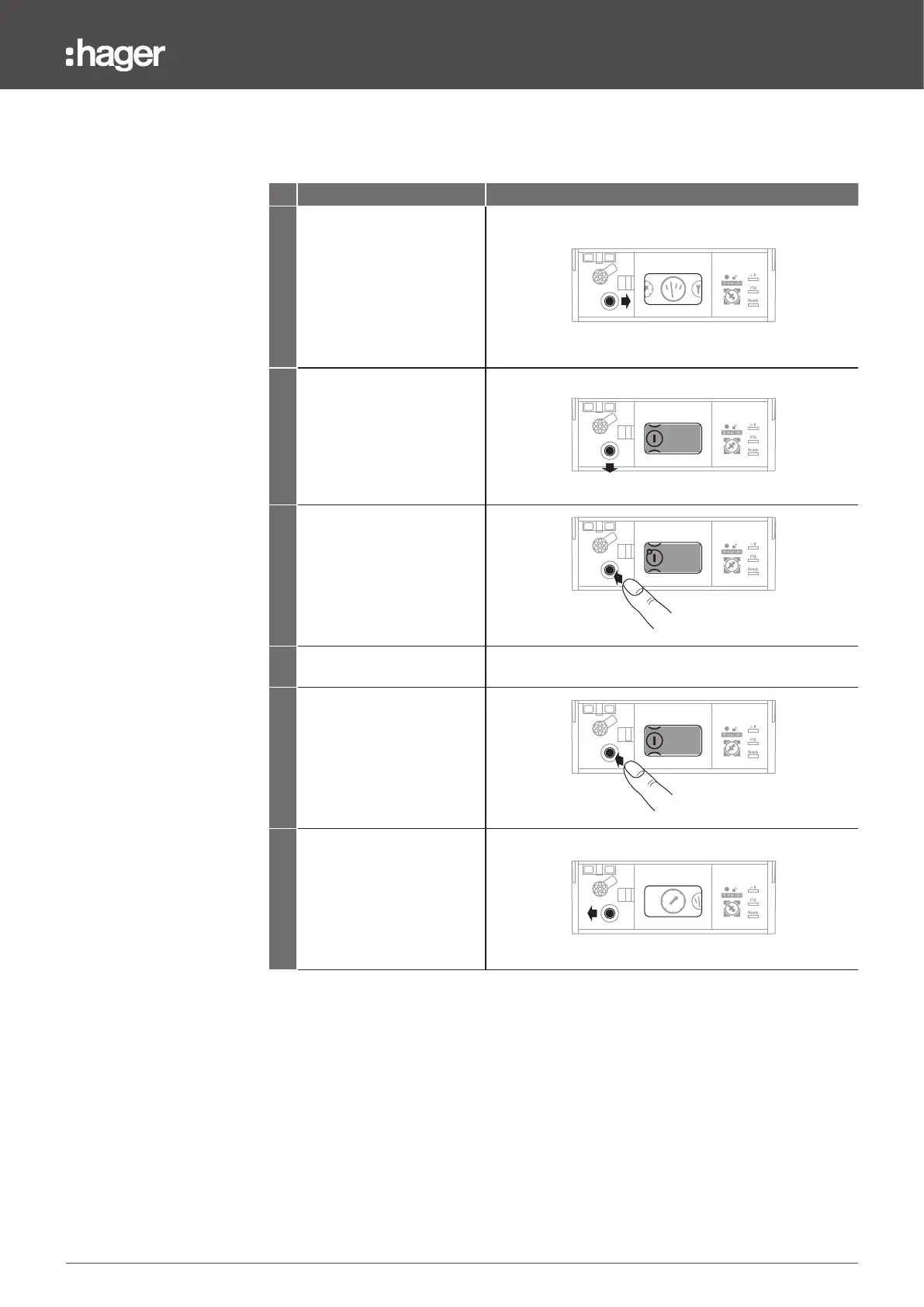
To manage favourites, proceed as follows:
Action Note/Illustration
1
Move the joystick to the right
to select the Measurements
menu.
Then press the joystick to
access the Measurements
menu.
63 160
125
100
2
Move the navigation joystick
downwards to select the view
to be set as the favourite.
63 160
125
100
82A
63A
54A
1
2
3
3
Briefly press the centre of
the joystick to confirm the
selection.
A star appears on the
measurements icon to
confirm the validation.
63 160
125
100
82A
63A
54A
1
2
3
4
Repeat steps 2 and 3 to add
other favourites.
5
Briefly press the centre of the
joystick on a view confirmed
as a favourite in order to
delete this favourite.
The star disappears on
the measurements icon to
confirm the validation.
63 160
125
100
82A
63A
54A
1
2
3
6
Move the joystick to the left to
return to the Main menu.
63 160
125
100
Note
Live mode starts automatically after 30 seconds of inactivity.


 To Next Page