EasyManua.ls Logo

Hanlong UC802(P) - Remote Phonebook; Call History

Hanlong UC802(P)
111 pages
Print Icon
To Next Page IconTo Next Page
To Previous Page IconTo Previous Page
Loading...
Table of Content
42
Remote Phonebook
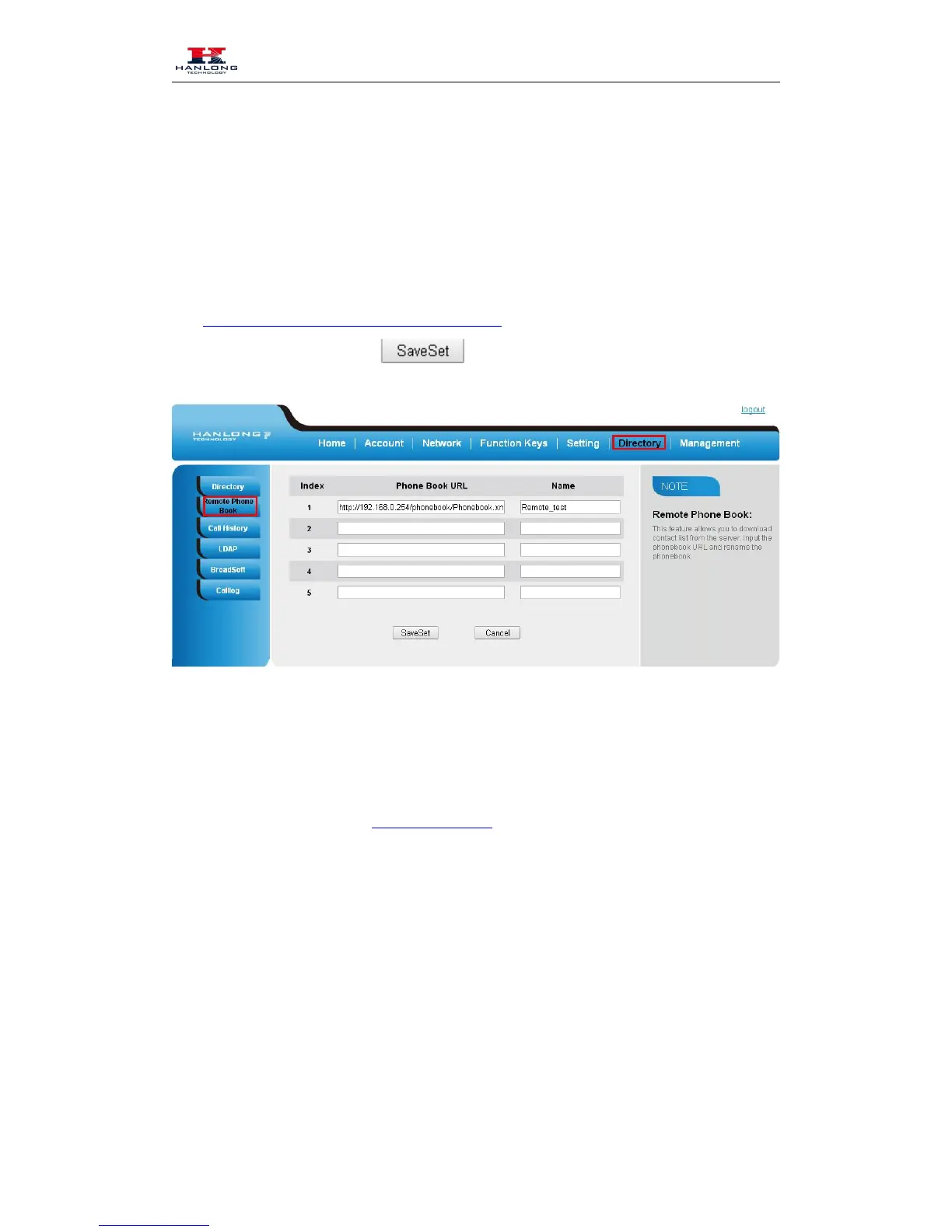
To set Romote PhoneBook via web interface:
1. Login the webpage and click Directory
Remote Phone Book
2. Fill the path of the remote file in the Phone Book URL field.
For example,
http://192.168.0.254/phonebook/Phonebook.xml
3. Fill the Name and then click to save the configuration.
To check the contacts via phone interface:
1. Press Directory
Left Button
Left Button, and then you can see the item you set, press enter
you will find the detail.
For More detail, please refer to: Remote Phonebook on Hanlong webpage.
Call History
This phone maintains call history lists of Dialed Calls, Received Calls, Missed Calls and
Forwarded Calls. The call history list supports up to100 entries in all on phone interface and more
than 1500 items. You can check the call history, dial a call, add a contact or delete an entry from
the call history list. You should enable the history record feature in advance.
To enable the history record feature via phone interface:


Table of Contents

Related product manuals