31
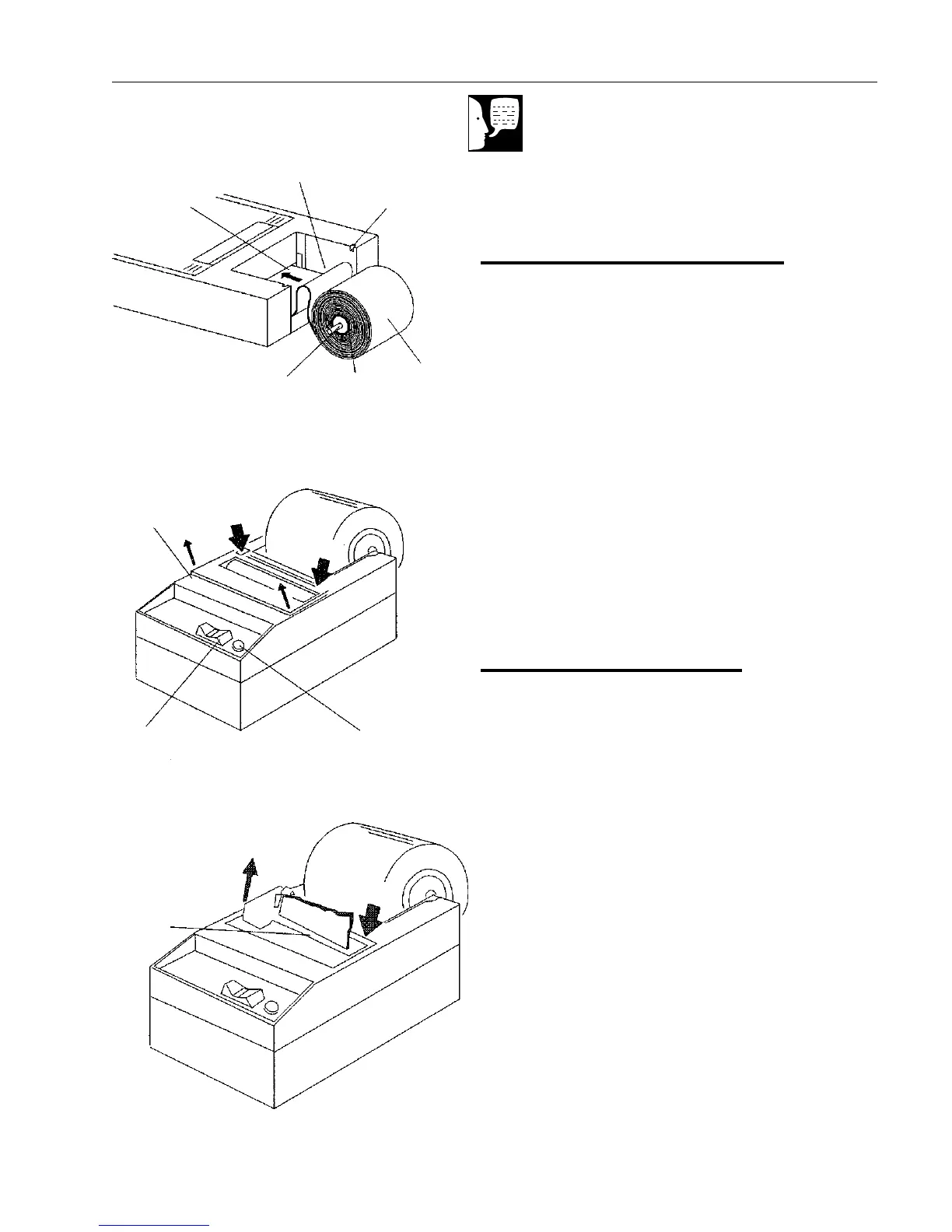
Paper Roll Replacement
1. To remove the old paper roll core, lift
up and snap out.
2. Insert spindle into the new paper roll.
3. Feed the paper from the bottom of the
roll into the paper pick up slot
(between the shiny metal strips).
4. Press the paper feed switch until the
paper feeds out the exit slot in the top
of the printer.
5. Place the spindle in the slots and
press down to snap in place.
Ribbon Replacement
1. To remove the ribbon cover, press
down as shown. Lift the cover up and
out.
2. To remove the ribbon, press down as
shown. Grasp the ribbon and lift it from
the printer.
3. Press the new ribbon down until it
snaps into place.
4. Install paper roll.
5. Snap cover back in place.
PRINTER
Note
Cut feed end of new paper roll
straight across for ease of re-
placement.
Press
Figure 17
Paper Roll Replacement
Be Sure Feed End is
Cut Straight Across
Spindle
Slot
Shiny
Metal
Strip
Paper
Roll
Paper
Roll
Core
Spindle
Figure 18
Ribbon Cover Removal
Ribbon
Cover
Press
Pilot
Light
On-Off
Paper Feed
Switch
Figure 19
Ribbon Removal
Lift
Press
Ribbon


 To Next Page