36
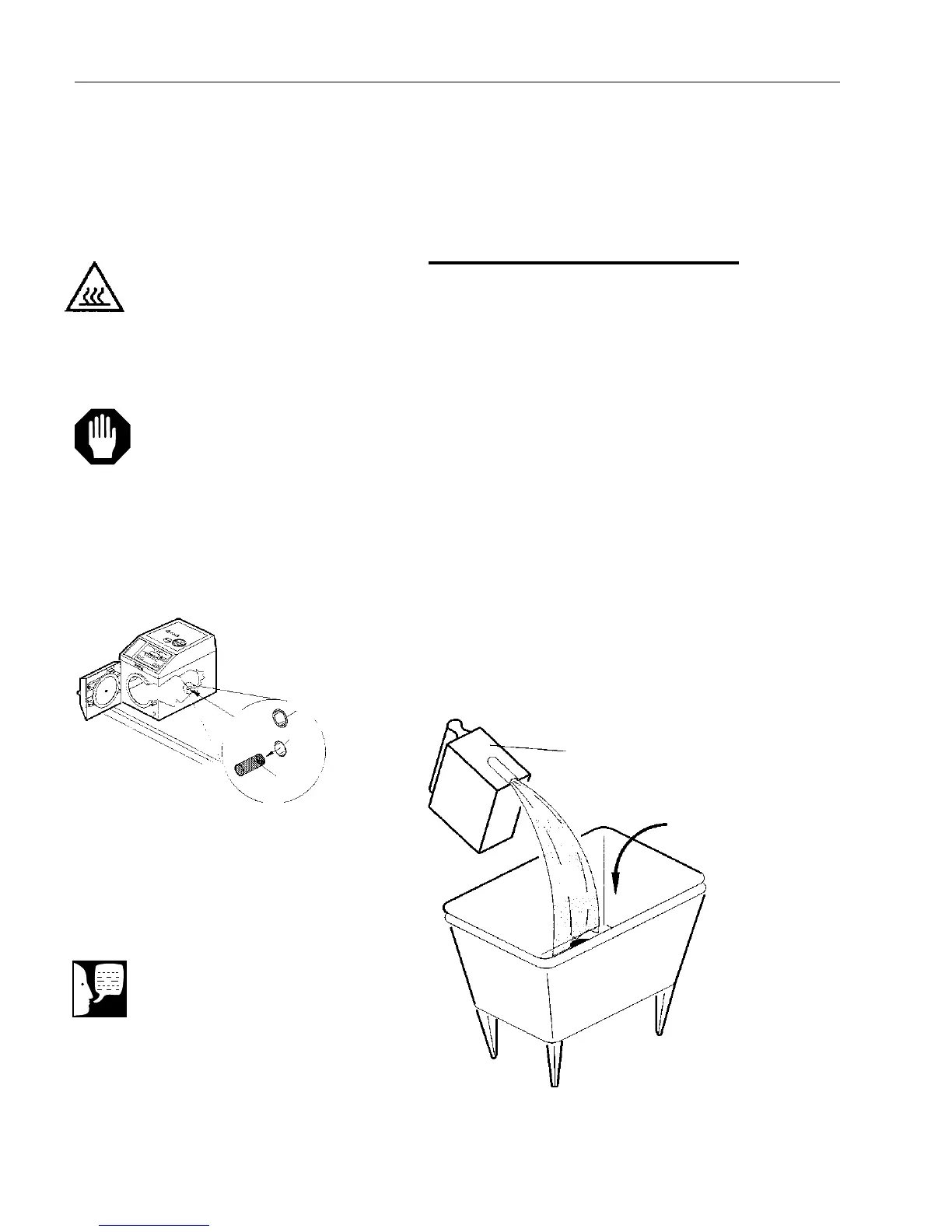
Cleaning Chamber Filter Screen
1. Pull the filter screen assembly out of the
water fill port inside the chamber.
2. Clean any deposits from the screen
using a small stiff-bristled brush
(toothbrush) or ultrasonic cleaner.
3. When clean, push the open end of the
filter screen into the water fill port in the
back of the chamber.
OPERATOR MAINTENANCE
Figure 27
Emptying Non-Recirculating Collection Bottle
Figure 26
Filter Screen
Hot Surface
Burn Hazard: Be sure sterilizer is
cool before removing chamber filter
screen.
Caution
Operating the sterilizer without the
filter screen in place will damage
the unit.
Note
The fill port is the bottom hole in
the back of the chamber. The top
hole is for the temperature probe
and should not be obstructed.
Pull Out
To Remove
Temperature
Probe
Filter Screen
Assembly
Water Fill
Port
Collection
Bottle
Empty Contents
Down The Drain


 To Next Page