20
Cab (HeadRush / Revalver)
The Cab category is a list of popular guitar and bass amp
cabinets, which contain the speakers. HeadRush Prime
recreates not only the sound of the cabinet but also the type
of microphone recording it.
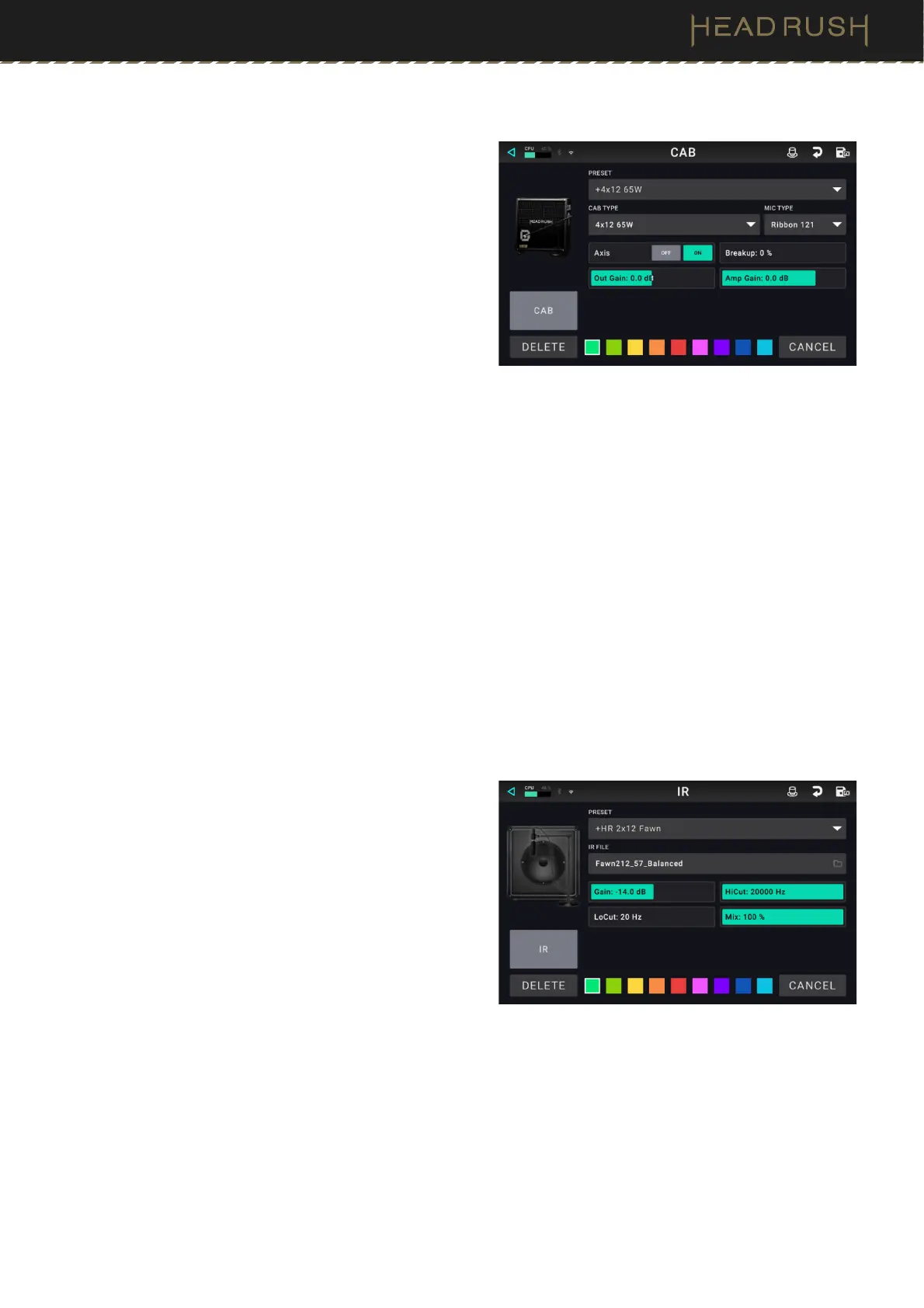
Preset: This is the current cab preset, which includes the
model, all its settings, and its color assignment.
Cab Type: This is the cab type. Numbers notated as
_X__ indicate the number of speakers it has and the
size of each speaker (e.g., 2X12 denotes a cab with
two 12-inch speakers, 4X10 denotes a cab with four
10-inch speakers). Numbers notated as __W indicate
the emulated wattage (output power) of the speaker.
Mic Type: This is the type of microphone being used on the cab. You can select different models of dynamic
(Dyn), condenser (Cond), or ribbon (Ribbon) microphones.
Mic Settings: These are the settings for the microphone:
• Break Up: This determines the amount of speaker “breakup”—the natural distortion that occurs when the
audio signal overdrives the speaker.
• On-Axis: This determines the microphone position relative to the cab. On-axis placement (On) positions the
microphone at the center of the speaker, usually resulting in a brighter sound with more definition. Off-axis
placement (Off) is slightly offset at an angle from the center of the speaker, and it often sounds darker in tone.
• Out Gain: This is the cab’s output gain level.
• Amp Gain: This is the amplifier’s gain level.
Color: This is the assigned color, which will appear in the Hardware Assign screen and the switch indicator if
the cab is assigned to a switch.
Impulse Response (2048 / 1024)
An Impulse Response (IR) is a popular alternative to
traditional guitar cabinet models, typically stored as a .WAV
file. HeadRush Prime includes over 300 Impulse
Responses onboard; however, there are also many
reputable third-party companies, producers, and artists
that capture and distribute impulse responses that can be
imported into HeadRush Prime.
If you are loading an impulse response (IR) file, you can do
so at the highest quality (2048 samples) or choose to load
at a lower quality (truncated to 1024 samples), which is less
DSP-intensive, freeing up more resources to load and use
additional blocks and/or IRs to your rigs.
Preset: This is the current IR preset, which includes the selected IR, all its settings, and its color assignment.
IR File: Tap here to select an IR file from your internal storage.
IR Settings: After the IR has been selected, you can further dial in the IR’s sound by adjusting the Gain, Hi-
Cut, Lo-Cut, and Mix parameters on screen.



 To Next Page