60
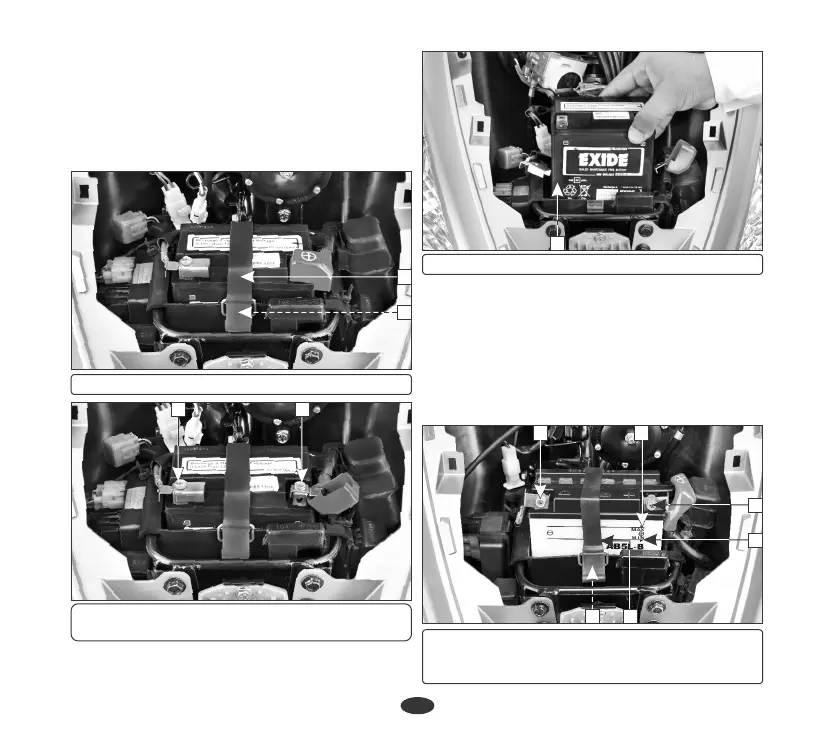
î Ensure the battery leads are properly connected
to the battery terminals during installation.
Battery Removal
î Remove the front center cover (page 35).
î Remove the battery band (1) from the boot
band clip (2).
(1) Battery Band
1
2
(2) Boot band clip
(3) Negative (-)ve Terminal
(4) Positive (+)ve Terminal
î Disconnect the negative (-)ve terminal lead
(3) from the battery first, then disconnect
the positive (+)ve terminal lead (4).
(5) Battery
î Reinstall in the reverse order of removal. Be
sure to connect the positive (+)ve terminal first,
then the negative (-)ve terminal.
î Check the bolts and other fasteners are secure.
Battery installation
5
(1) Upper level mark (2) Lower level mark (3)
Battery band (4) Boot band clip (5) (-)ve
terminal (6) (+)ve terminal
BATTERY (LX model)
5 1
2
6
î Remove the battery (5).
3 4
34










 To Next Page