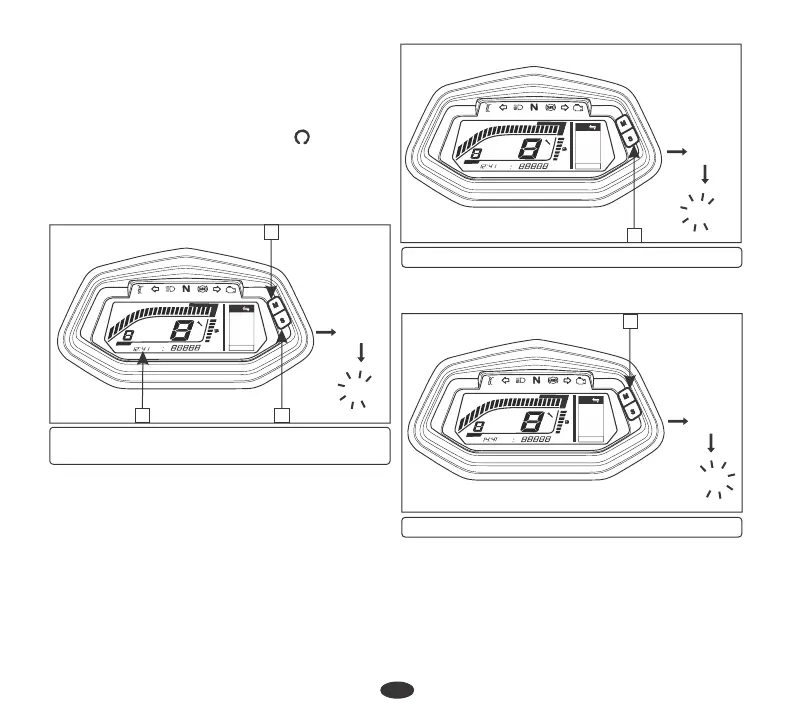
(a) Digital clock
• To set the hour, press set button (2) until
the desired hour is displayed.
• The time advances fast when the
button is pressed and held.
• The time is advanced by 1 hour
each time the button is pressed.
•
Press the mode button (3). The minutes
display starts blinking.
LCD PANEL
•
The time advances by 1 minute, each
time the button is pressed.
•
To set the minute press set utton ( ) until b 2
the desired minute is displayed. The minute
display will return to when is
"
60
"
"
00
"
reached without affecting the hour display.
19
(1) Digital clock (2) Set button
(3) Mode button
(2) Set button
(3) Mode button
Digital clock (1) shows hour and minute. To
adjust the time, proceed as follows :
•
Turn the ignition switch "ON" ( ).
•
Press and hold set button (2) and mode
button (3) simultaneously for more than 2
seconds. The clock will be set in the adjust
mode with the hour's digit display blinking.
241.6 km
Avg
45.1 km/h
Time
1h 06m
Trip 1
30 Aug
x
000
I
F
F
F
E
E
E
km/h
RPM
Gear
ODO
ODO
ODO
km
0
0
0
I
I
I
2
2
2
3
3
3
4
4
4
5
5
5
6
6
6
7
7
7
8
8
8
9
9
9
IO
IO
IO
II
II
II
14:41
12:41
2
12:41
2
3
1
12:41
x
000
I
F
F
F
E
E
E
km/h
RPM
Gear
ODO
ODO
ODO
km
0
0
0
I
I
I
2
2
2
3
3
3
4
4
4
5
5
5
6
6
6
7
7
7
8
8
8
9
9
9
IO
IO
IO
II
II
II
241.6 km
Avg
45.1 km/h
Time
1h 06m
Trip 1
30 Aug
241.6 km
Avg
45.1 km/h
Time
1h 06m
Trip 1
30 Aug
x
000I
F
FF
E
EE
km/h
RPM
Gear
ODO
ODOODO
km
0
00
I
II
2
22
3
33
4
44
5
55
6
66
7
77
8
88
9
99
IO
IOIO
II
IIII
14:41
14:41
3






 To Next Page