AB4701en_SARev.: 05 / 11.2023
Setting up the centrifuge
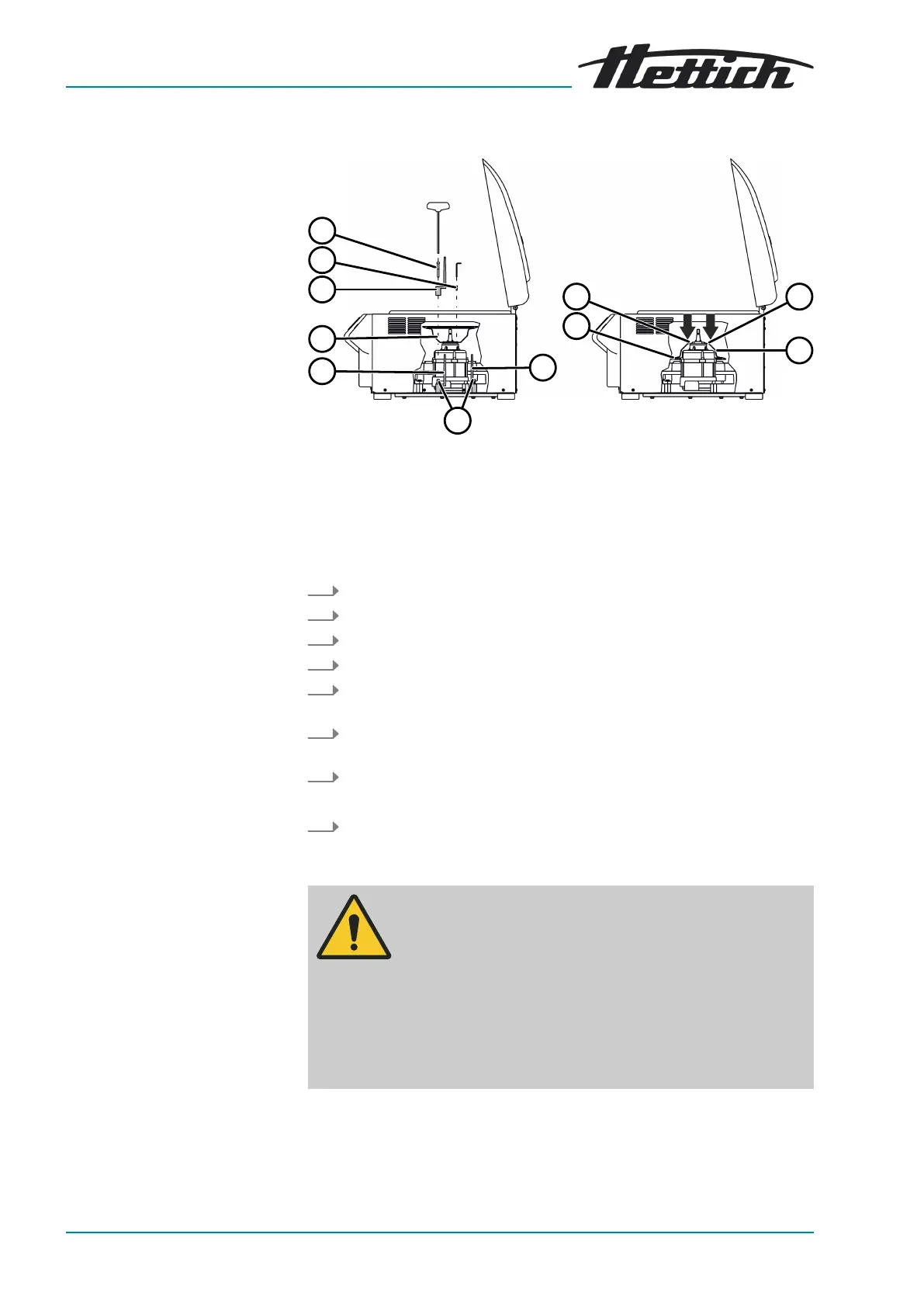
Fig. 21: Transport lock
1 Screws
2 Motor cover
3 *Bellows (only for centrifuges with cooling)
4 Transport lock
5 Transport lock screws
6 Spacer sleeve
1.
Open the lid.
2. Unscrew 4 screws (
1
).
3. Remove the motor cover (
2
).
4. Unscrew 3 transport lock screws (
5
).
5. Remove the transport lock screws (
5
), spacer sleeves (
6
) and trans-
port locks (
4
) and store them safely.
6. Turn over the motor cover (
2
) and insert it. Note the recess for the
cable.
7. For ROTINA 420 R:
Push the bellows (
3
) over the edge of the centrifuging chamber.
8. Screw in 4 screws (
1
).
5.3
Setting up and connecting the centrifuge
WARNING
Risk of injury due to failing to maintain a
sufcient distance to
the centrifuge.
− As per EN/IEC 61010-2-020, no persons, hazardous
materials or objects may be present within a safety zone
of 300mm around the centrifuge during a centrifugation
run.
−
A distance of 300mm from the ventilation slots and ven-
tilation openings of the centrifuge must be maintained.













 To Next Page