Wi-Fi 6 2x2:2 User Manual Rev: A0-00
56
CONFIDENTIAL
10.2 Network/Wireless/Radio and SSID configuration of thick AP
The wireless configuration screen of thick AP GUI enables the user to view and configure radio and SSID
parameters. Multiple SSID can be added separately for 2.4 and 5 GHz radio. Radio configuration remains
same for all SSIDs operating at the respective 2.4 and 5 GHz radio. All clients associated with respective SSID
are also listed in a tabular form in this screen along with some basic information.
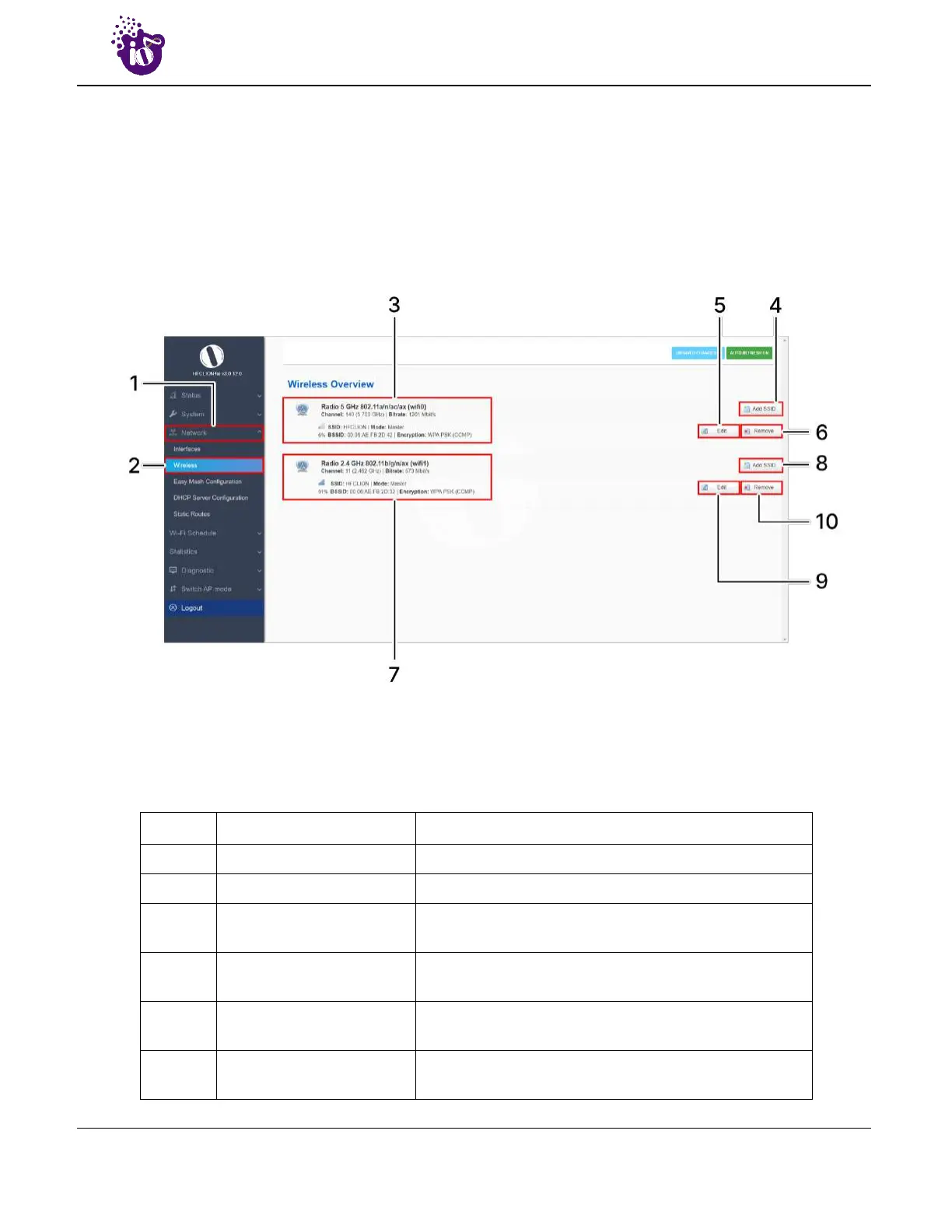
A basic overview of the wireless configuration screen for thick AP is given below:
Figure 33: Basic overview of the wireless configuration screen for thick AP
Follow the steps given below to view the wireless configuration of thick AP:
Table 23: List of actions to view the wireless configuration of thick AP
Callout Name Description
1. Network Click on “Network” dropdown
2. Wireless Click on “Wireless” option
3. 5 GHz overview
Displays the overview of 5 GHz radio along with the list
of associated SSIDs as shown in the above figure
4.
Add SSID/Radio
Configuration
Click on the “Add” option to configure a new SSID or to
update the radio configuration parameters at 5 GHz
5. Edit SSID
Click on “Edit” option to modify the parameters of
respective SSID configuration at 5 GHz
6. Remove SSID
Click on “Remove” option to delete the respective SSID
at 5 GHz



 To Next Page