Wi-Fi 6 2x2:2 User Manual Rev: A0-00
83
CONFIDENTIAL
14 Diagnostics
Following are the diagnostic features provided in thick AP GUI.
14.1 Routes
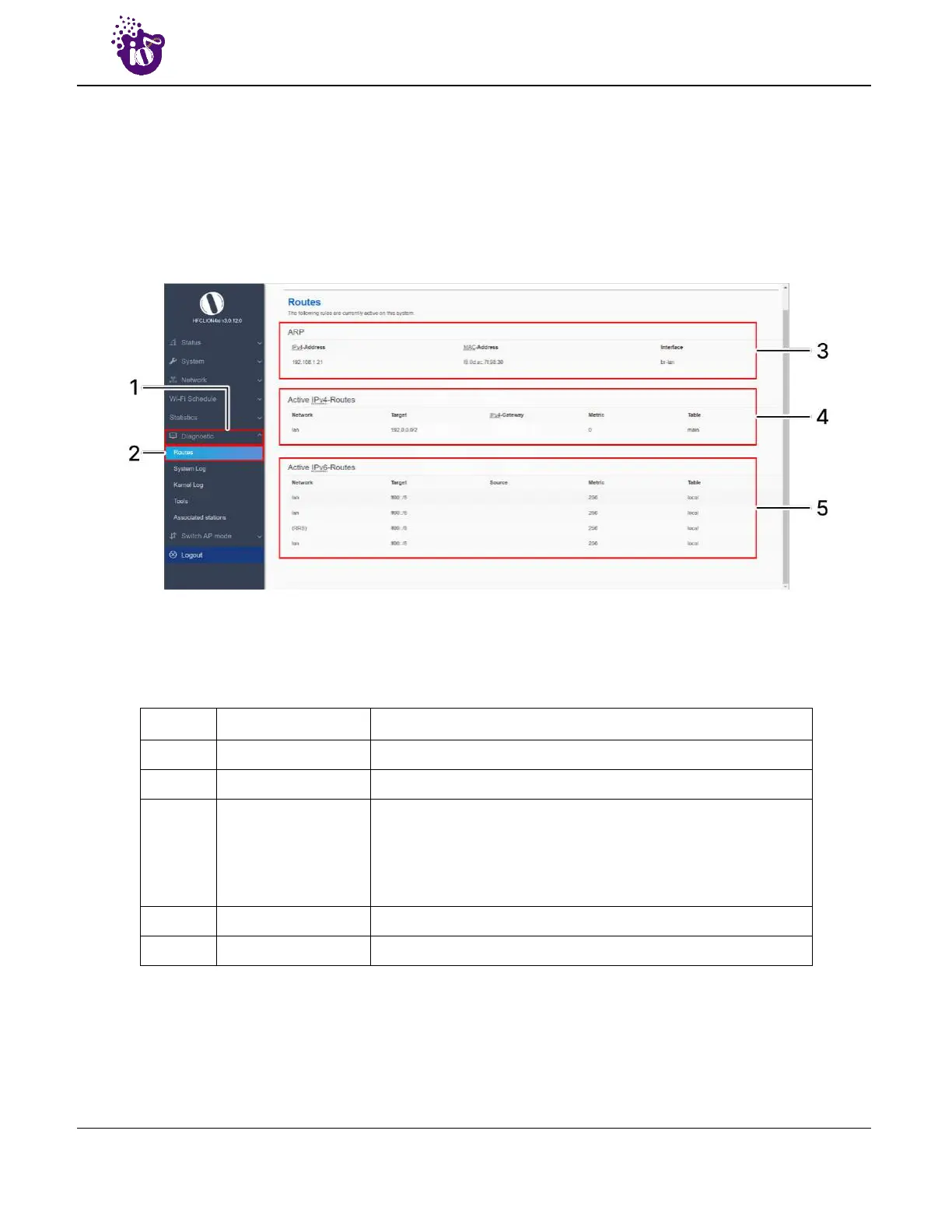
This screen is provided to view the active routes on the system. A basic overview of the screen to view the
active routes is given below:
Figure 51: Basic overview of the screen to view the active routes
Follow the steps given below to view the active routes on the system:
Table 41: List of actions to view the active routes on the system
Callout Name Description
1. Diagnostics Click on “Diagnostics” dropdown
2. Routes Click on “Routes” option
3. ARP
Displays the MAC addresses of all reachable IPs. The Address
Resolution Protocol (ARP) is a communication protocol used for
discovering the link layer address, such as a MAC address
associated with a given internet layer address, typically an IPv4
address.
4. Active IPv4 Routes Displays all the IPv4 routes which are active at present
5. Active IPv6 Routes Displays all the IPv6 routes which are active at present



 To Next Page