Wi-Fi 6 2x2:2 User Manual Rev: A0-00
46
CONFIDENTIAL
9.5 Reboot
Reboot restarts the device with existing configuration. We can change the firmware when the device is
rebooted with different partitions. Based on the selected partition, the corresponding firmware will be loaded
into the device as working firmware
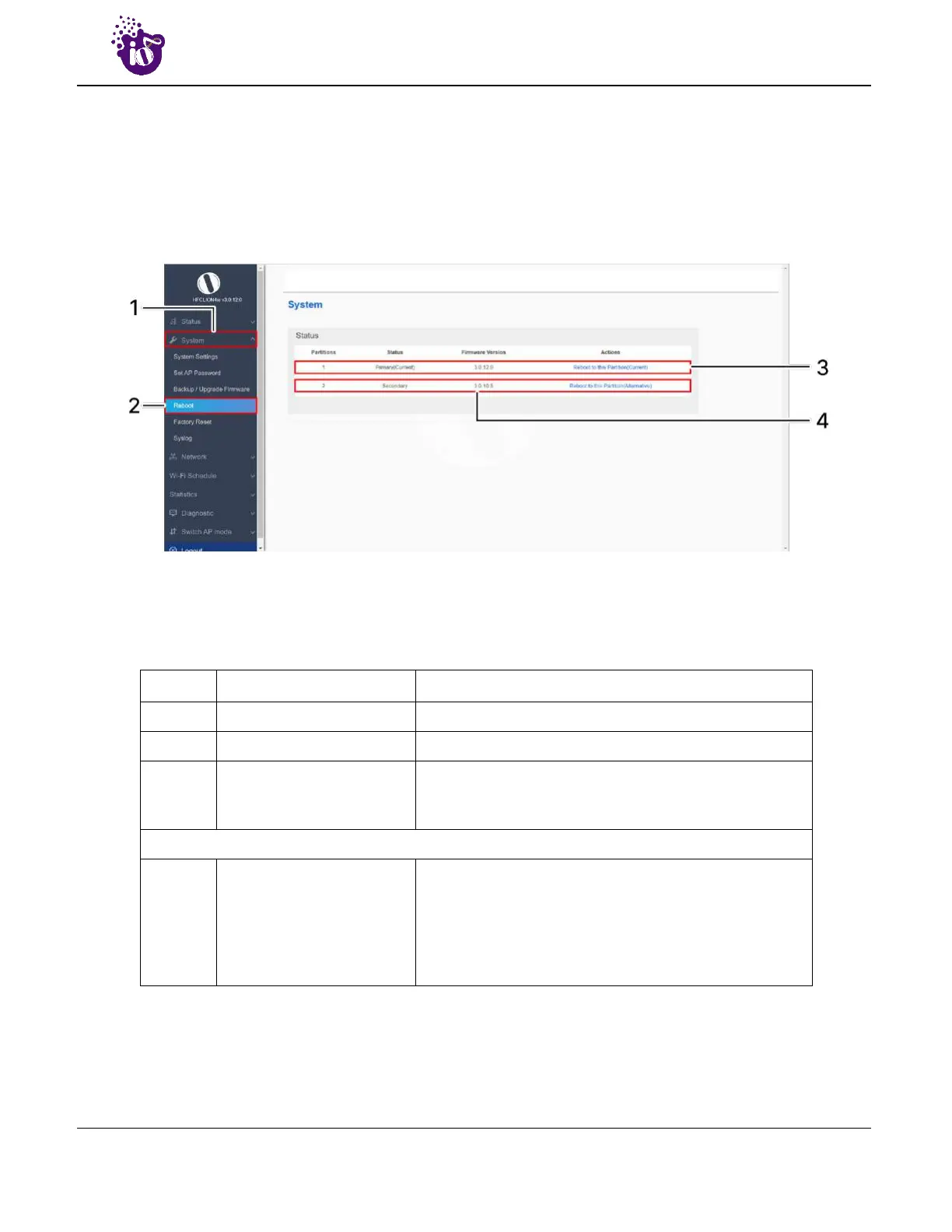
A basic overview of the Reboot screen is given below:
Figure 25: Basic overview of the reboot screen
Follow the steps given below and reboot the AP:
Table 15: List of actions to reboot the AP
Callout Name Description
1. System Click on “System” dropdown in navigation tollbar
2. Reboot Click on “Reboot” option
3. Reboot to Current partition
Click on “Reboot to Current partition” option. Device will
boot from current partition, and the firmware version
present in the current partition will be in use
Or
4.
Reboot to Alternate
partition
Click on “Reboot to alternate partition” option. Device will
boot from alternate partition, and the firmware version
present in the alternate partition will be in use. The
firmware upgrade always happen on alternate partition.
Use this option and reboot to the latest uploaded
firmware version



 To Next Page