Wi-Fi 6 2x2:2 User Manual Rev: A0-00
71
CONFIDENTIAL
10.3 Network/EasyMesh configuration of thick AP
A wireless mesh network serves as a network of radio nodes organized in a mesh topology. All APs
participating in mesh topology does not need to have a wired connection for backhaul connectivity and only
one root AP serves that purpose.
Mesh configuration require access points to operate in two operating modes as follows:
1. Controller AP: Controller AP have wired connections, for example, Ethernet backhaul to a wired
network and to cNMS.
2. Agent AP: Repeats wireless signals to extend range without being connected with cable to Access
Point, or with clients.
Mesh configuration allows access points to connect with each other in mesh topology. An access point
(Controller AP) is connected to the wired network with the use of wireless connections over the 802.11 radio
backhaul and other agent access points act as repeaters in mesh topology. In case of a mesh node failure,
the surrounding nodes automatically re-connect and resume service without downtime. Nodes identify the
best next hop and connect with it automatically.
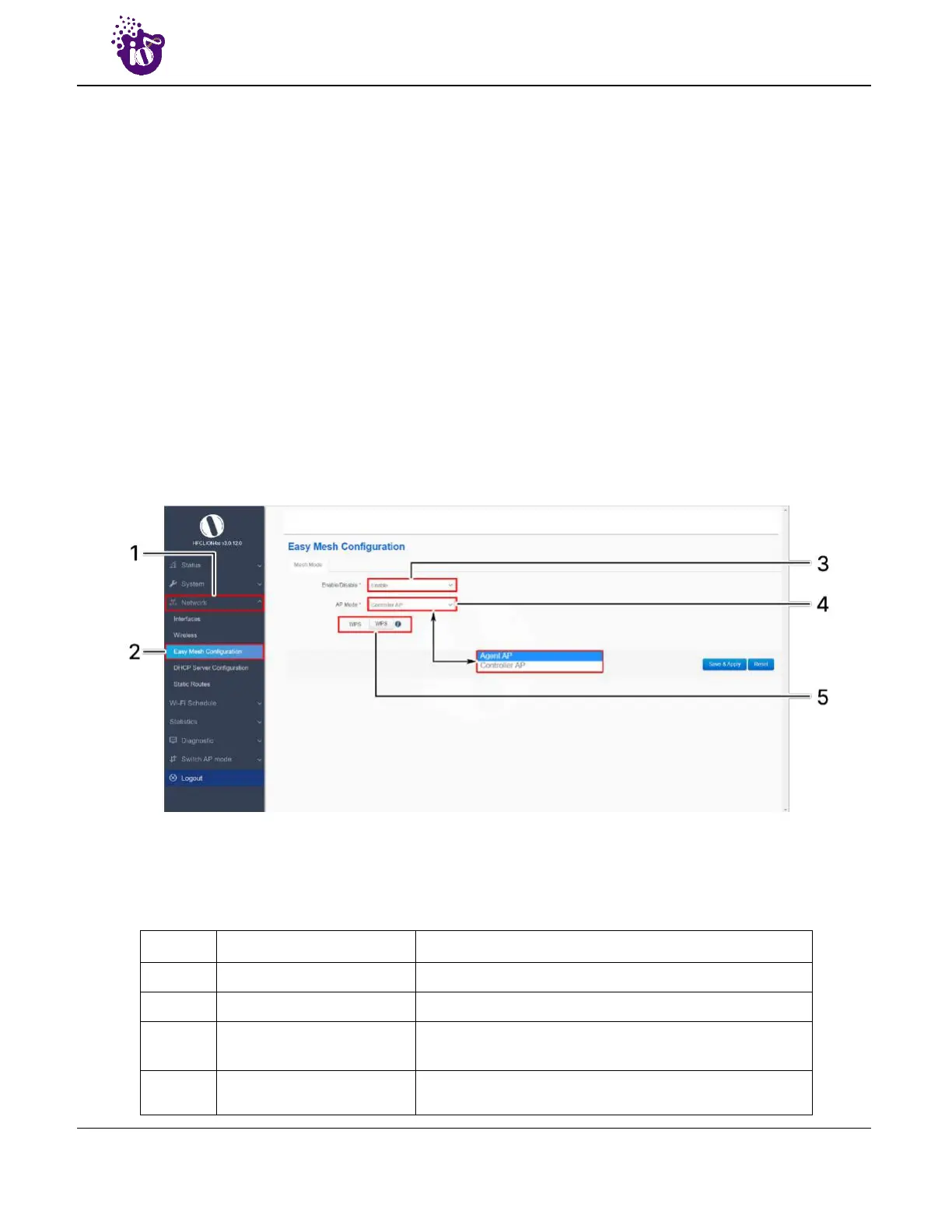
A basic overview of the mesh configuration screen for thick AP is given below:
Figure 42: Basic overview of the mesh configuration screen for thick AP
Follow the steps given below to view the mesh configuration of thick AP:
Table 32: List of actions to view the mesh configuration of thick AP
Callout Name Description
1. Network Click on “Network” dropdown
2. Easy Mesh Configuration Click on “Mesh Configuration” option
3. Mesh Mode
Enable or disable the EasyMesh mode. If enabled,
provide the following parameters
4. AP Mode
Select the contributing mode of the access point in the
EasyMesh topology from the drop down list (Controller



 To Next Page