Wi-Fi 6 2x2:2 User Manual Rev: A0-00
64
CONFIDENTIAL
10.2.4.2 SSID/Wireless security (2.4 GHz and 5 GHz)
By default the wireless security is set to “No Encryption”, and few of the other options provided to change the
encryption accordingly are as follows:
1. No Encryption: Any device can connect to the network. Not recommended.
2. WPA-PSK(Wi-Fi Protected Access): WPA is part of the wireless security standard (802.11i)
standardized by the Wi-Fi Alliance and was intended as an intermediate measure to take the place
of WEP while the 802.11 standard was being prepared. It supports TKIP/AES encryption. The personal
authentication is the pre-shared key (PSK) that is an alphanumeric passphrase shared with the
wireless peer.
3. WPA2-PSK: WPA2 is the implementation of security standard specified in the final 802.11i standard.
It supports AES encryption and this option uses pre-shared key (PSK) based authentication.
4. WPA-PSK/WPA2-PSK Mixed mode: Allows both WPA and WPA2 clients to connect simultaneously
using PSK authentication.
5. WPA2-EAP: Allows you to use WPA2 with RADIUS server authentication.
6. WPA3-Enterprise: Enterprise, governments, and financial institutions have greater security with
WPA3-Enterprise. WPA3-Enterprise also offers an optional mode using 192-bit minimum-strength
security protocols and cryptographic tools to better protect sensitive data.
10.2.4.2.1 Key based Wireless security Encryption
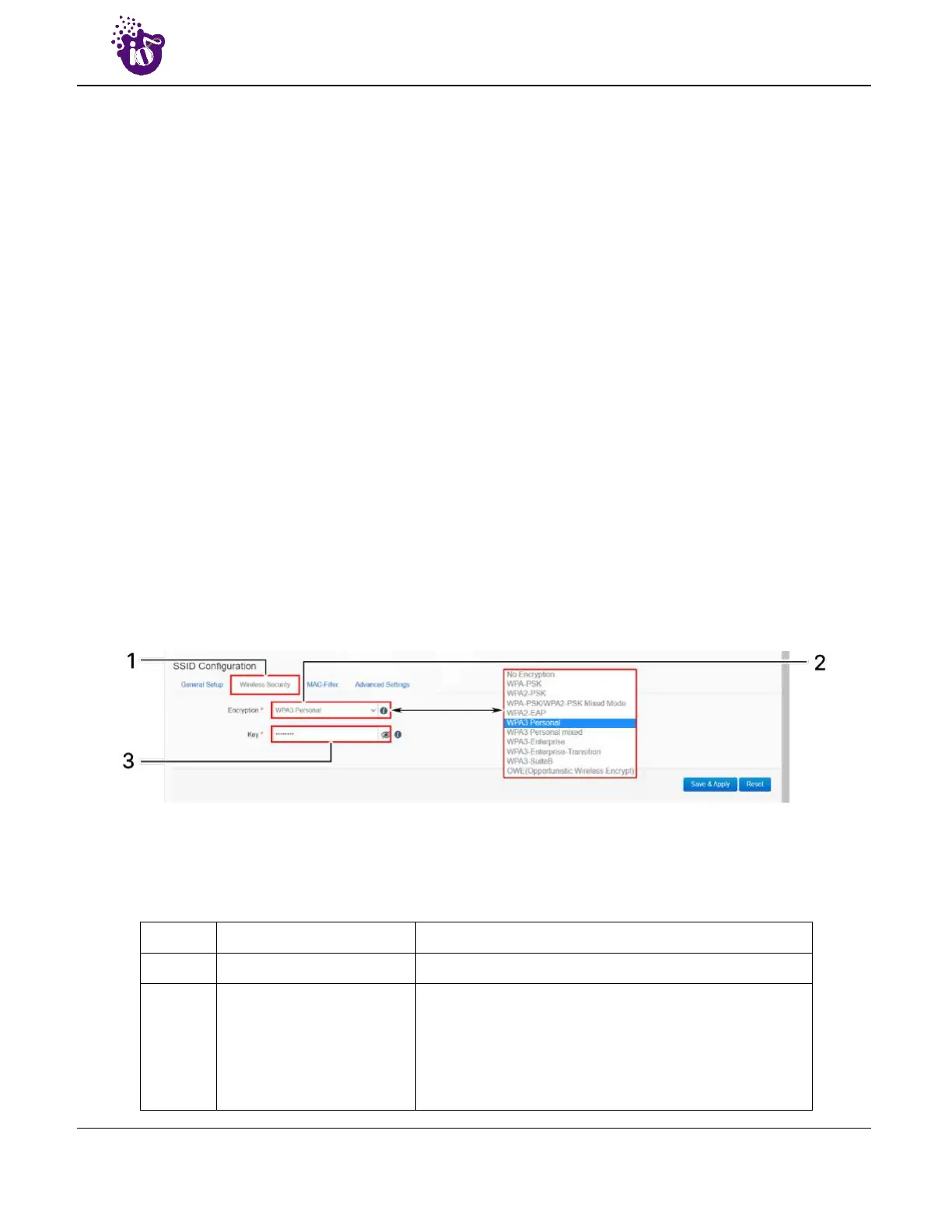
A basic overview of the screen to configure wireless security parameters of SSID is given below:
Figure 38: Basic overview of the screen to configure wireless security parameters of SSID
Follow the steps given below and configure the wireless security parameters of SSID:
Table 28: List of actions to configure the wireless security parameters of SSID
Callout Name Description
1. Wireless Security Click on “Wireless Security” option
2. Encryption
Select the encryption protocol from the dropdown list
(No Encryption/WPA-PSK/WPA2-PSK/ WPA-PSK /WPA2-
PSK_Mixed_Mode/WPA3 Personal/WPA3 Personal Mixed
/OWE (Opportunistic Wireless Encrypt)). No passphrase
is needed in case of “Open” and “OWE (Opportunistic
Wireless Encrypt)”type network authentication protocol



 To Next Page