Wi-Fi 6 2x2:2 User Manual Rev: A0-00
76
CONFIDENTIAL
10.5 Static Routes
User can configure static routes and redirect packets to the destination network. A static route is a pre-
determined pathway that a packet must travel to reach a specific host or network.
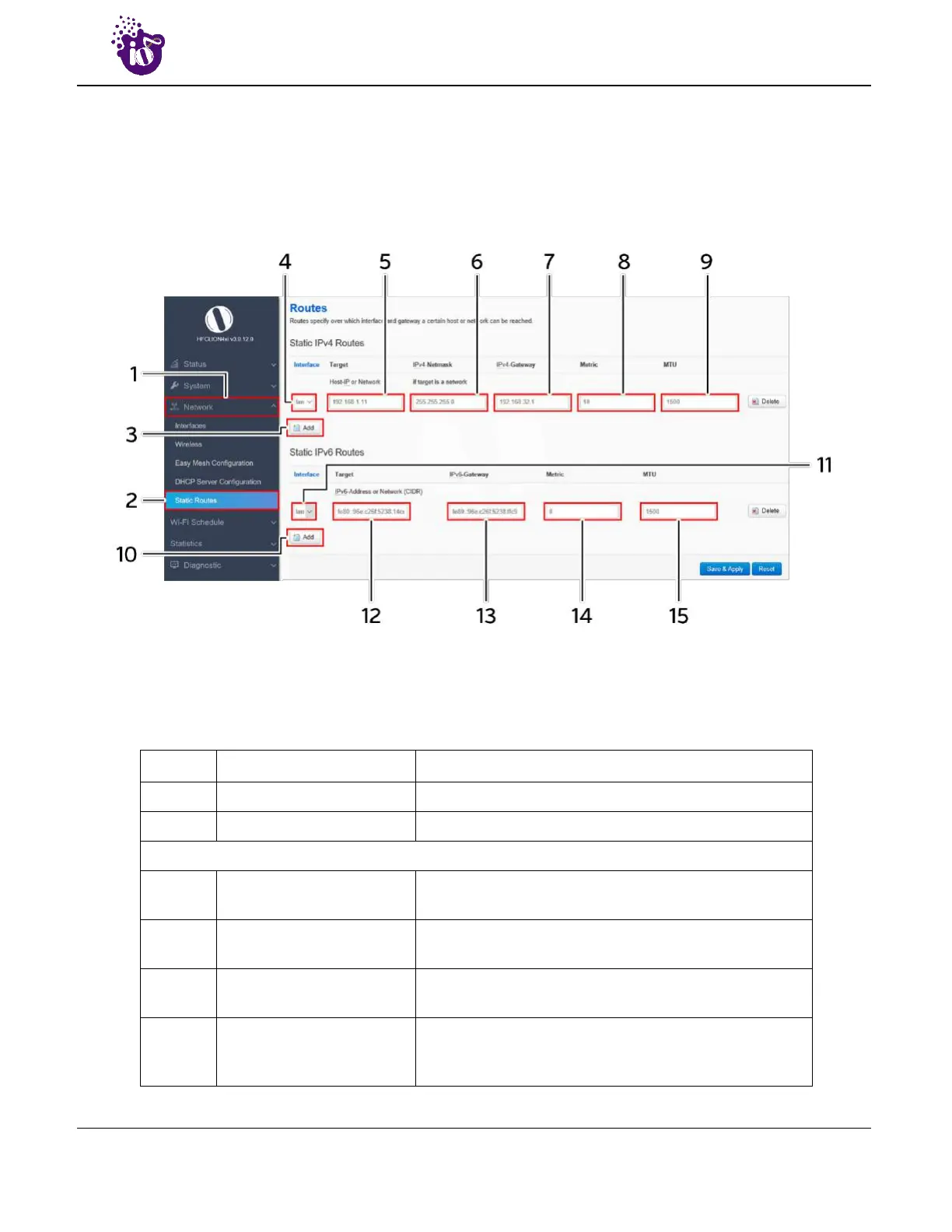
A basic overview of the static route configuration screen for thick AP is given below:
Figure 45: Basic overview of the static route configuration screen for thick AP
Follow the steps given below for static route configuration of thick AP:
Table 35: List of actions for static route configuration of thick AP
Callout Name Description
1. Network Click on “Network” dropdown
2. Static Routes Click on “Static Routes” option
Static IPv4 Routes
3. Add
Click on “Add” option to add a new static route in IPv4
format
4. Interface
Select the physical network interface through which this
route is accessible from the dropdown list
5. Target
Enter the IP address of the destination host or network in
IPv4 format to which the route leads
6. IPv4-Netmask
Enter the IPv4 netmask for the destination host or
network. By default subnet mask is set to
255.255.255.255



 To Next Page