Wi-Fi 6 2x2:2 User Manual Rev: A0-00
79
CONFIDENTIAL
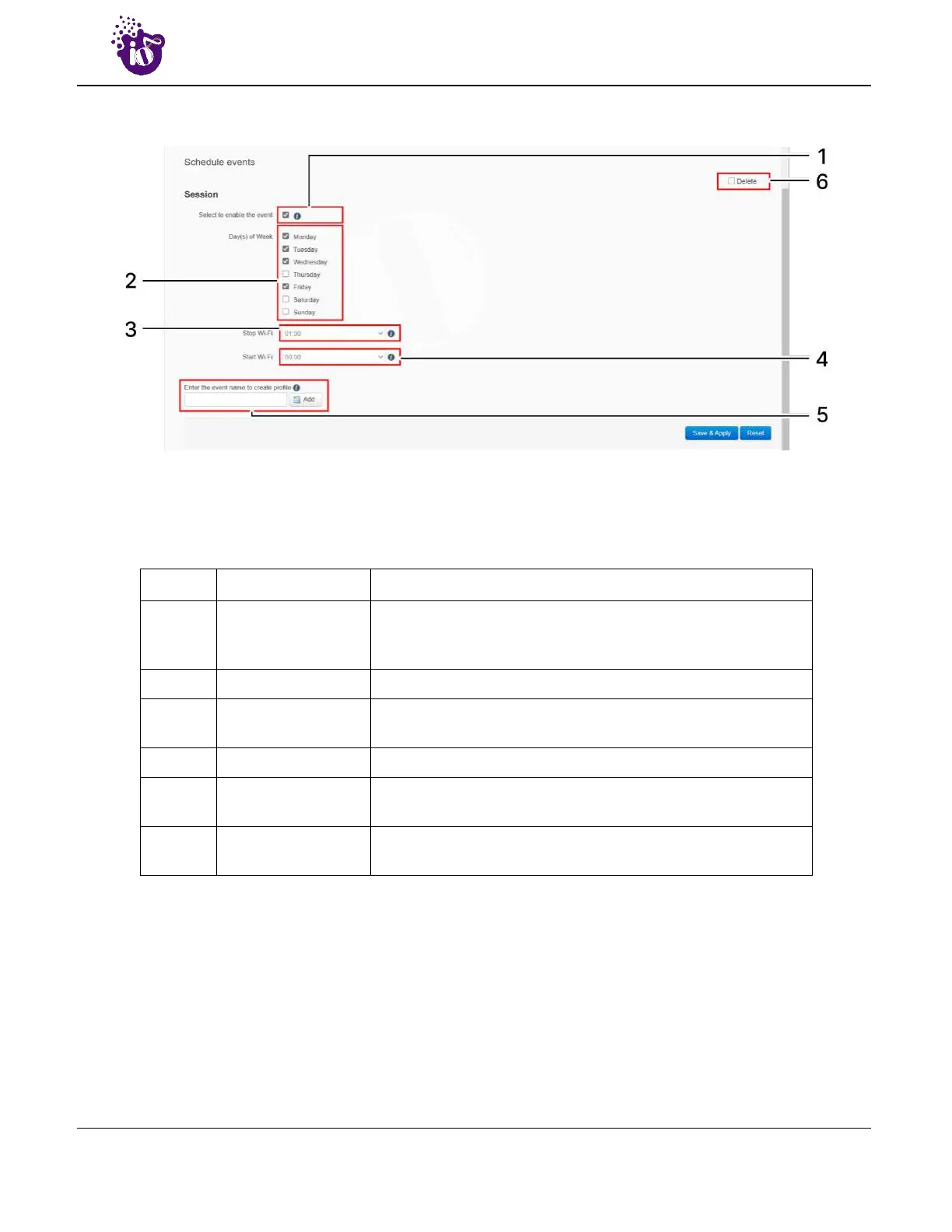
A basic overview of the schedule parameters are given below:
Figure 47: Basic overview of the Wi-Fi schedule screen
Follow the steps given below to create, edit, or delete a Wi-Fi schedule:
Table 37: List of actions to create, edit, or delete a Wi-Fi schedule
Callout Name Description
1. Enable event
Click on the check box to enable the newly created schedule
event. If kept deselected the event will not be listed in the
scheduled jobs
2. Event days Select the days for the event
3. Stop Wi-Fi
Assign the time from the dropdown list to stop the Wi-Fi. The
stop Wi-Fi time must be after the start Wi-Fi
4. Start Wi-Fi Assign the time from the dropdown list to start the Wi-Fi
5. Add Schedule
Enter a unique name and click on “Add” option to create an
another new schedule event
6. Delete Event
Click on the “Delete” option of the respective schedule to
remove it from the list
Click “Save & Apply” to save the Wi-Fi schedule or click “Reset” to configure the same again. All enabled
events are listed in the Scheduled Jobs screen.



 To Next Page