Wi-Fi 6 2x2:2 User Manual Rev: A0-00
67
CONFIDENTIAL
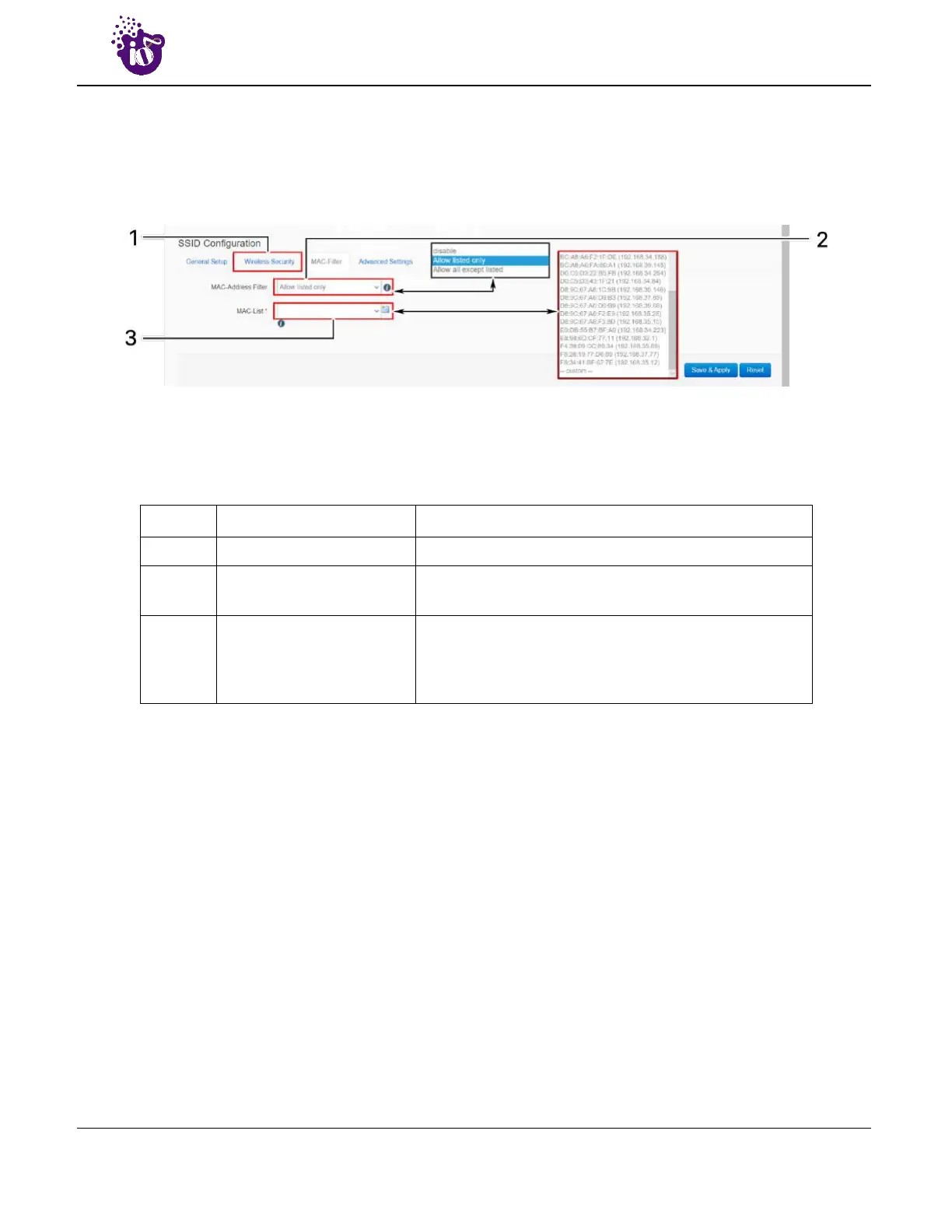
10.2.4.3 SSID/MAC filter (2.4 GHz and 5 GHz)
The user can add multiple MAC addresses with allow and deny policy and the same is mapped with
respective SSID. A basic overview of the screen to configure the MAC filter for SSID configuration is given
below:
Figure 40: Basic overview of the screen to configure the MAC filter for SSID configuration
Follow the steps given below and configure the MAC filter for SSID configuration:
Table 30: List of actions to configure the MAC filter for SSID configuration
Callout Name Description
1. MAC-Filter Click on “MAC-Filter” option
2. MAC address filter
Click on the dropdown and disable or set the allow/deny
policy for the MAC filter
3. MAC List
Click on the dropdown and select the MAC address from
the list or click on “Custom” to add the MAC address
manually. Click on the “+” icon to add multiple MAC
addresses
Click “Save & Apply” to save the MAC filter configuration or click “Reset” to configure the same again.



 To Next Page