Surface Features and Controls
Compella™ Bariatric Bed System Instructions for Use (178951 REV 6) 69
the Foam Mattress screen.
The Foot Inflating screen shows, the foot section inflates, and then the Foam Mattress screen
shows.
Deflate the Side Bolsters and Foot Section for Patient Transport
To deflate the side bolsters and foot section for patient transport, do as follows:
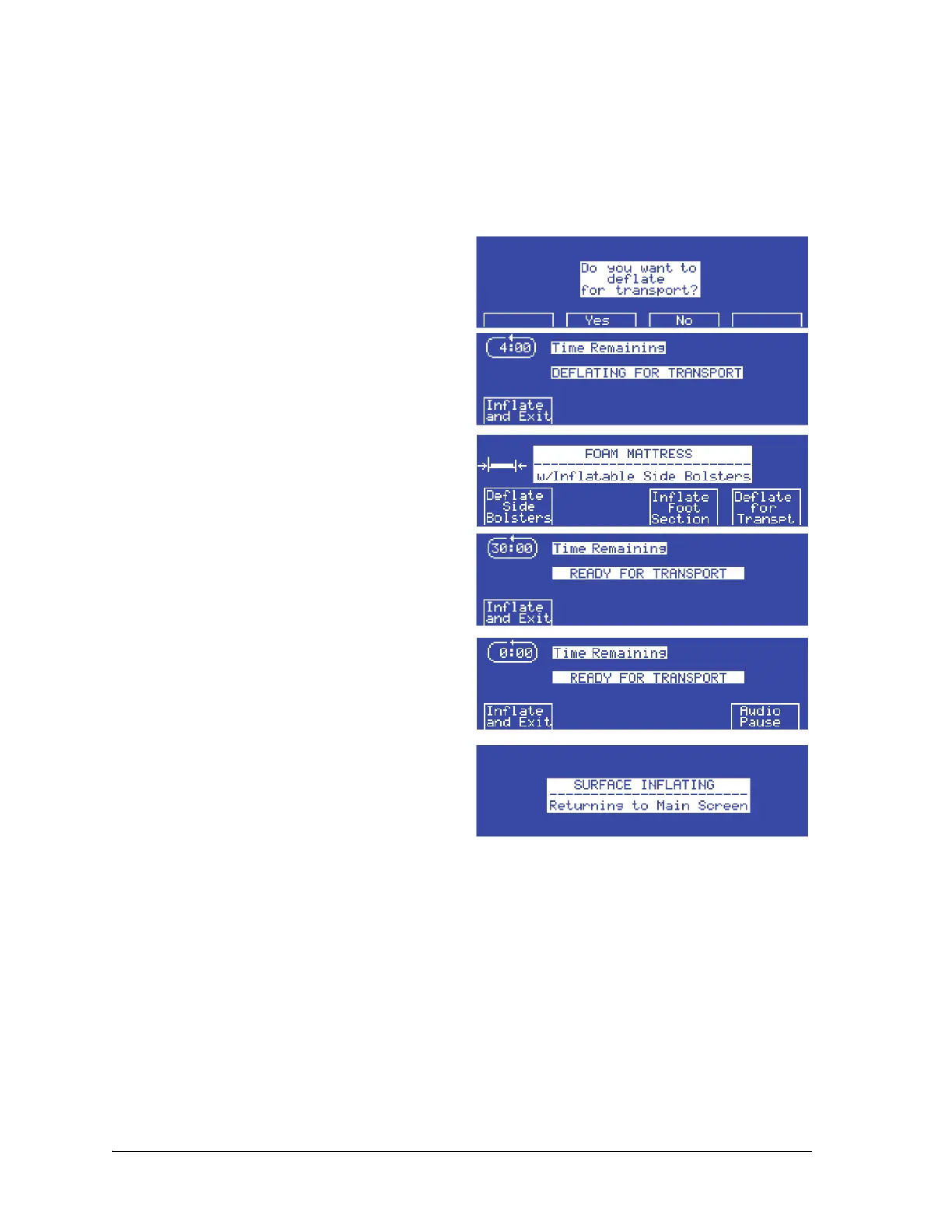
1. At the Foam Mattress screen, press Deflate
for Transpt. The Do you want to deflate for
transport? screen shows.
2. Press Ye s . The side bolsters and foot section of
the surface start to deflate, and the Deflating
for Transport screen shows.
If you press No, the display shows the Foam
Mattress screen.
3. When the side bolsters and foot section are
deflated, the Ready for Transport screen
shows.
4. If the surface is deflated for more than 30
minutes, the alarm sounds. To mute the alarm
for 10 minutes, press Audio Pause.
To inflate the side bolsters and foot section, do as
follows:
Press Inflate and Exit. The Surface Inflating
screen flashes, the side bolsters and foot
section inflate.
AIR SUPPLY UNIT—INFORMATIONAL TONES
The unit generates informational tones to let the caregiver know the system status during its operation.
This includes single beeps that let the caregiver know these:
• Input is necessary to change the functionality of the system.
• A full turn has been completed.
• Communications with the bed frame has been lost.















 To Next Page