EasyManua.ls Logo

Hitachi IJ PH - Faults - Ink-Stop Type; Ink Low

Hitachi IJ PH
211 pages
Print Icon
To Next Page IconTo Next Page
To Previous Page IconTo Previous Page
Loading...
6-3
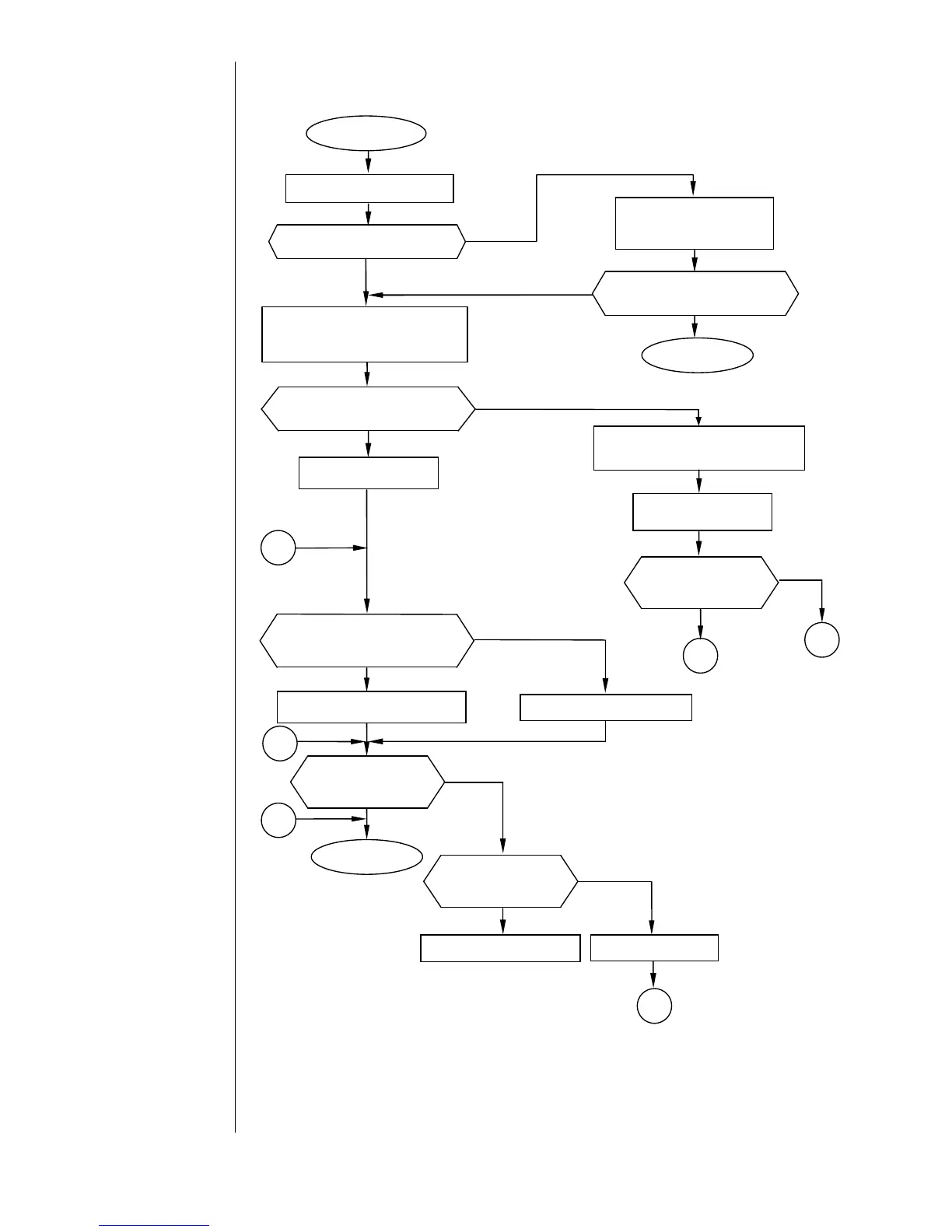
6.2 Faults – Ink-stop type
6.2.1 Ink Low
Is there ink in the ink reservoir?
Uncap the ink reservoir
and add ink.
Open the maintenance cover.
No
Yes
END
Yes
No
Turn OFF the power.
Unscrew and pull out the sensor
section.
Clean the electrode with JK wiper
moistened with makeup ink.
Yes
No
Return the sensor
section to its position.
Return the sensor
section to its position.
Ink Low
Is the fault cleared by
pressing the Clear key?
Is an insoluble substance
deposited on the sensor?
Is the EZJ93 board CN6
connector disconnected?
Connect the CN6 connector.
No
Yes
No
Disconnect the CN6 connector,
then reconnect it.
Is the fault cleared
by power-on reset?
END
1
OK
Yes
3
Is the connection
harness
conducting?
Replace the harness.
2
NG
Replace the EZJ93 board.
2
1
No
Is the fault cleared
by power-on reset?
Yes
3

Table of Contents

Related product manuals