Press the Start up key.
Start
up
Start up : Ejects ink while applying deflection voltage.
Eject ink : Ejects ink while applying no deflection voltage.
Manual Control Menu
Online/
Offline
Start up Eject ink
Cancel
Press the Eject ink key.
Com=0
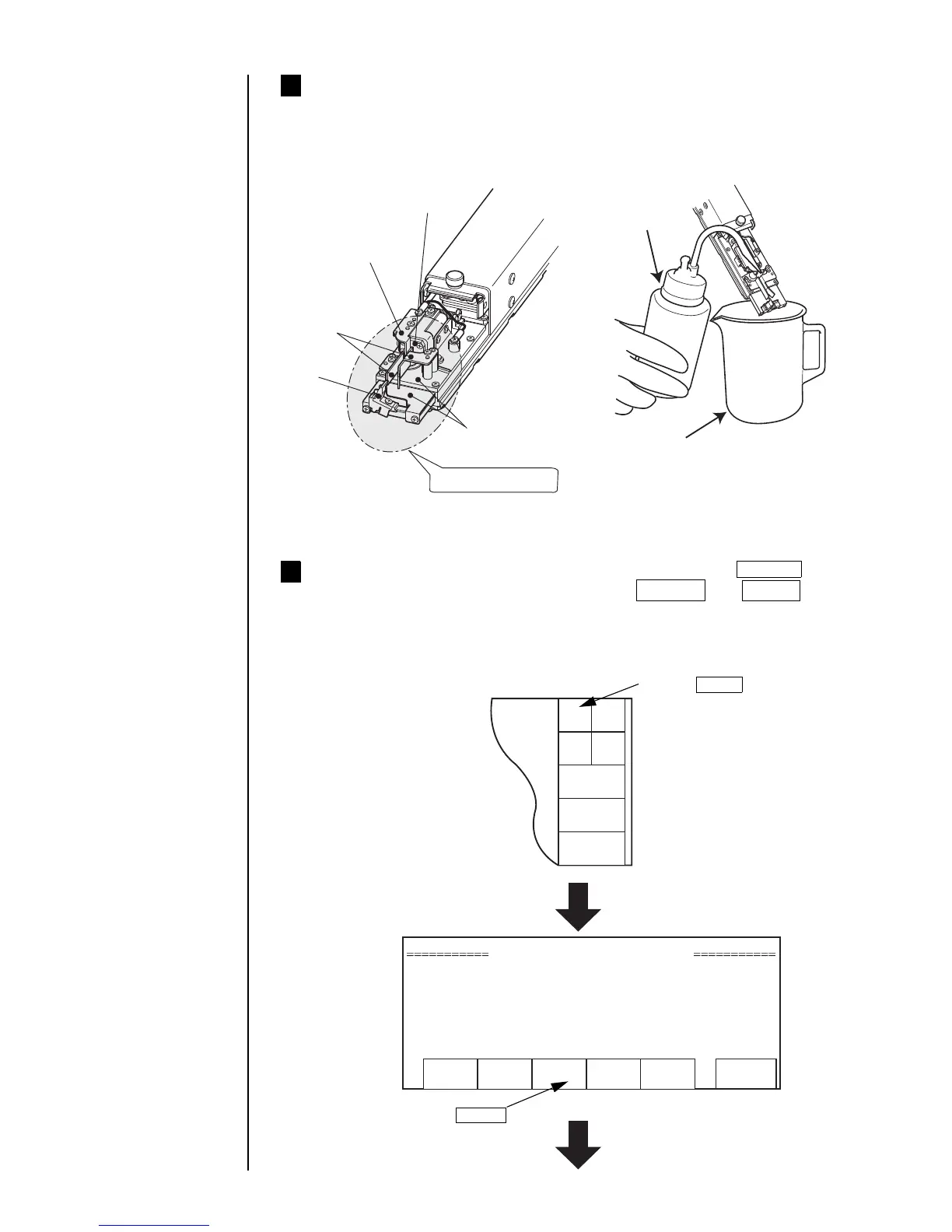
Perform cleaning by pouring the intensifier over the area to be
cleaned.
Pour the makeup ink over the orifice plate, charge electrode, deflection electrodes,
gutter, and mounting base to clean them (you should also refer to Section 1.2.3, Print
head cleaning).
3
Orifice plate
Charge electrode
Deflection
electrode
Gutter
Mounting base
Area to be cleaned
Cleaning bottle
Beaker
* With wiping paper, thoroughly wipe the makeup ink away from the parts
(mounting base included) surfaces, and then allow them to dry.
With the print head cover left removed, press the Manual key
to display the control menu. Press the Start up and Ready keys
in sequence.
● The ink jets out of the nozzle. (The status changes from "Stop" to "Starting.")
● Perform an operation while the end of the print head is placed in a beaker.
4
Entering a run signal
executes the same
action.
(See Section 1.5.3-9,
Input for remote
control signals.)



 To Next Page