3-25 ● Printing Characters
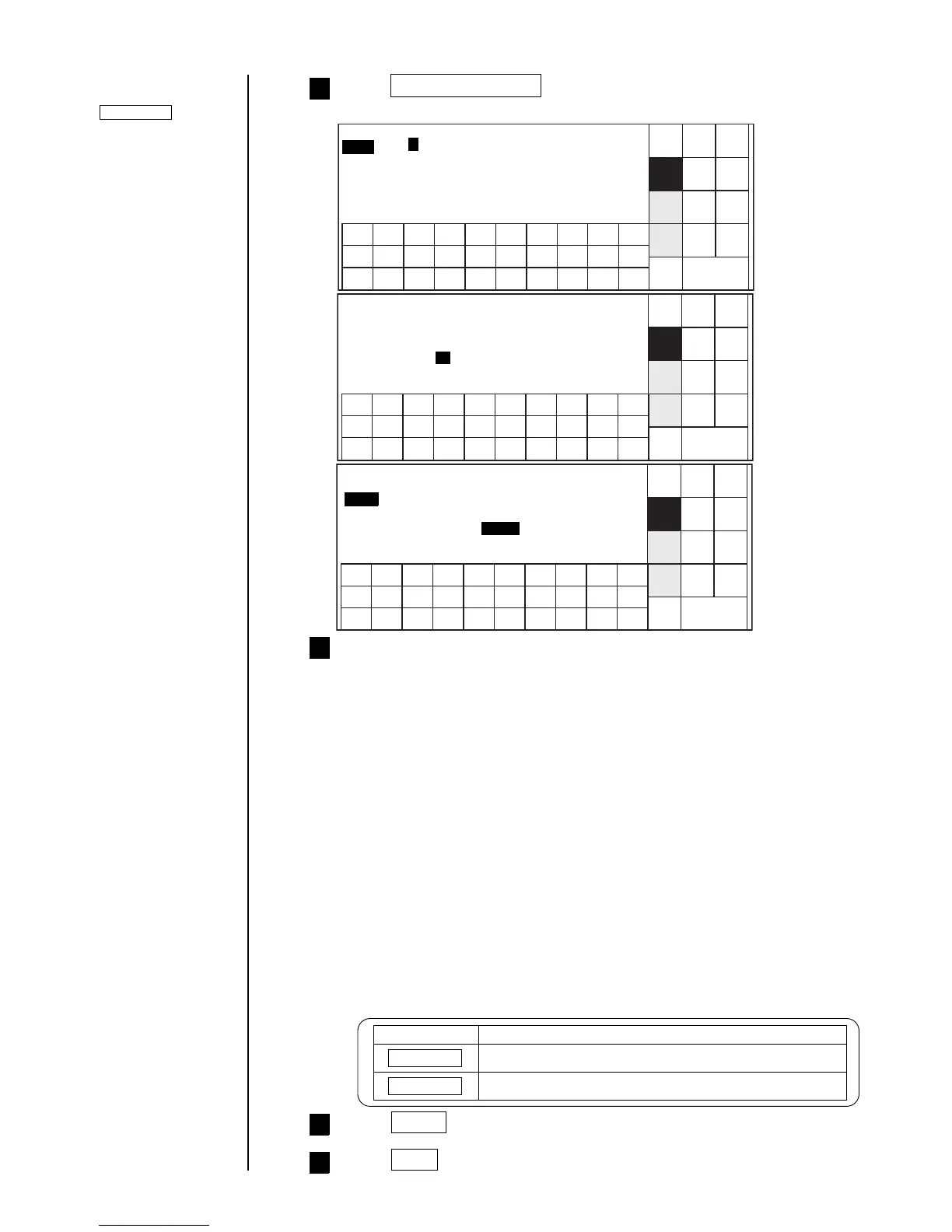
Change the following settings.
Value [AA0001 ]
Range [AA0000 ] Update [000000]
[ZZ9999 ] [000001]
Jump from: [ZZ9999 ] increment [01]
to: [AA0001 ] Direction [0]
Note: Input minimum and maximum obtainable values in whole digits for count
range.
[Example] In case when value is to be updated in the following sequence:
001 → 002 → ... → 998 → 999 → 001
Correct setting Wrong setting
Value [001] Value [001]
Range [000] Range [001]
[999] [999]
Jump from: [999] Jump from: [999]
to: [001] to: [001]
Update [ 0 0 0 0 0 0 ] (In progress)
[ 0 0 0 0 0 1 ] (unit)
Increment [ 0 1 ]
Direction [ 1 ] (1: 2:down)
up
Press Count conditions .
The "Count conditions" screen then opens.
6
8
■Keying procedures
Key Function
Increment Increments a numerical setting.
Decrement Decrements a numerical setting.
Press Apply .
9
Press Back twice.
You are then returned to the "Edit message" screen.
10
Cursor will move to the
line you touched.
Selected item on the
cursor-positioned line
can be changed by
touching.
Shut
down
Manual
Back
Show
cursor



 To Next Page