26
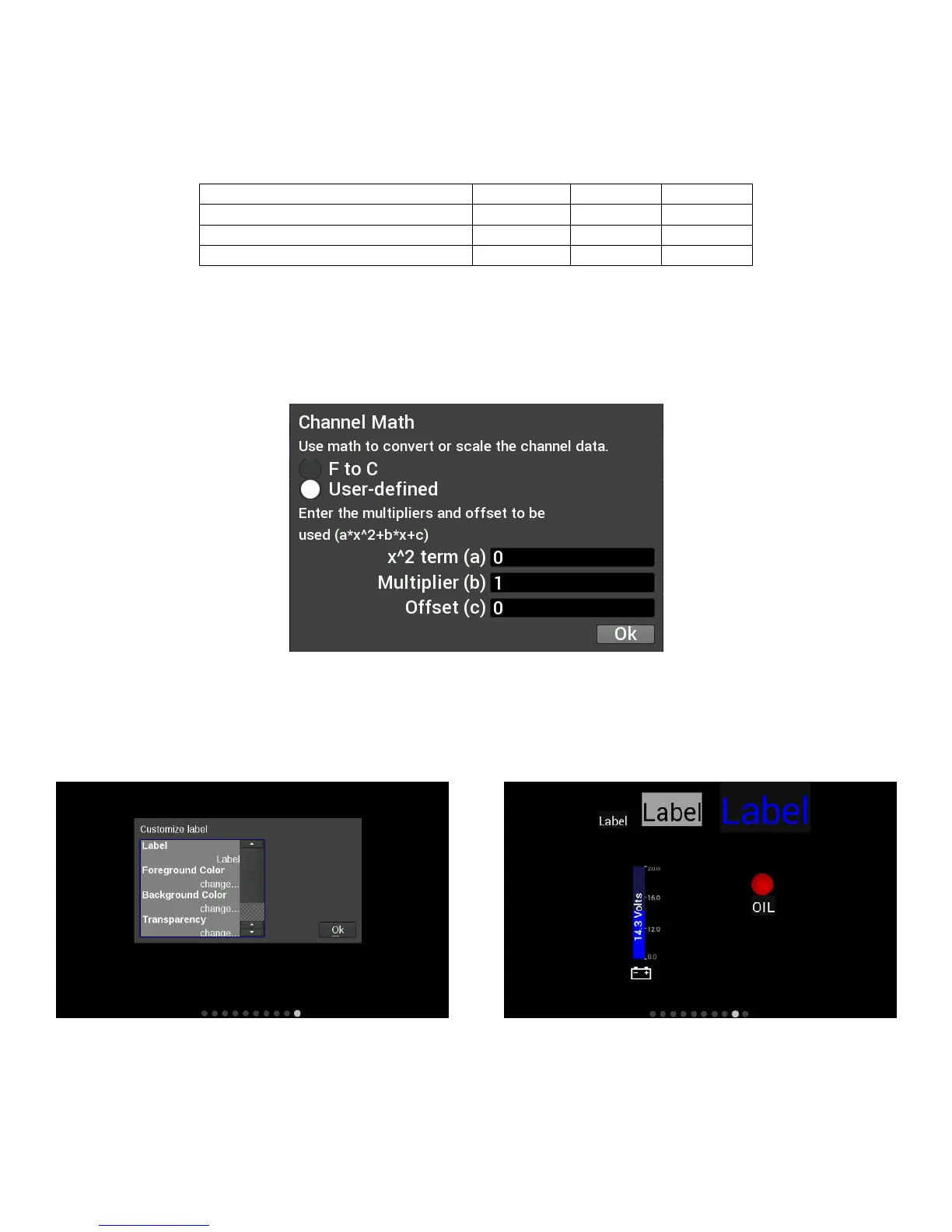
Channel Math
Channel Math can be used to perform unit conversion on any gauge. The default value is ‘1’ and this should
be used if no conversion is desired. Any unused value may remain zero.
For simple multipliers use the ‘Multiplier (b)’ box. (Example, enter ‘1.60934’ to convert MPH to KM/H).
Temperature gauges can from °F to °C by using the ‘F to C’ radio button. Selecting this option will
automatically update the unit’s label of the gauge and disable the user-defined multiplier.
If any gauges appear to read incorrectly, be sure to verify that this multiplier value has not been inadvertently
changed.
Adding Labels
Labels can be added anywhere on the gauge screen. The customization options for Labels include Font Size,
Foreground & Background colors, and Transparency. See below for an example of the variety of sizes, colors
and symbols that can be used.
Adding Switches
Switches can be placed anywhere on the gauge screen, they can be used to turn devices on or off, as a
nitrous enable, etc. These functions are mapped through the Holley EFI software. Follow these steps for
proper configuration:










 To Next Page