FAXITRON PATH USER MANUAL | HOLOGIC | REVISION 024
ECTION
ISION
oftware
5
5-15
Annotation
The button shown in Figure 5.4.8 will open up the annotation tools. These tools and
their many features are discussed in further detail in section 5.8.0.
PACS Store
The button shown in Figure 5.4.9 will only function when the system is installed in a
medical facility with a PACS network. To save your files locally, please refer to
section 5.7.0.
PACS Print
The button shown in Figure 5.4.10 will only function when the system is installed in
a medical facility with a PACS network. For local printing please refer to section
5.7.0.
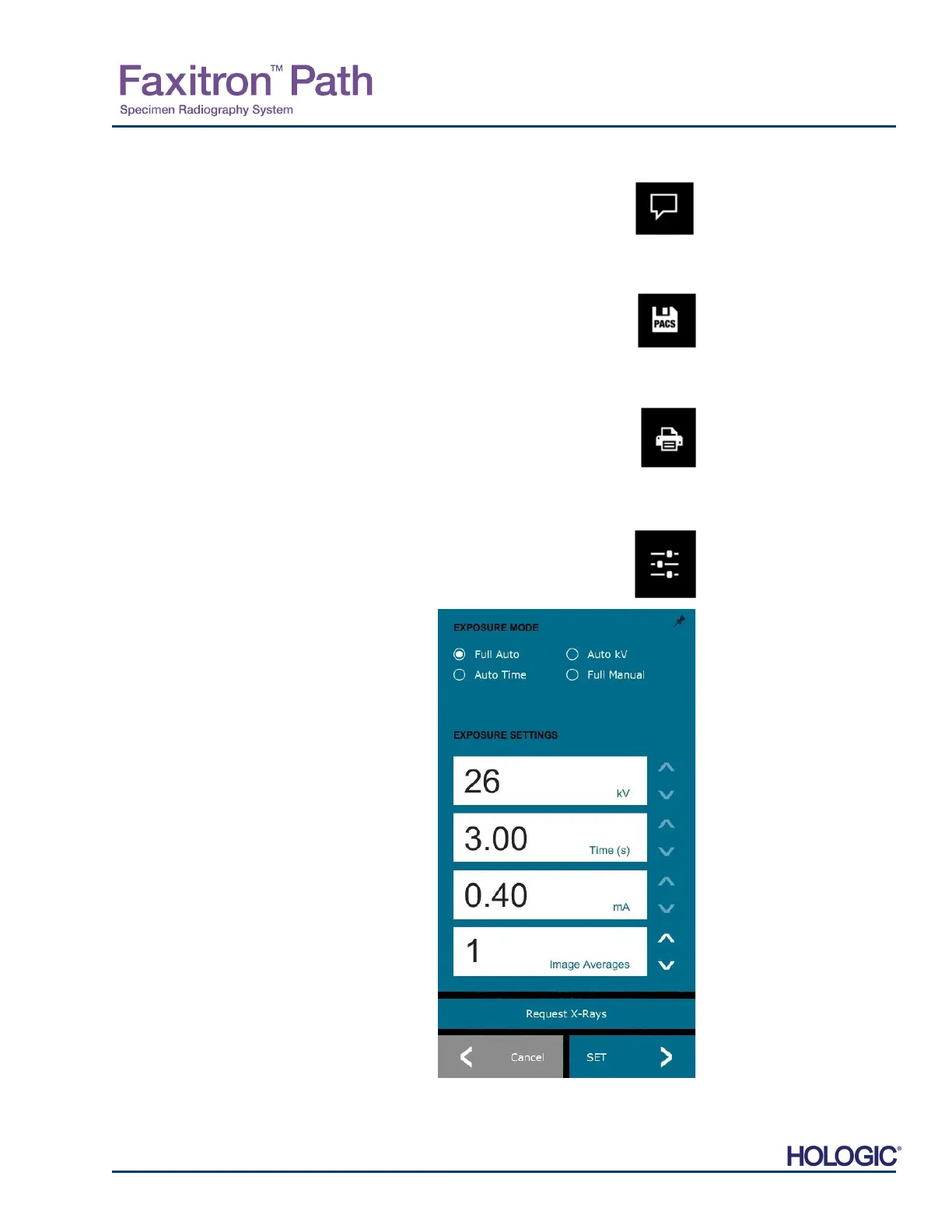
Device Control Panel
The button shown in Figure 5.4.11 will open the Device Control Panel, which allows
the device user the convenience of controlling the X-Ray system through the
software. The user can easily select the Exposure Mode, X-Ray Tube kV settings,
Exposure Time, and the number of images to acquire for Image Averaging (if
desired) and initiate X-Ray exposure.
NOTE: The status, or availability, of the Exposure
Settings is indicated by the up/down arrows
adjacent to the setting. The arrows will be white for
active settings and light blue of inactive settings.
The Exposure Settings that are active is dependent
on which Exposure Mode is selected.
Figure 5.4.12 to the right shows Full Auto mode has
been selected and that kV, Time, and Image
verages are all active. The user can adjust each
of these settings.
Note that the mA setting in the Faxitron Path
system is not adjustable via the software. The mA
settings will show as inactive.
When finished click on the Request X-Rays button
to acquire an image, or the Set button to save the
settings and close the Device Control Panel.
If the Cancel button is clicked the Device Control
Panel will close without saving any of the changes.
5.4.1 Cont.
Figure 5.4.8
nnotation
icon
Figure 5.4.9
PACS Store icon
Figure 5.4.10
PACS Print icon
Figure 5.4.11
Back to Procedure icon
Figure 5.4.12
Device Control Panel













 To Next Page