FAXITRON PATH USER MANUAL | HOLOGIC | REVISION 024
ECTION
ISION
oftware
5
5-21
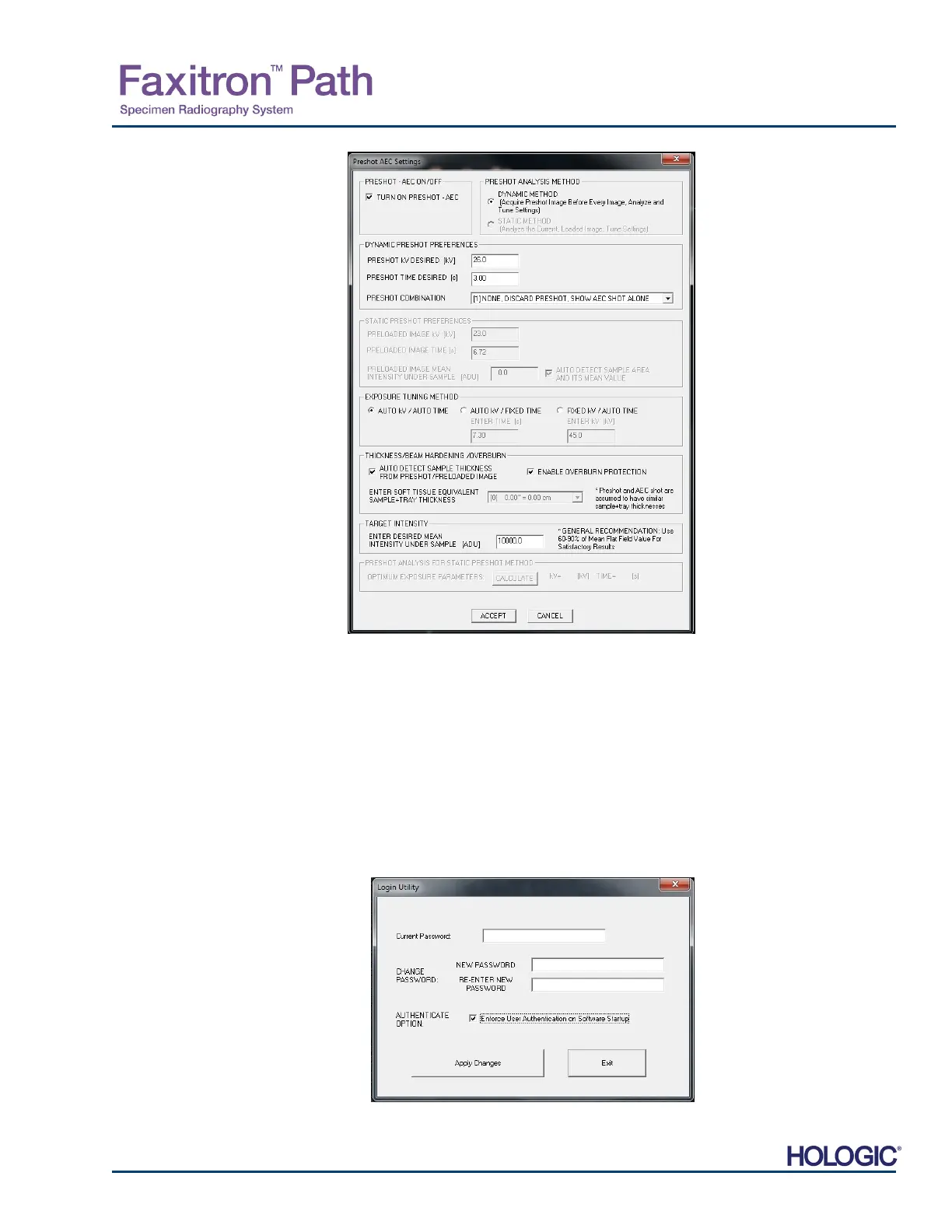
Enter the PRESHOT AEC values in
the window shown at right.
The settings shown reflect a 26 kV
and 3 second exposure time with a
target intensity of 10,000 ADUs for
the pre-shot setting. Users can enter
the selection of pre-shot parameters
only with the selection of DYNAMIC
METHOD in the ANALYSIS
METHOD section. The STATIC
METHOD selection will use Faxitron
predefined parameters. In addition,
the user has the option of selecting
the kV and exposure time settings
from the EXPOSURE TUNING
METHOD section.
For more accurate images, the user
can enter the SOFT TISSUE
(Sample) thickness and the
TARGET INTENSITY in ADUs.
NOTE the values int eh above
image are an example only. The
correct value needs to be
determined.
Note: The values in the above
image are typical for the Faxitron
Path system. The exact values for
your system need to be determined.
For the AUTOMATIC EXPOSURE CONTROL mode, push the Start button within the Vision
software (or on the Control Panel). The Vision software will perform a pre-shot (a short, low
dose, pre-exposure) of the sample to create a Region of Interest (ROI) for obtaining the
exposure parameters for the optimum image exposure.
Login Utility
The Login Utility is under the ADVANCED TOOLS menu and allows the user to configure and
activate the start-up password authentication for Vision software. Activation of this feature is
optional on the Faxitron Path system. If the user activates the password authentication they will
be prompted for the password each time the program is opened. The program will close if the
correct password is not entered.
5.4.4 Cont.
Figure 5.4.20
Preshot AEC Setup dialog box
Figure 5.4.21
Login Utility. Same screen
will appear during
authentication at the
startup.













 To Next Page