FAXITRON PATH USER MANUAL | HOLOGIC | REVISION 024
ECTION
ISION
oftware
5
5-33
Modality
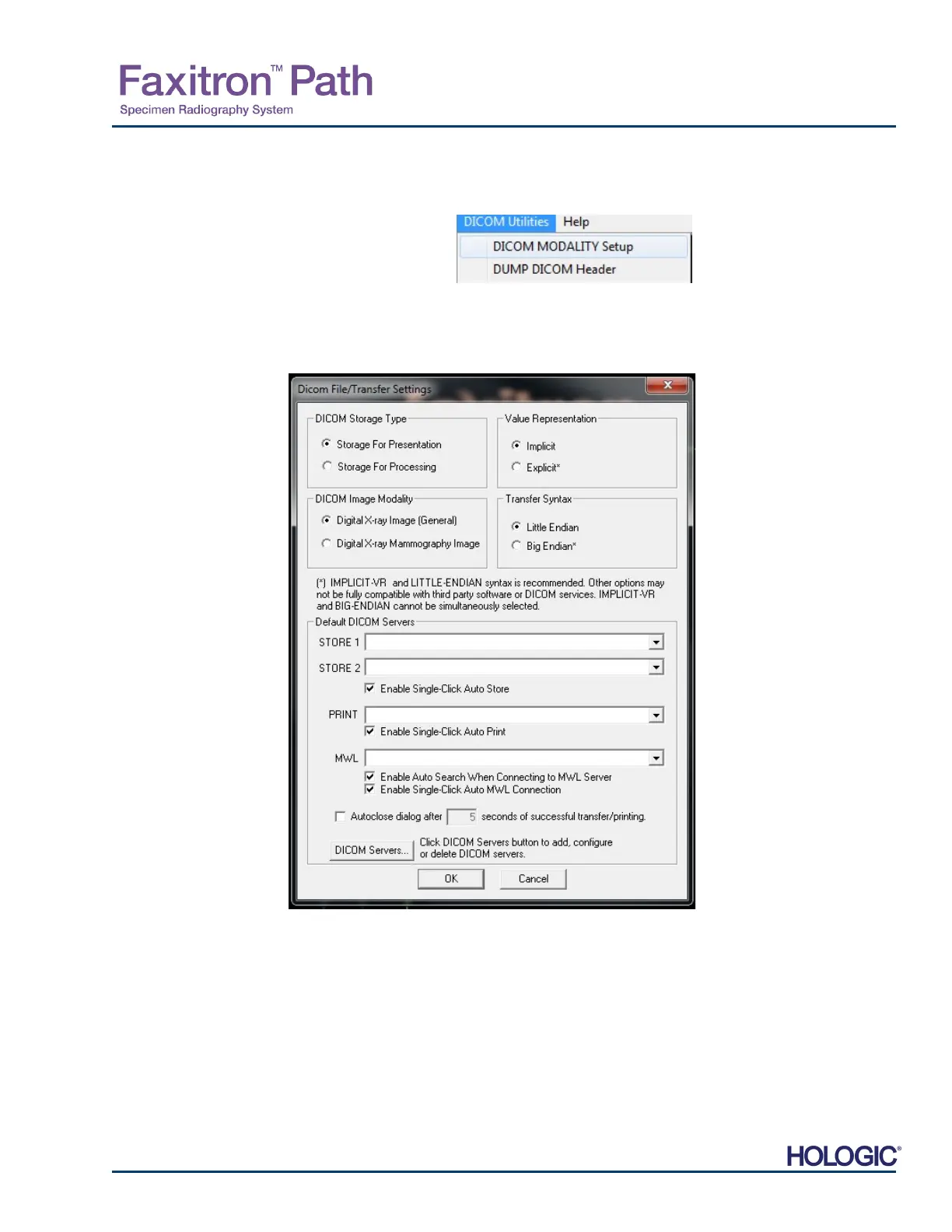
The DICOM file settings for Modality are accessed from the Top Menu Bar by selecting “DICO
Utilities”, then “DICOM Modality Setup”.
The DICOM storage type, either Presentation or Processing may be selected. The same Dialog
box allows for selecting the DICOM Image Modality, either Digital X-Ray or Digital X-Ray
Mammography. The Transfer Syntax and Value Representation is not user definable. They are
always assigned to be META HEADER PRESENT, LITTLE_ENDIAN and VR_IMPLICIT.
NOTE: Once the DICOM Modalities have been selected, they remain in effect even after the
Vision software has been closed. The Modality settings are stored and will remain in the
configured manner until they are changed again using the DICOM File Settings. These settings
(Storage Type & Modality, Transfer Syntax, and Value Representation) will be effective for all
DICOM Local Save or Print functionalities.
5.7.0 Cont.
Figure 5.7.2
DICOM Utilities menu
Figure 5.7.3
DICOM Modality Settings
Default settings shown













 To Next Page