Configuring how alerts age out
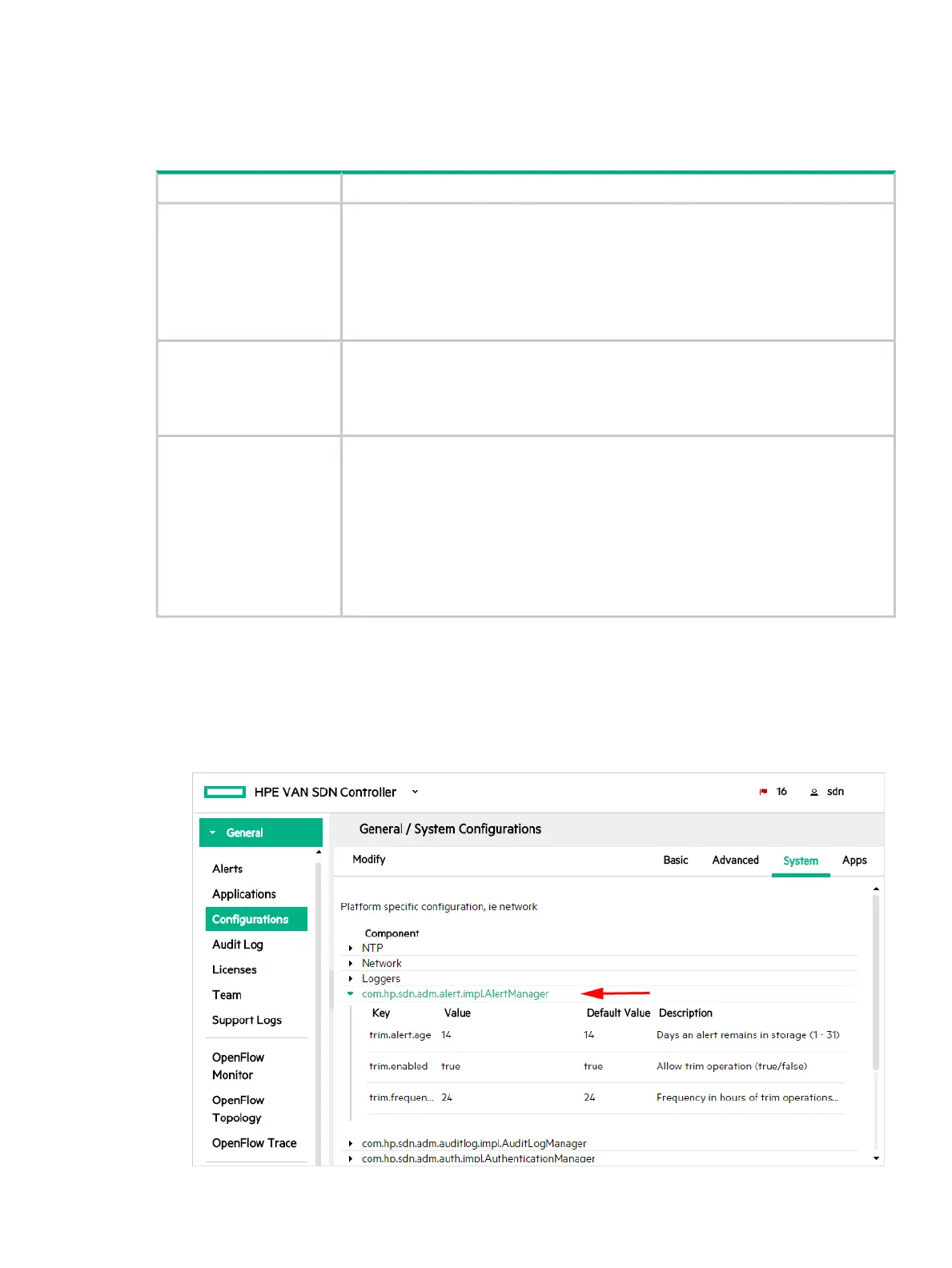
You can configure the following key values for alerts to control how alert data ages out. To set
these key values you configure the com.hp.sdn.adm.alert.impl.AlertManager component
using the Configurations screen.
DescriptionKey
Specifies the number of days an alert remains in persistent storage and remains
displayed on the Alerts screen.
trim.alert.age
Data type
A number from 1 through 31
Default value
14
When true, specifies that the controller deletes alerts that have exceeded the
trim.alert.age limit.
trim.enabled
Default value
true
Specifies how often, in hours, the controller is to delete alerts that have exceeded the
trim.alert.age limit.
trim.frequency
Data type
A number from 8 through 168
Default value
24
Example
Enter 8 to specify that the controller delete aged-out alerts every eight hours.
To configure how alerts age out:
1. On the Configurations screen in the System tab, select the
com.hp.sdn.adm.alert.impl.AlertManager component. For more information on
configuration components, see “Configuration components” (page 38).
Figure 8 Select the AlertManager component
Alerts 31



 To Next Page