EasyManua.ls Logo

HP UPS - User Manual

HP UPS
133 pages
Print Icon
To Next Page IconTo Next Page
Loading...
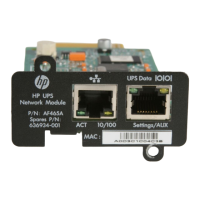
HP UPS Management Module
User Guide
Part Number 435656-004
January 2010 (Fourth Edition)

Table of Contents

Questions and Answers

  • P
    Peter StoneSep 8, 2025
    Why I am unable to start the HP UPS Protection Agent for Linux?
    • W
      William EverettSep 9, 2025
      If you're having trouble starting the HP UPS Power Protection Agent for Linux, there are a couple of potential causes: * The server name and IP address might be incorrect; update them in /etc/hosts. * Some files might be missing; install the file compat-libstdc++7.3-2.96.128.i386.rpm, which is required by the HP UPS Power Protection Agent Linux package (HPRA-4.5-x.i586.rpm).
  • A
    Austin BentonSep 12, 2025
    How to resolve HP SIM listing discovered HP Power Supply UPS as Unmanaged?
    • M
      Martin HodgesSep 12, 2025
      If HP SIM lists a discovered UPS as Unmanaged, try the following steps: * Delete the discovered UPS from HP SIM. * Using the management module web interface, add the HP SIM server as a Manager on the SNMP Managers tab. * Rediscover the UPS in HP SIM.
  • R
    Renee LaneSep 12, 2025
    What to do if HP UPS Power Supply battery test did not run?
    • W
      Whitney CopelandSep 13, 2025
      The UPS must be in a certain state before the battery test runs, if the UPS is On Battery the battery test will not run.
  • M
    Mark ThompsonSep 14, 2025
    How to install agent on Red Hat Itanium HP UPS Power Supply?
    • T
      Timothy McgeeSep 15, 2025
      To install the agent on Red Hat Itanium, follow these steps: * Install the ia32* file for your operating system from the supplementary disc. * Install the appropriate library files for your operating system from the compact layer in the following order: * Install the glibc* library file. * Install the zlib* library file. * Install the agent using the Linux installation script. * Install the agent using the Linux silent installation method.
  • C
    Cory SmithSep 16, 2025
    What to do if attached device did not shut down gracefully with HP Power Supply?
    • P
      Patrick FrankSep 17, 2025
      If an attached device did not shut down gracefully, be sure the shutdown settings do not exceed the UPS runtime.

Summary

HP UPS Power Protection Agent Requirements

Installing the HP UPS Management Module

Connecting the Network Cable

Launching a Terminal Emulation Program

Configuring the Management Module for Remote Access

Installing the HP UPS Power Protection Agent

Installing the Agent on Windows Operating Systems

Provides instructions for installing the agent on Windows systems using GUI or silent methods.

Installing the Agent Using the GUI Method

Installing the Agent Using the Silent Installation Method

Reconfiguring the Agent on Windows Operating Systems

Installing the Agent on Linux Operating Systems

Installing the Agent Using the Installation Script

Explains how to install the Linux agent using a script.

Installing the Agent on HP-UX Operating Systems

Installing the Agent Locally or Remotely Using the Installation Script Method

Details installing the HP-UX agent via script, locally or remotely.

HP UPS Management Module Web Interface

Signing in to the Web Interface

Browser Security Alert

Manual Control Menu

Power Fail Menu

Advanced Power Fail Settings

Shutdown Events Menu

HP UPS Management Module Service Menu

Terminal Emulation Session

Troubleshooting

Agent Does Not Install on Red Hat Itanium

Steps to resolve agent installation issues on Red Hat Itanium.

Battery Test Did Not Run

Explains possible cause (On Battery) and action for battery test failure.

Browser Does Not Display the Web Interface for an Installed Management Module

Actions to resolve issues with displaying the web interface.

Error LED Illuminates or Flashes

Explains LED error codes and troubleshooting steps.

InstallShield Error Code -6001 Appears During Setup

Resolves InstallShield error code -6001 during installation.

Alert Messages

Configuring HP SIM to Receive Traps

Configuring the Management Module to Send Traps to HP SIM

Security Considerations Overview

SNMP Monitoring

Updating the Firmware Overview

Configuring the Software for Redundancy

Configuring the Firewall on Windows

Using the HP Flash Utility

HP UPS Specifications

General IconGeneral
BrandHP
ModelUPS
CategoryPower Supply
LanguageEnglish

Related product manuals