6.4.3.2 Replacing an ECC800-Pro PSU
Prerequisites
Do not touch the terminals in the rear of a removed PSU to avoid electric shocks.
● Tool: insulation gloves
● Materials: a reserved undamaged and undeformed PSU of the appropriate
model.
Context
The PSU is hot-swappable.
Procedure
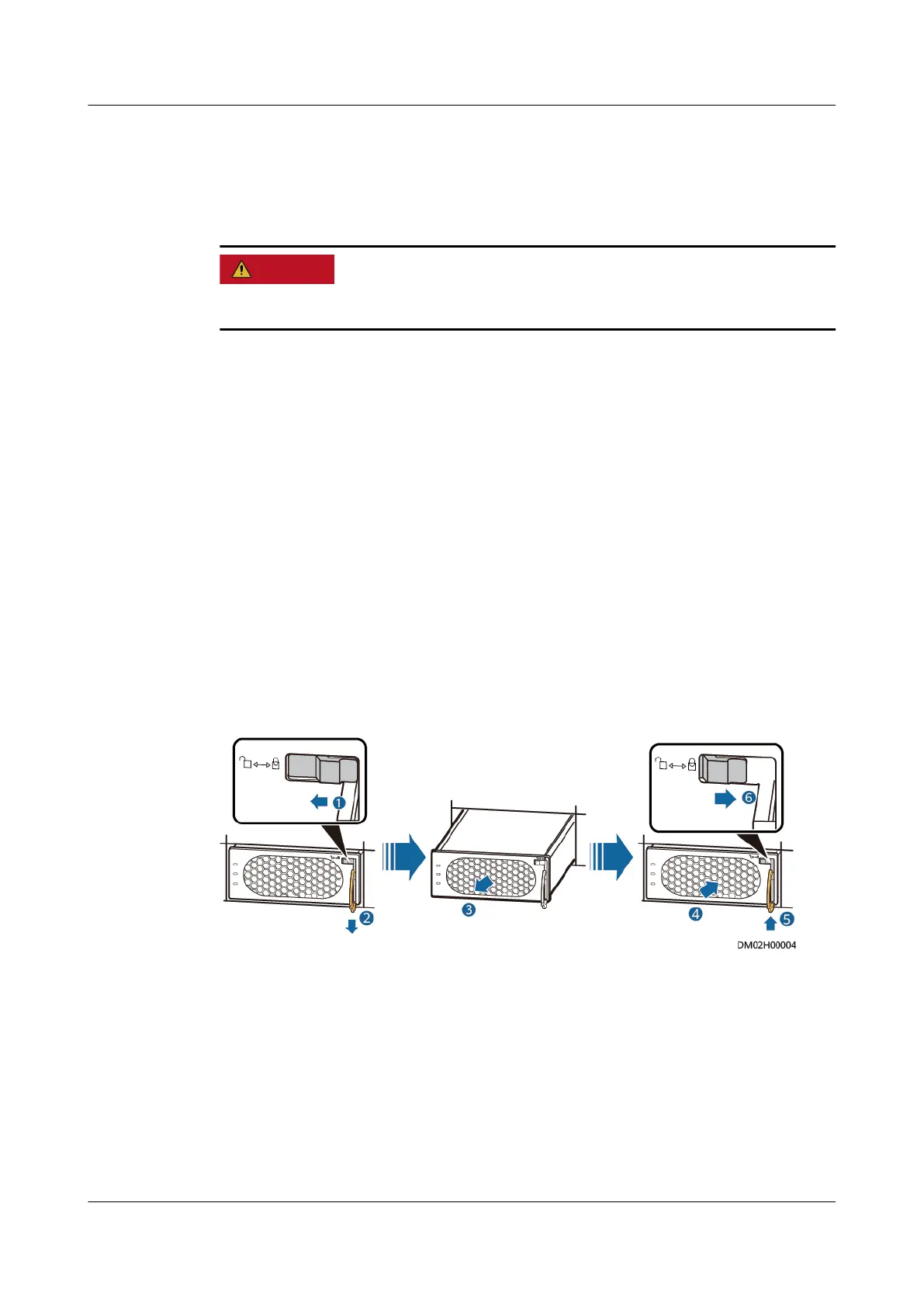
Step 1 Push the locking latch in the upper right corner of the PSU panel leftwards.
Step 2 Pull out the handle of the PSU to remove the PSU from the subrack.
Step 3 Gently push the reserved PSU into the subrack along guide rails, and push the
locking latch rightwards to secure the handle.
Figure 6-8 Replacing a PSU
----End
6.4.3.3 Replacing ECC800-Pro Antennas
Prerequisites
● Tools: ESD wrist strap, ESD gloves
● Materials: Spare ECC800-Pro antennas of the same model are available and
functional.
FusionModule500 Smart Mini Data Center
User Manual (Philippines, FusionModule500-
SU61A12S) 6 O&M
Issue 02 (2021-06-30) Copyright © Huawei Technologies Co., Ltd. 187






 To Next Page