RMS-SNMP01A SNMP Card
User Manual
4 Managing the UPS on the WebUI
Copyright © Huawei Technologies Co., Ltd.
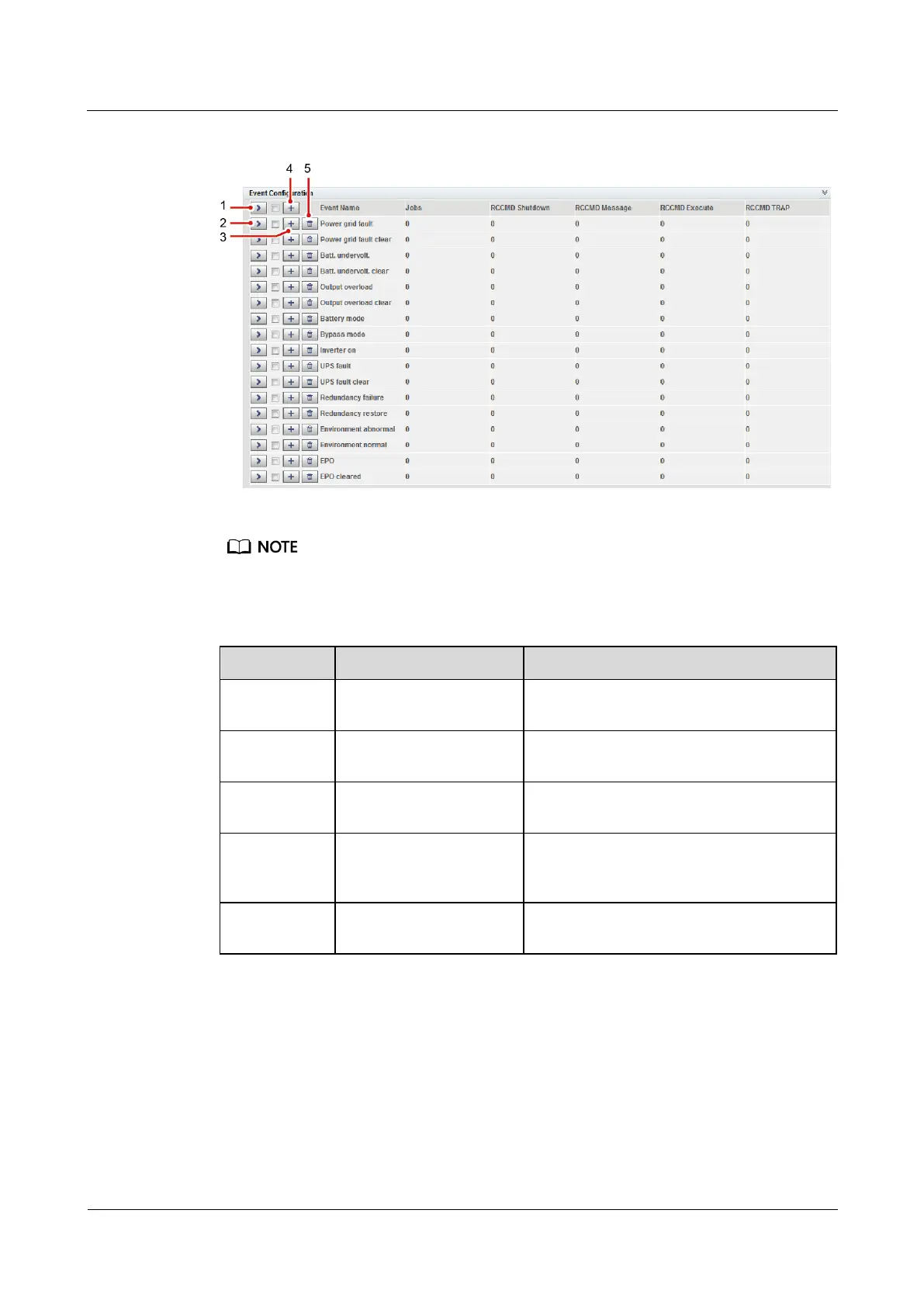
Figure 4-43 Event configuration page
Number of jobs = Number of RCCMD Shutdown jobs + Number of RCCMD Message jobs + Number
of RCCMD Execute jobs + Number of RCCMD TRAP jobs.
Table 4-7 Buttons on the event configuration page
You can view all jobs of all events by
clicking this button.
Button for expanding one
event
You can view all jobs of the event by
clicking this button.
Button for adding one job
You can add one job for the event by
clicking this button.
Button for adding one job
for events
Select multiple events, and you can add one
job for the selected events at the same time
by clicking this button.
Button for deleting all
jobs
You can delete all jobs of the event by
clicking this button.
Figure 4-44 shows the buttons after one event is expanded and Table 4-8 describes these
buttons.

 To Next Page
 Loading...