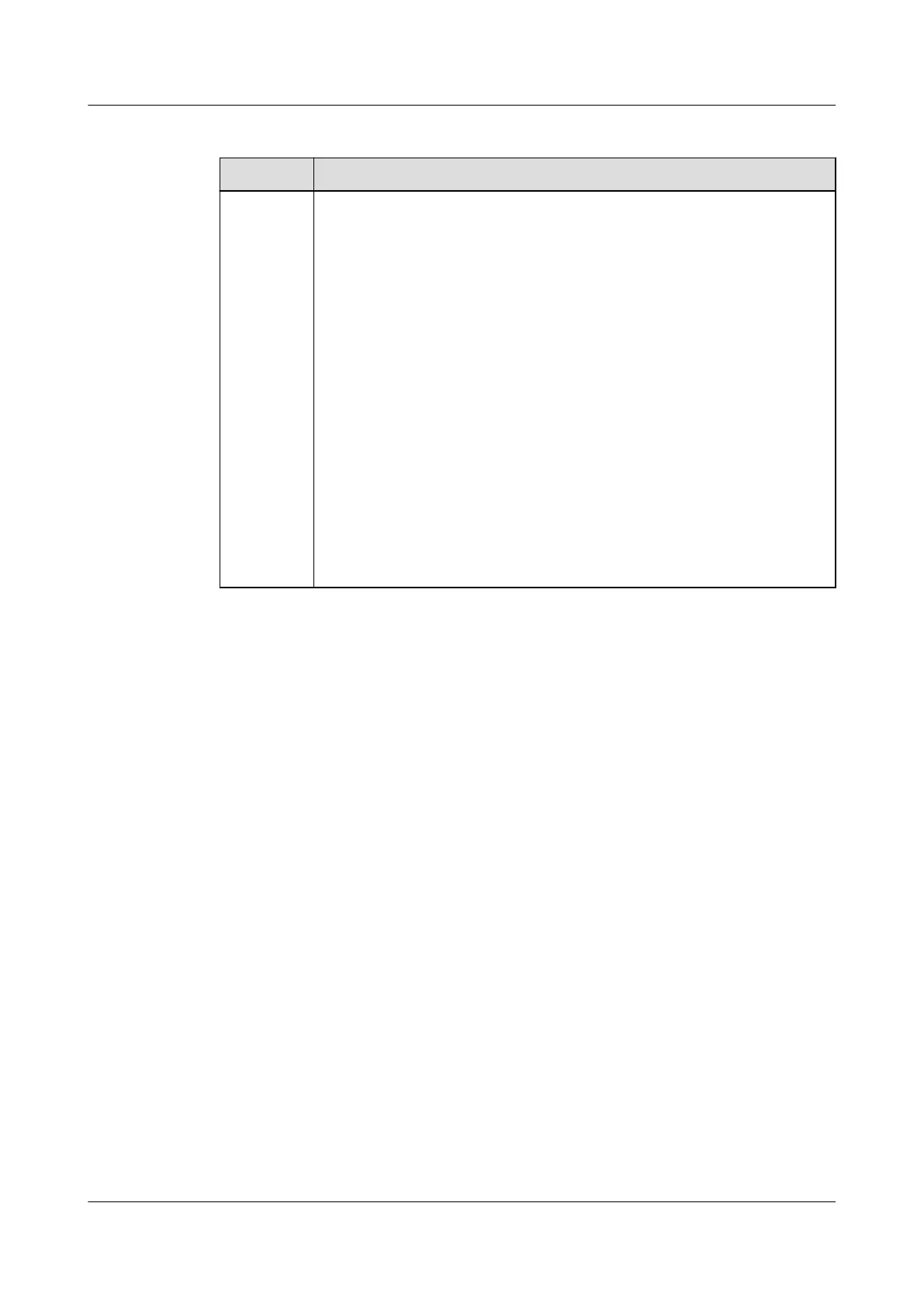
Table F-2 Troubleshooting measures
Scenario Troubleshooting
Negotiati
on failed
1. Check whether the device cables are connected properly. If no,
connect the device cables correctly.
2. Check whether service operations such as upgrade and log
export are performed on the management system. If yes,
perform baud rate negotiation again after such operations are
complete.
3. To replace an RS485_2 device (such as a battery or power
meter), choose Maintenance > Subdevice management on the
home screen, touch and hold the replaced RS485_2 device to
delete it.
4. Perform baud rate negotiation again.
5. When replacing or adding an inverter or an RS485_2 device
(such as a battery or power meter), if you tap Negotiate a
higher rate and a message "Negotiation failed. The southbound
device does not support the rate." is displayed, it indicates that
the device does not support baud rate negotiation. In this case,
you only need to tap 9600.
6. If the fault persists, contact your vendor.
SUN2000-(5K-12K)-MAP0 Series
User Manual F Baud Rate Negotiation
Issue 01 (2024-05-13) Copyright © Huawei Digital Power Technologies Co., Ltd. 149












 To Next Page