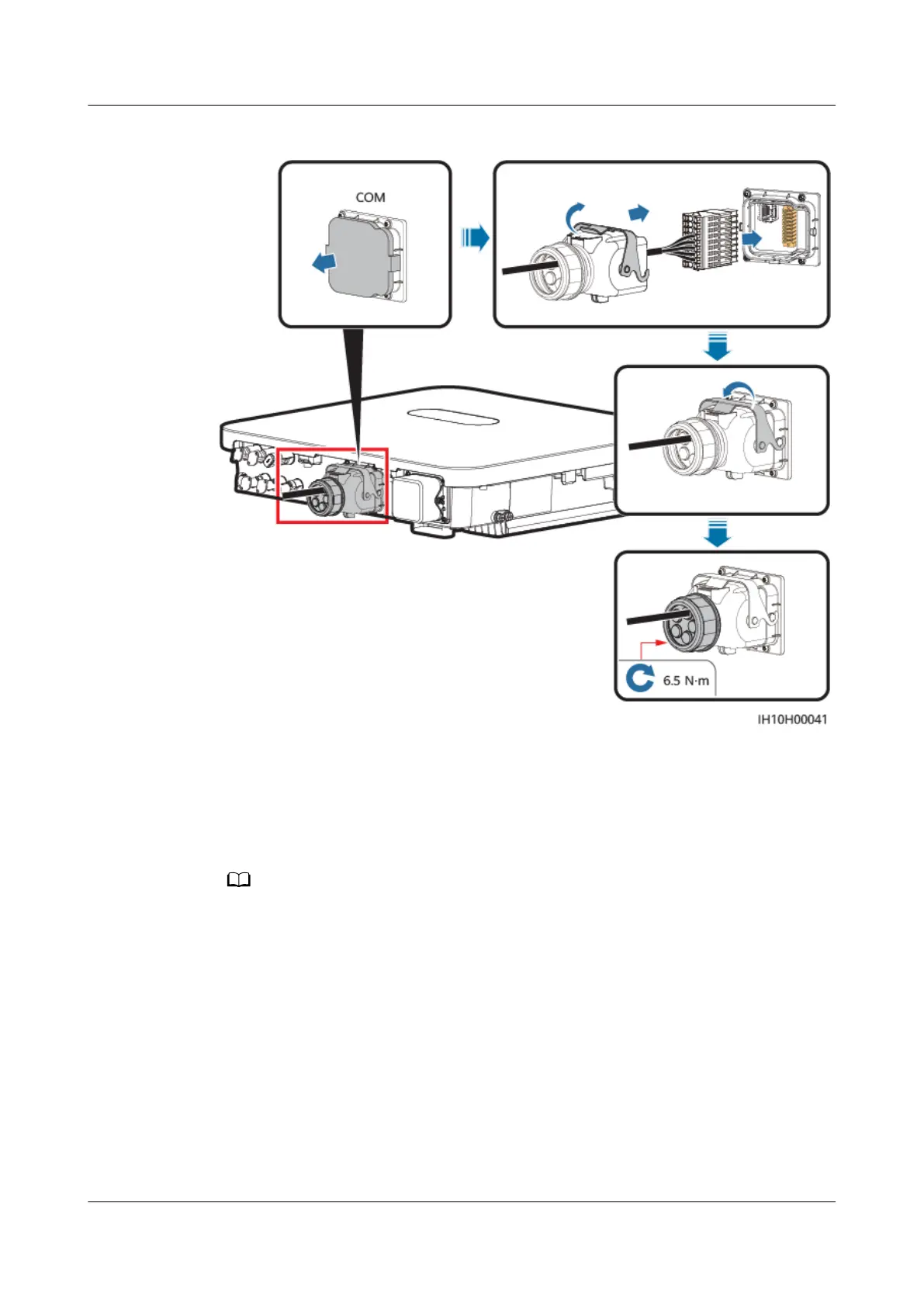
Figure 5-37 Securing the signal cable connector
----End
5.7.7 Connecting NS Protection Signal Cables
Cable Connection
● The NS protection function is applicable to grid code VDE-AR-N-4105, SWITZERLAND-
NA/EEA:2020-LV230, EN50549-FI, or ANRE.
● Connect the NS protection switch to GND (pin 16) and DIN5 (pin 18). The switch is
turned on by default. When the switch is turned o, NS protection is triggered. Rapid
shutdown and NS protection use the same pins, which are GND (pin 16) and DIN5 (pin
18). Therefore, you can use only either of the functions.
● The cable connection method for a single inverter is the same as that for cascaded
inverters. For a single inverter, connect GND and DIN5 to the same cable.
● Log in to the FusionSolar app as an installer, choose Me > Device commissioning, and
connect to the WLAN hotspot of the inverter. Log in to the local commissioning system
as an installer, choose Settings > Feature parameters > Dry contact function, and set
Dry contact function to NS protection.
SUN2000-(5K-12K)-MAP0 Series
User Manual 5 Electrical Connections
Issue 01 (2024-05-13) Copyright © Huawei Digital Power Technologies Co., Ltd. 79












 To Next Page