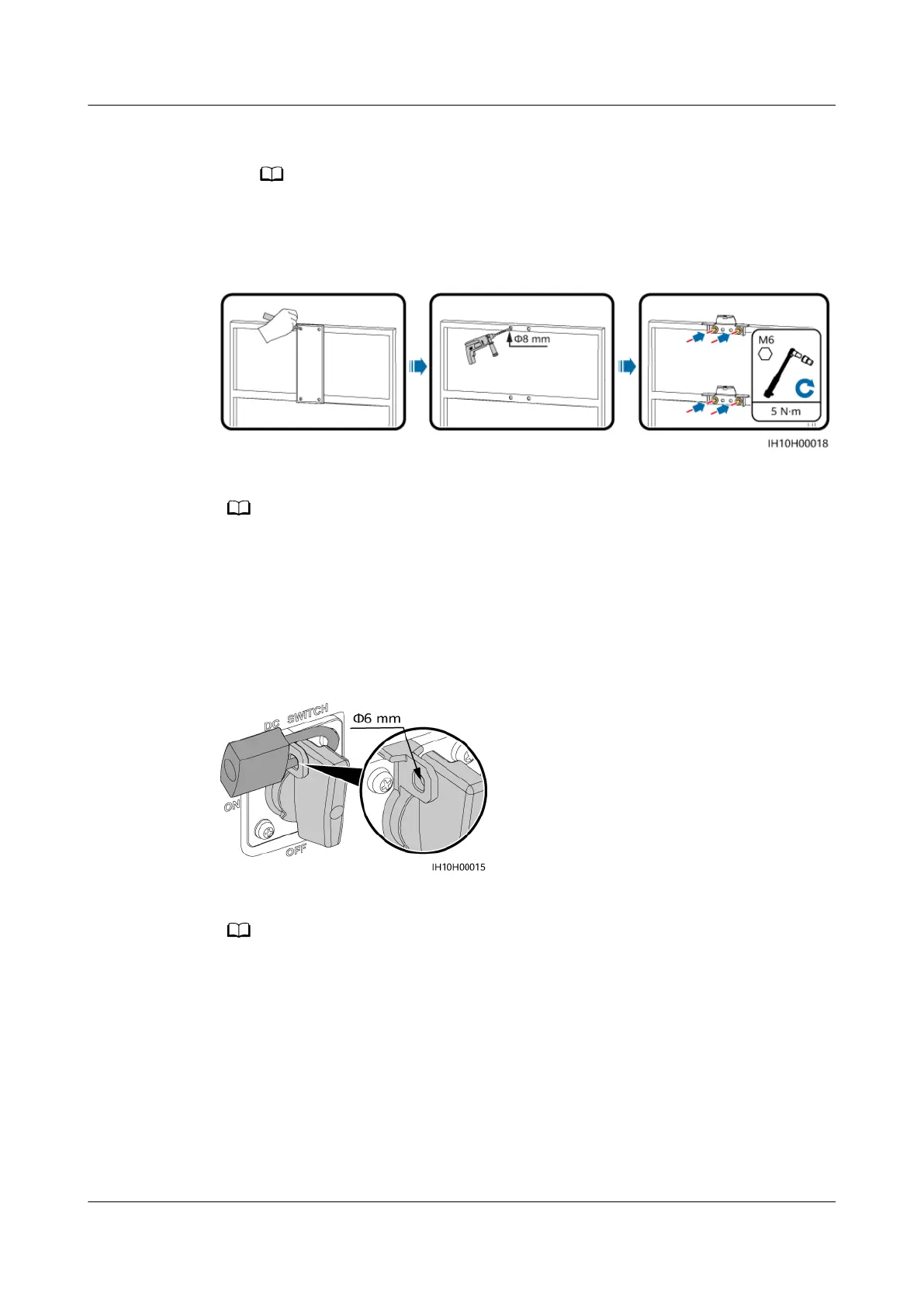
2. Drill holes using a hammer drill.
You are advised to apply anti-rust paint on the hole positions for protection.
3. Secure the mounting brackets.
Figure 4-11 Installing the mounting brackets
Step 2 (Optional) Install a DC switch padlock.
● For models used in Australia, the DC switch padlock needs to be installed according to
the local standard to secure the DC switch (DC SWITCH) and prevent incorrect startup.
● The DC switch padlock needs to be prepared by the customer. Select a padlock based on
the lock hole diameter (Ф6 mm) to ensure that the padlock can be installed smoothly.
● An outdoor waterproof padlock is recommended.
● Keep the padlock key properly.
Figure 4-12 Installing a DC switch padlock
Step 3 Install the inverter on the mounting brackets.
The M6x16 hexagonal bolts delivered with the inverter are used to secure the mounting
bracket and hanging kit in the upper part.
SUN2000-(5K-12K)-MAP0 Series
User Manual 4 Installation
Issue 01 (2024-05-13) Copyright © Huawei Digital Power Technologies Co., Ltd. 37












 To Next Page