power cable to ground the PE terminal of the AC connector and the ground
screws of the enclosure, respectively.
Procedure
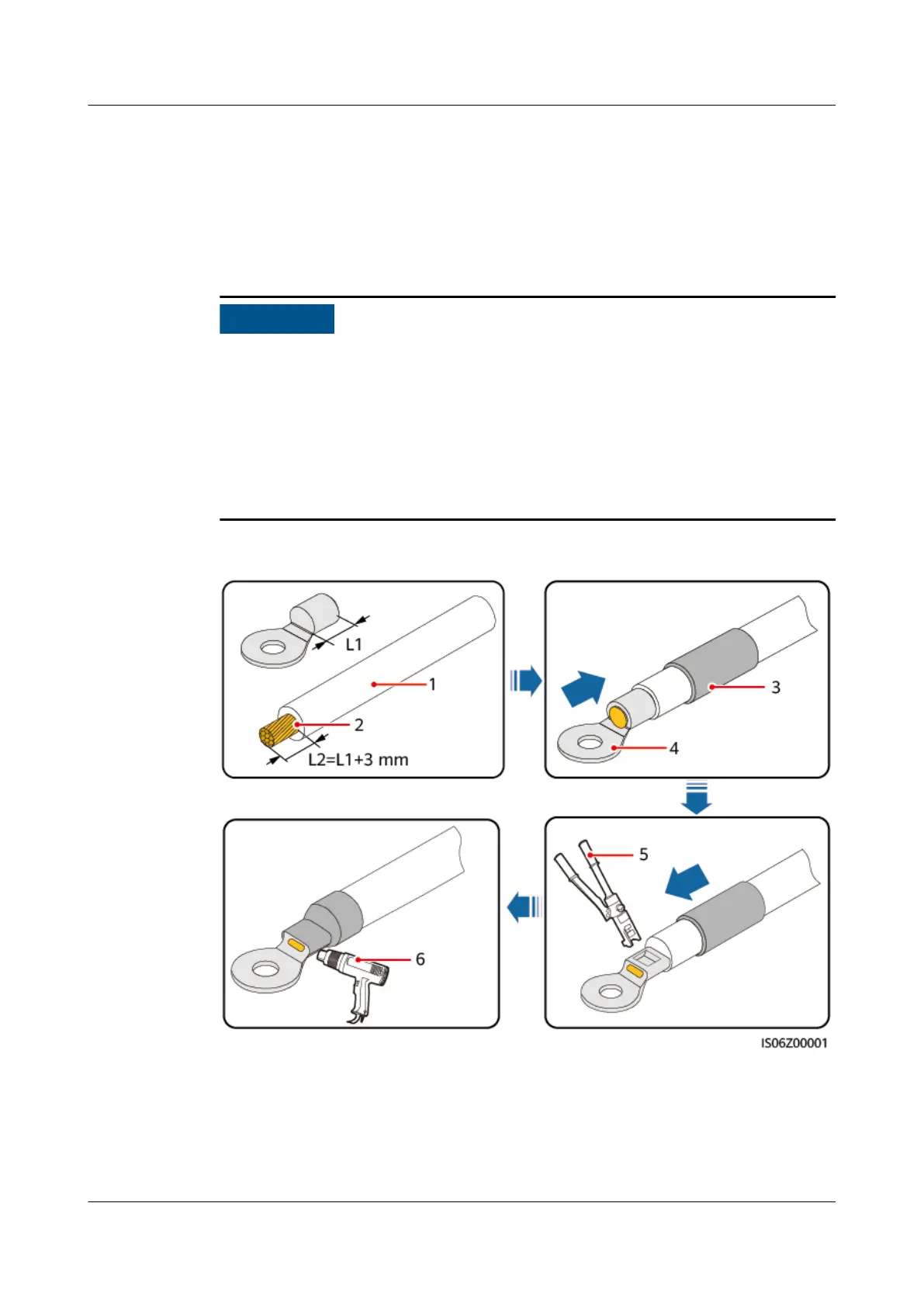
Step 1 Crimp an OT terminal.
● Avoid scratching the core wire when stripping a cable.
● The cavity formed after the conductor crimp strip of the OT terminal is crimped
must wrap the core wire completely. The core wire must make close contact
with the OT terminal.
● Wrap the wire crimping area with heat shrink tubing or insulation tape. The
heat shrink tubing is used as an example.
● Use a heat gun carefully to avoid heat damage to the equipment.
Figure 5-2 Crimping an OT terminal
(1) Cable
(2) Core wire (3) Heat shrink tubing
(4) OT terminal (5) Hydraulic pliers (6) Heat gun
SUN2000-(5K-12K)-MAP0 Series
User Manual 5 Electrical Connections
Issue 01 (2024-05-13) Copyright © Huawei Digital Power Technologies Co., Ltd. 45












 To Next Page