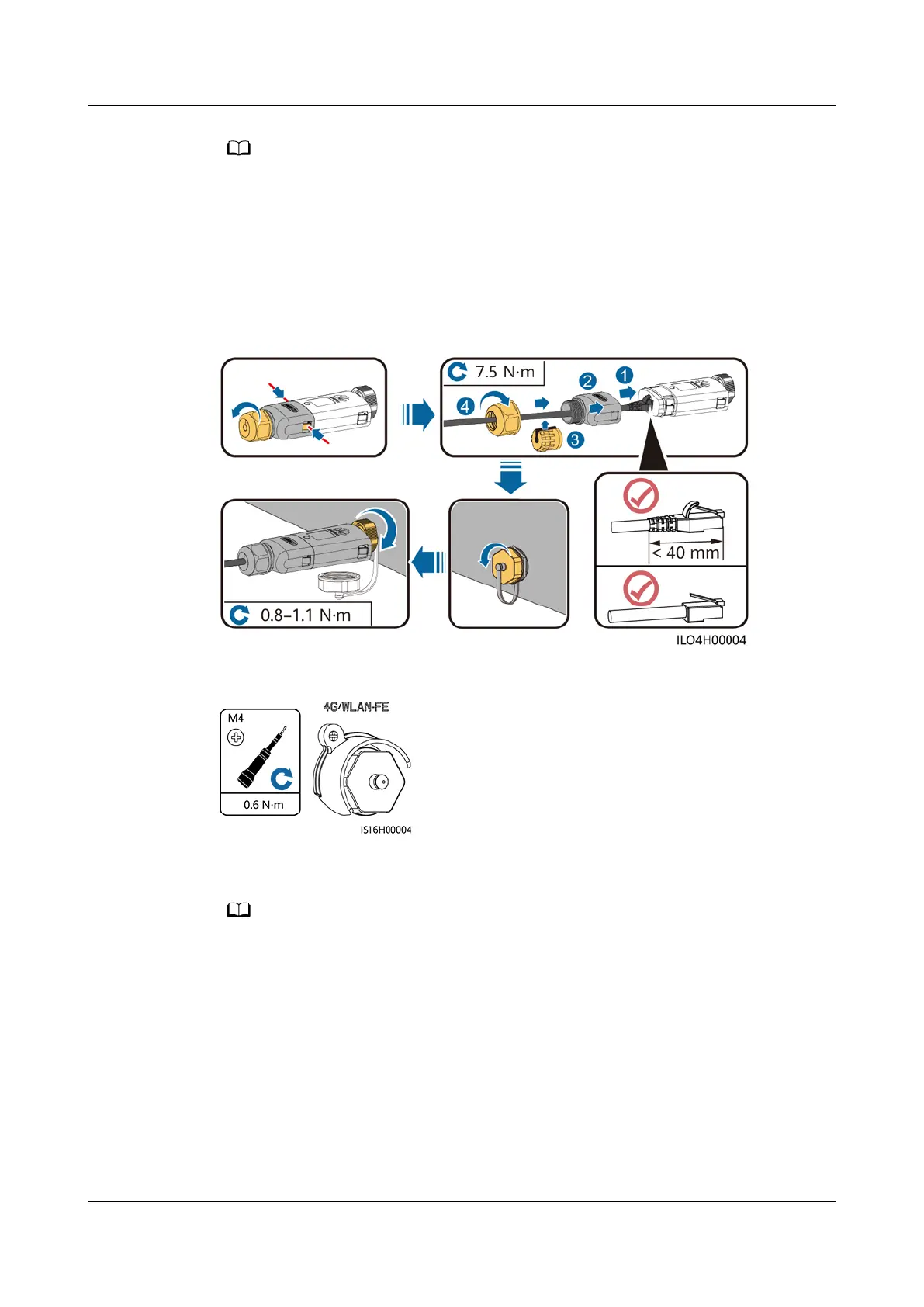
If the Smart Dongle is used, you need to install anti-theft components after installing the
Smart Dongle.
WLAN-FE Smart Dongle (FE Communication)
You are advised to use a CAT 5E outdoor shielded network cable (outer diameter
< 9 mm; internal resistance ≤ 1.5 ohms/10 m) and shielded RJ45 connectors.
Figure 5-43 Installing a WLAN-FE Smart Dongle (FE communication)
Figure 5-44 Installing anti-theft components for the Smart Dongle
4G Smart Dongle (4G Communication)
● If you prepared a Smart Dongle without a SIM card, you need to prepare a standard SIM
card (size: 25 mm x 15 mm) with the capacity greater than or equal to 64 KB.
● When installing the SIM card, determine its installation direction based on the silk
screen and arrow on the card slot.
● Press the SIM card in place to lock it, indicating that the SIM card is correctly installed.
● When removing the SIM card, push it inwards to eject it.
● When reinstalling the cover of the Smart Dongle, ensure that the buckles spring back in
place with a click sound.
SUN2000-(5K-12K)-MAP0 Series
User Manual 5 Electrical Connections
Issue 01 (2024-05-13) Copyright © Huawei Digital Power Technologies Co., Ltd. 83












 To Next Page