6. Optional Balancer Procedures
6.1. Tools
The Tools button contains equipment information and set
up options.
Set Up
The “Set Up” screen contains a list box of balancer set up
items. Select the item you wish to set up and follow the
on screen prompts.
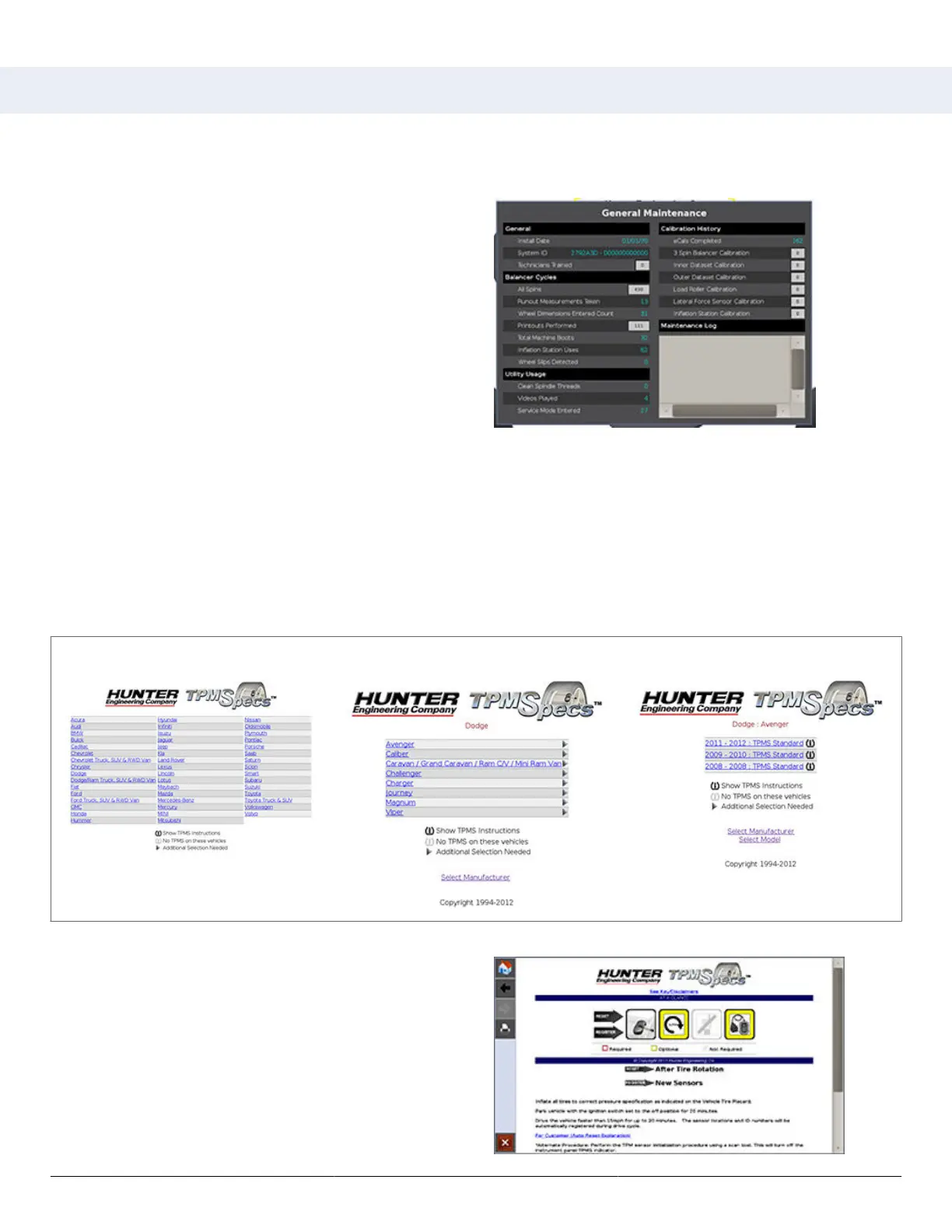
Maintenance History
From the main balance screen, touch the “Tools” >
“Advanced” > “Maintenance History” button.
The Maintenance screen displays general balancer history. Pressing any of the grey boxes will show a yout with more
information.
TPMS
From the main balance screen, touch the “Tools” > “TPMS” buttons.
The main TPMSpecs® screen is displayed. Select the make, model and specics of the vehicle being serviced.
Make Model Specics
The “AT A GLANCE” overview starts each vehicle TPMS
specication. The rst image shows the type of TPMS
sensor on the vehicle. The following three images show
the requirements for servicing the wheel: process, scan
tool and OEM scanner.
The red border, yellow border or grayed appearance
of the image denotes the requirement as required,
optional or not required. Red and white striped border
indicates the requirement is possibly required; refer to
the explanation below the images.
HD Elite Wheel Balancer
Page 45 of 51



 To Next Page