22
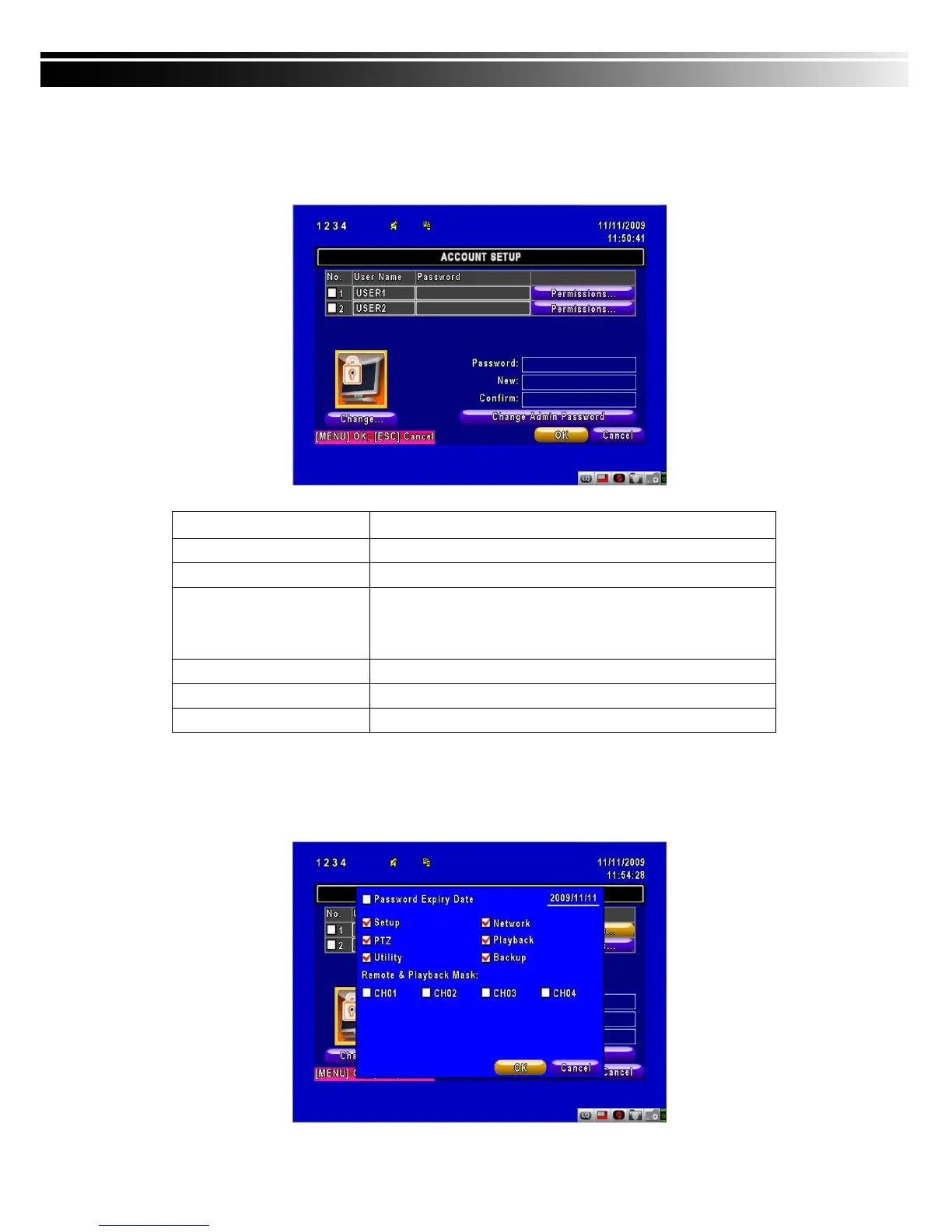
4-5 ACCOUNT SETUP
The Account Setup menu is used to provide role-based permission independently setting for
each user (maximum of 2 users) to access DVR over network. The default admin account and
password is “admin” and “123456” The default password remains the same after firmware
upgrade, however, it requires 8-digits for password length when you setup a new one
Item Description
No.
Check to activate the user’s account.
Username
Set up username
Password
Set up password for each user. Password is 8-digits required
and can be mixed by letters and numbers with
case-sensitive. Letters can be mixed with capitals or
lowercases.
Permissions
Set up Permissions for each user
Change Admin Password
Change administrator’s password
Change
Change user’s picture
4-5.1 Permission Setup
The Account Setup is set to provide individual user (maximum of 2 users) role-based
permissions, including access to Setup menu, Network operation, PTZ function, Playback,
Utility, Backup, Password expiry date and Mask on specific channels while playing back.



 To Next Page