51
CHAPTER 9 CMS INSTALLATION AND USAGE GUIDE
9-1 CMS Installation
System Requirement:
*Intel Pentium 4 processor or equivalent.
*Microsoft Windows Vista、Windows XP、Windows 2003 Server.
*Besides OS and other required APs, there will be 512MB remaining memory needed or above.
*512MB memory above.(500M requested for group DVR connection and 180M for single DVR)
*20MB HD space. Recording and image capturing require extra space for storage.
*VGA Card needs to support DirectX9 and function well while running it. Please refer to
p40 Note 1.
Installation:
1. Connect to the manufacturer’s website and download the CMS software.
2. Decompress and execute “setup.exe”.
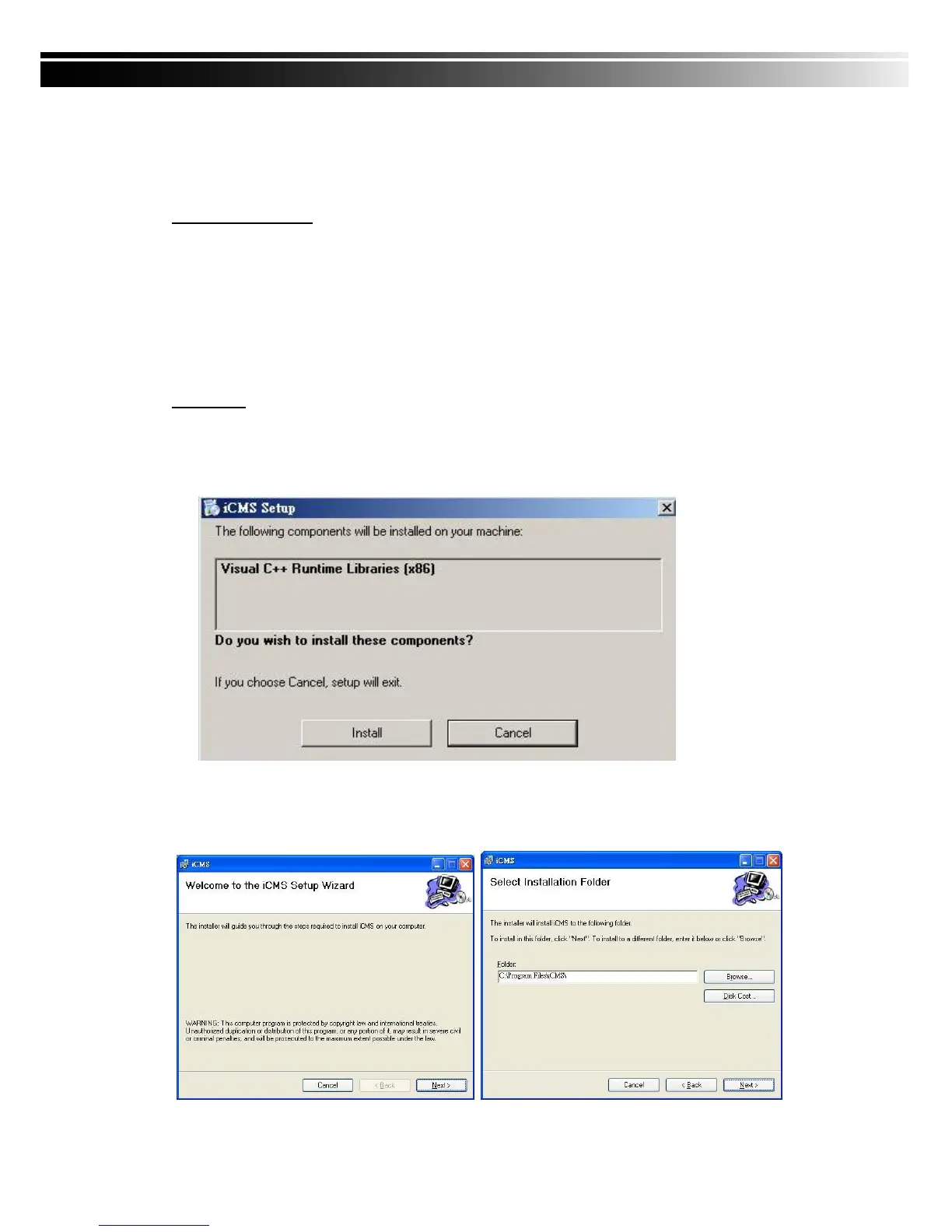
3. If “Visual C++ Runtime Libraries” has not been installed before in the operating PC, the
following sign will suggest an installation automatically.
4. Select “Next”, and then select “Browse” to change installation path if needed. To check
available space on hard disk, please select “Disk Cost” then please select “Next” to the
next step.



 To Next Page