48
8-2 Mobile Application Installation and Operation for Windows Mobile System
There are two kinds of applications for Window Mobile OS: JPEG compression and H.264
compression. The one for H.264 compression can transfer both audio and video signal to your
mobile device.
System Requirement:
Mobile device OS:Windows mobile system 5.0 above.
Mobile device need to support internet: GPRS/3G/Wifi… etc.
8-2.1 Mobile Application Installation
Please follow the steps cited below to perform the mobile device
surveillance function on your mobile device (mobile phone,
PDA ...etc).
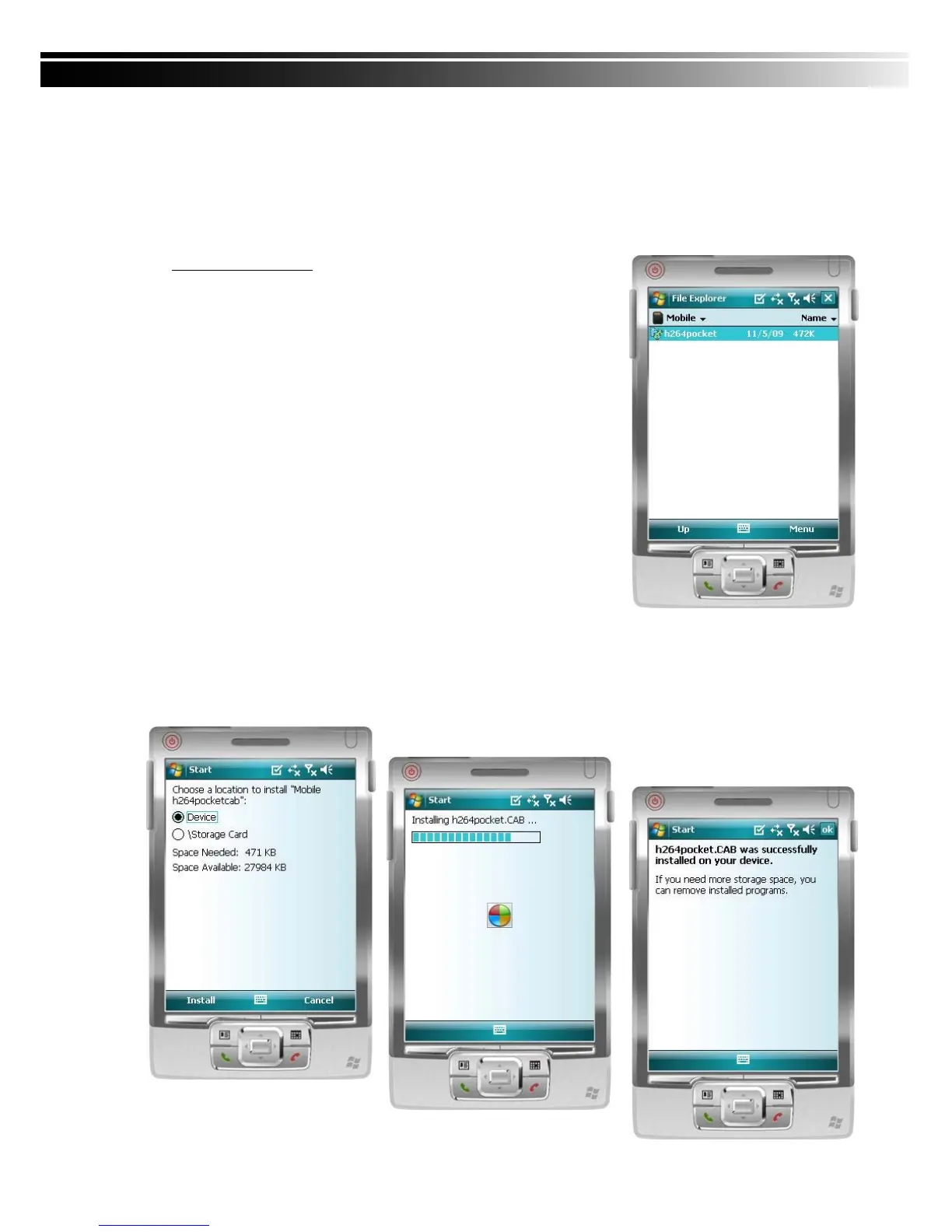
Step 1: The mobile application called “Jrviewer.CAB” and
“H264Pocket.CAB” need to be installed in your mobile
device. The application can be downloaded directly from the
manufacturer’s website to your mobile or; alternatively, it can
be transferred to your mobile device from the CD that
packed with DVR through Bluetooth or USB cable.
Step 2: Install the application software “Jrviewer.CAB” and “H264Pocket.CAB” in your mobile
device, two folders named ”Jrviewer” and “H264Pocket” will be created. It might be
installed automatically after downloading; otherwise, select it from the downloading file
for installation.



 To Next Page