iCR 3600
TM
– Service Manual
7.2 Using the Focus Tool for Hardware Diagnostics
The Focus tool is an efficient test that can provide the Service Engineer with valuable
feed back regarding the functionality of the
i
CR 3600’s hardware. There are a series of
questions following the work instructions that are designed to help include/eliminate
potential failures in the iCR 3600’s subsystems.
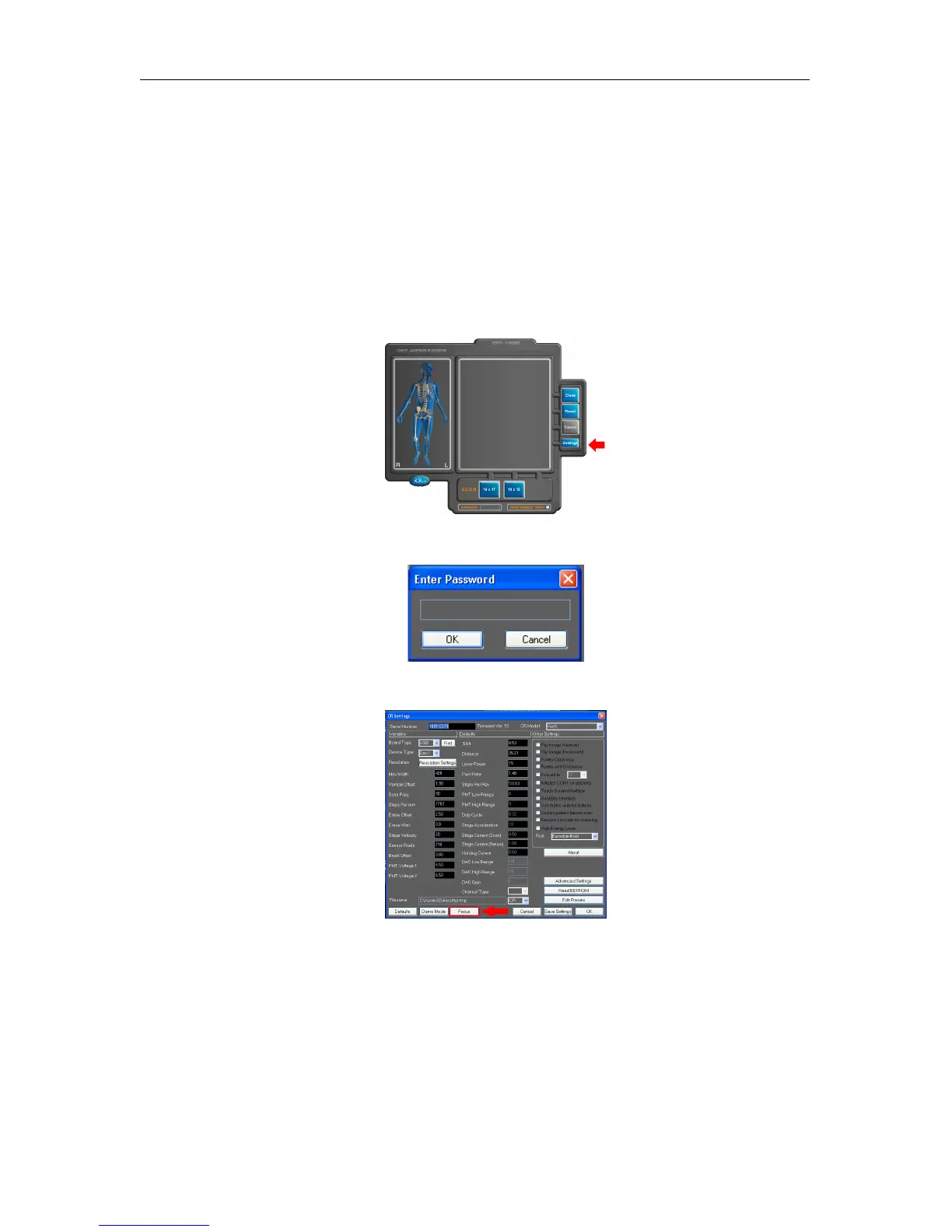
1. Leave the Cassette out of the unit and close the bay door.
2.
Open QPC XSCAN32, access the Scan interface, then click the
Settings
button on the
Scan interface.
3. Enter the password earl in the dialog box.
4. Click on the FOCUS tool Button along the bottom edge of the settings window.
5.
A new window will come up, indicating the settings for the FOCUS tool. Use the
standard settings in the focus tool. Click
OK
in the dialog box. This moves the
carriage 4 inches into the unit, and begins to capture data.
c
2007-2009
Confidential and Proprietary
Property of iCRco, Inc.
27 of 61 Document # 3600-02A Rev C
March 22, 2010



 To Next Page