iCR 3600
TM
– Service Manual
8.5 Removing the Optical/Electrical Module from the Case
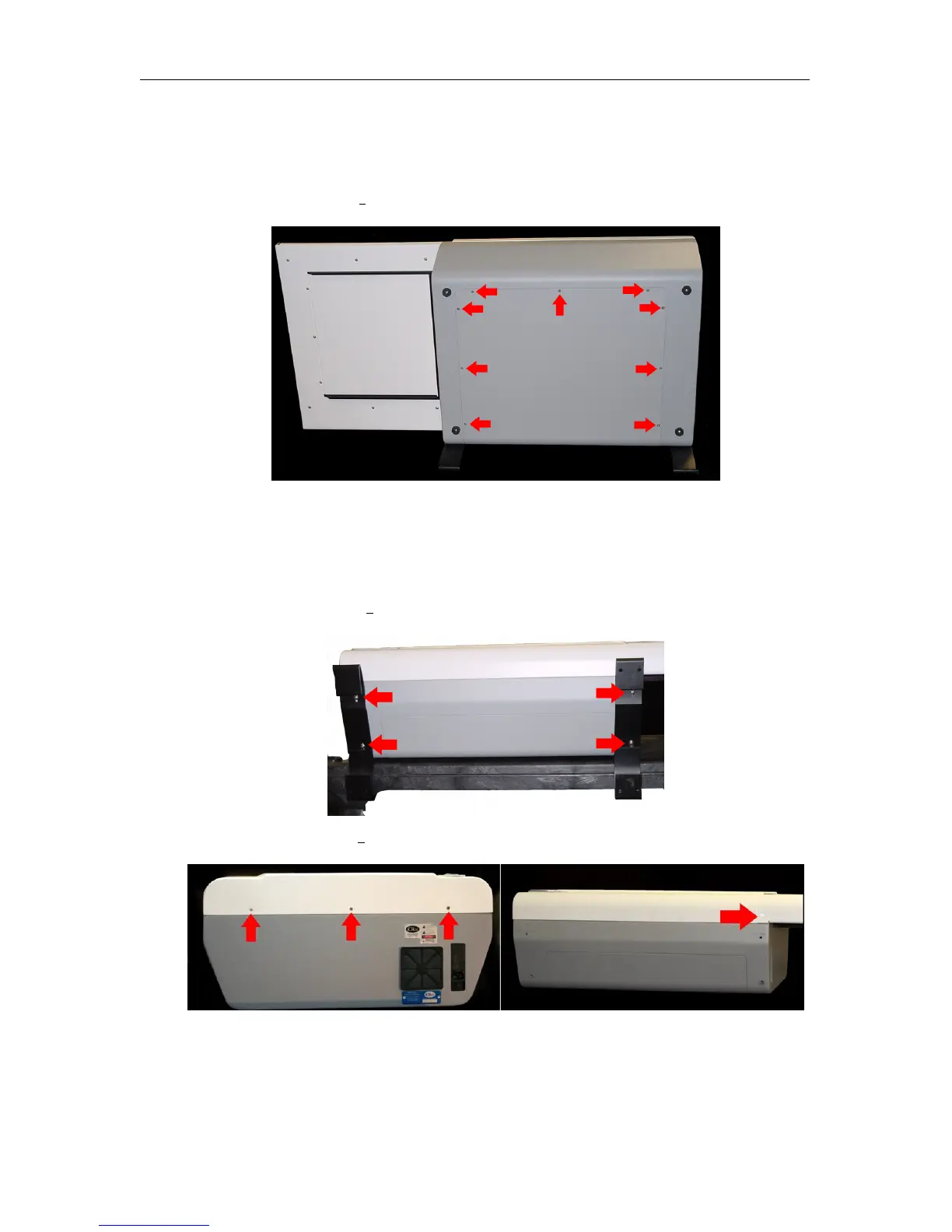
1. Make sure the CR unit is powered off. Remove the power cord from the unit.
2. Remove nine (9) 6-32 x
3
8
” flathead undercut screws from the back cover.
3.
Remove the internal USB connector from its external connection, the power switch
plugs from the main power supply and the eraser power supply, and the external fan
power plug.
4. Orient the CR unit on its back.
5. Remove four (4) 10-32 x
1
2
” truss head screws from the feet.
6. Remove four (4) 6-32 x
3
8
” flathead screws from the front cover.
7. Slide the top cover back, then lift the cover off.
c
2007-2009
Confidential and Proprietary
Property of iCRco, Inc.
48 of 61 Document # 3600-02A Rev C
March 22, 2010



 To Next Page