30
TECHNICIAN/Cascade/Automatic detection Menu
e function called up by this parameter is used to detect the number of appliances in cascade.
is function can also be used to set a Master or Slave appliance as a single appliance.
See section 'Auto-detection' for more details.
TECHNICIAN/Cascade/Parameter synchronisation menu
WARNING: read and understand what is stated in the "Parameter Synchronisation" section before performing this operation.
is function synchronises the parameters of the Master appliance on the Slave appliance(s) according to the tables in the Slave appliance menu.
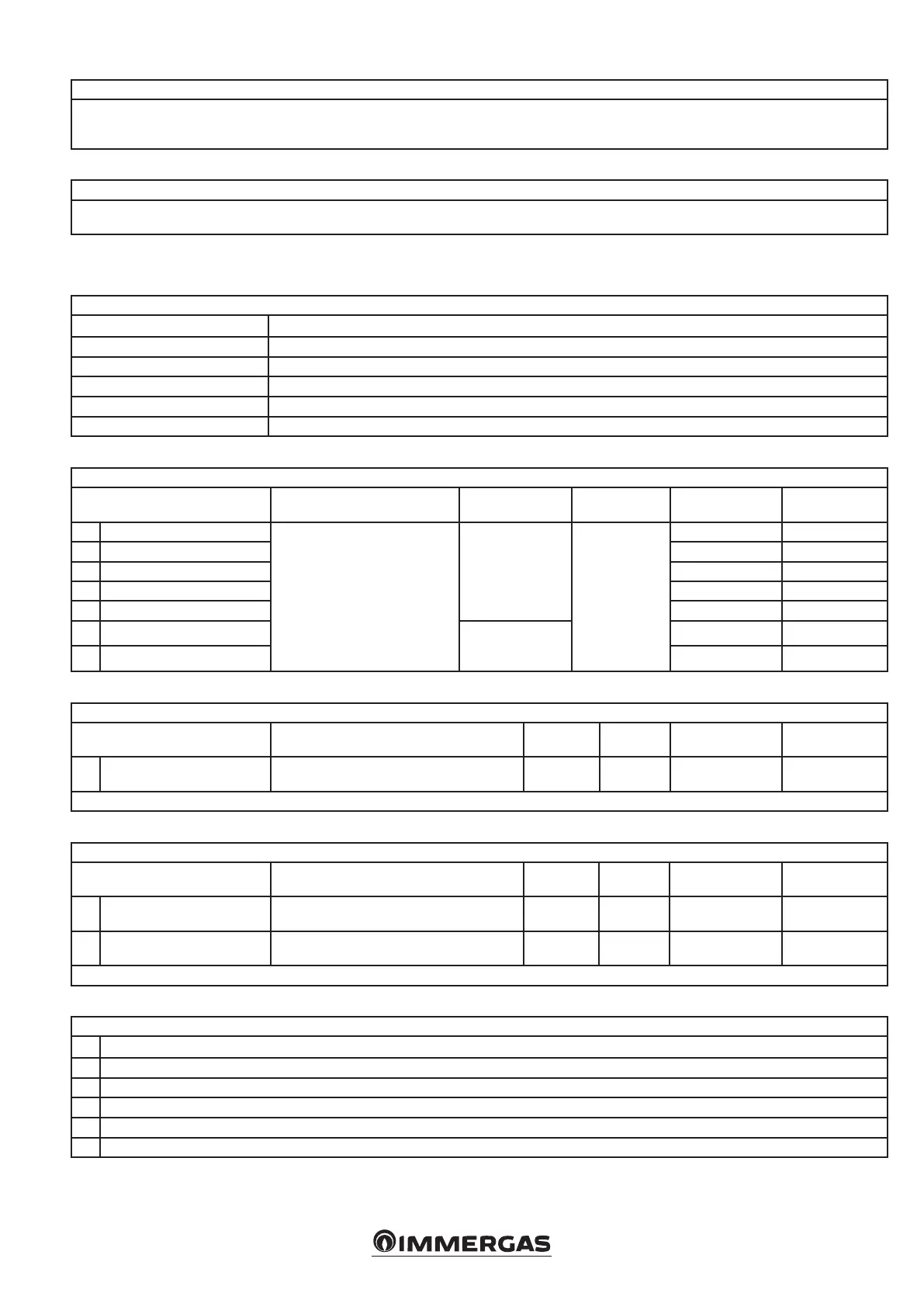
5.6 TECHNICIAN MENU SLAVE
TECHNICIAN Menu
1 Hydraulic settings
2 Heating settings
3 DHW settings
4 System settings
5 Diagnostics
6 Cascade
TECHNICIAN/Hydraulic settings/Relay settings menu
Menu item Description Range Default Synchronisation Customised value
1. K70-A1
Each relay has a dedicated param-
eter to determine its operation (see
paragraph 5.4).
N.B.: the rst ve relays are on the
P.C.B., while the other two are on
the display board.
Relay not used
Booster pump
Error
Burner on
Relay not used
No
2. K70-A2 No
3. K70-A3 No
4. K70-A4 No
5. K70-A5 No
6. K70-A6
Relay not used
Error
Burner on
No
7. K70-A7 No
TECHNICIAN/heating settings menu
Menu item Description Range Default Synchronisation Customised value
1. Post pump time To set the heating pump delay time.
0 - 20
(min) *
3
(min) *
Ye s
* 0 = O
TECHNICIAN/DHW settings menu
Menu item Description Range Default Synchronisation Customised value
1. Post pump time
Sets the pump post-circulation time in domestic
hot water seconds.
0 - 59
(s) *
0
(s) *
Ye s
2. Post pump time
Sets the pump post-circulation time in domestic
hot water minutes.
0 - 30
(min) *
1
(min) *
Ye s
* 0 = O
TECHNICIAN/System settings menu
1. Fan parameters
2. Pump parameters
3. T delta parameters
4. Decreasing slope
5. User interface settings
6. Anti-humidity settings






 To Next Page