1
2 2
3
4
5
31
44
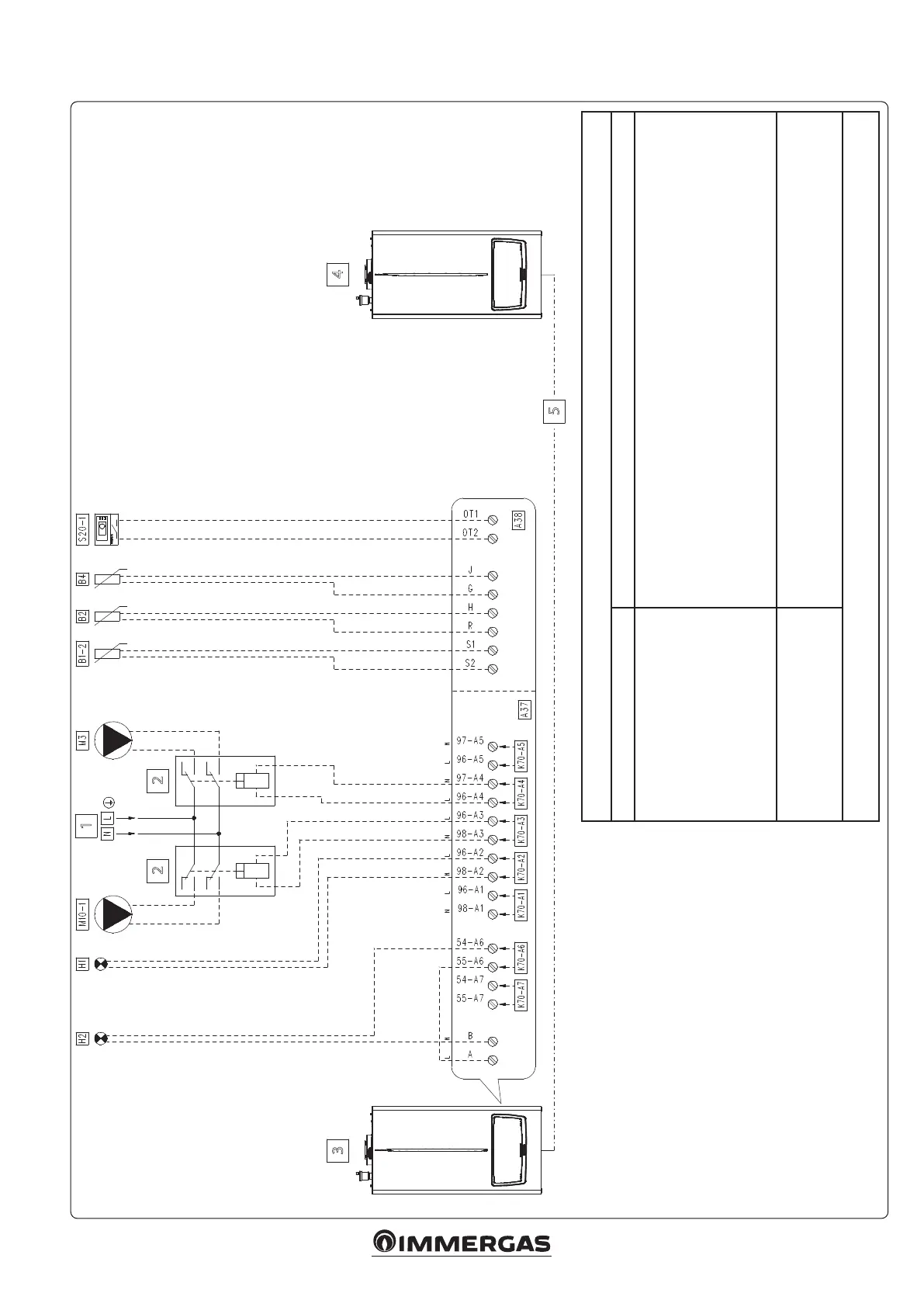
5.17 WIRING DIAGRAM DIRECT HEATING ZONE AND DHW PUMP PARALLEL OPERATION
Key:
A37 - Connection sheet (loads)
A38 - Connection card (signals)
B1-2 - System ow probe (NTC) (optional)
B2 - Domestic hot water probe (NTC) (optional)
B4 - External probe (NTC) (optional)
H1 - “ERROR" warning light (230 Vac) (optional)
H2 - “Burner on” indicator light (230 Vac) (optional)
M3 - DHW pump (optional)
M10-1 - Zone 1 circulator pump (optional)
S20-1 - Zone 1 room thermostat (optional)
1 - 230 Vac - 50 Hz
2 - External relay (optional) - Coil 230 Vac Max. 0.1 A
3 - Master appliance
4 - Slave appliance (last boiler)
5 - Simple cascade appliance communication BUS
(make connections as per specic diagram)
“HYDRAULIC SETTINGS” PARAMETER CONFIGURATION TABLE ('TECHNICIAN' MENU)
Parameter/menu name Setting
“Relay settings” submenu:
- K70-A1
- K70-A2
- K70-A3
- K70-A4
- K70-A5
- K70-A6
- K70-A7
System pump conguration
- Relay not used
- Error
- Zone 1 pump
- Domestic hot water pump:
- Relay not used
- Burner on
- Relay not used
- not used
- System sensor
- Type of heating request
- DHW request type
- Parallel mode
- Heating + domestic hot water mode
- Outdoor temperature curve and room thermostat
- Sensor
- Enabled
With parallel mode enabled, the appliance uses the DHW setpoint and the maximum power used is the greater of the DHW and CH setpoint.
Openerm:
• If an Openerm thermostat is used, set the parameter 'Heating
request type' as 'Room thermostat setpoint';
• Make sure that the Openerm thermostat is compatible with
the appliance.
Notes:
See further tables and notes pertaining to this scheme in section
5.10, "Tables and notes common to simple cascade wiring diagrams".








 To Next Page