30
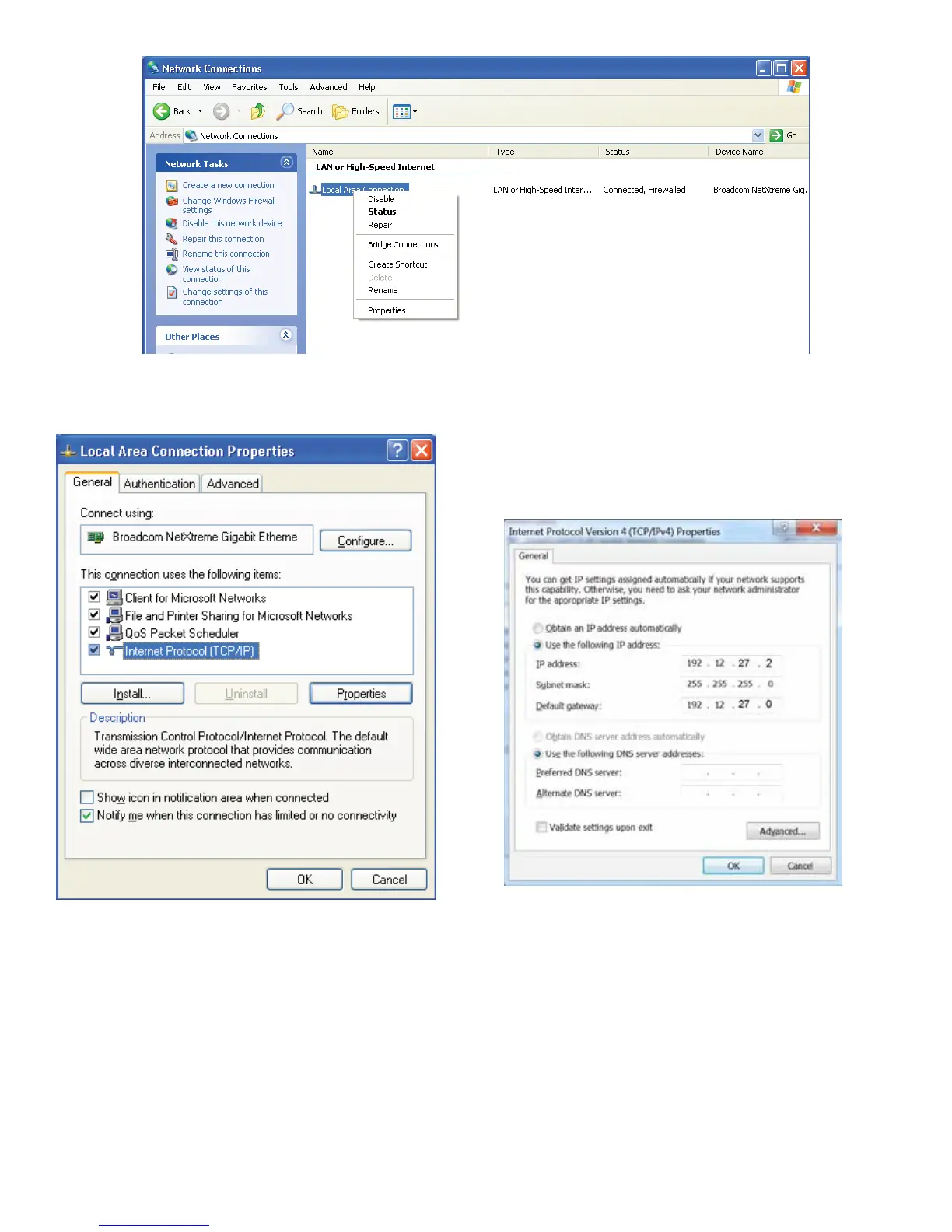
5. In the Local Area Connection Properties dialog box,
under “This connection uses the following items,”
select Internet Protocol (TCP / IP) and click
Properties.
Subnet Mask: Masking is a way to diversify the use of multiple subnets. The mask must match that of the network the
OPTImizer
2
is connected to. Masks are used in networking to create ‘sub-networks’ within a whole, like slicing an apple.
You have separate slices that may be in different locations, but they are still from the same apple. Administrators use this
to make separate networks, to maximize bandwidth or capacity of medium resources (cables or ber). Therefore, when
your network uses static IP addressing (assigned by an administrator), this mask must match the Subnet Mask of the
router port that it is attached to. If the network uses a DHCP server (automatically assigns IP addresses) then the mask
should meet the specications set by your administrator.
Default Gateway: The Gateway is the logical address to the nearest router port, commonly the one that is connected to
the console. Consult your administrator for details on this and other network parameters.
8. Leave the DNS information blank. Click “OK” and close the Control Panel.
6. Select Use the following IP
address.
7. Enter the IP address “192.12.27.2”



 To Next Page