63
6.2 Fiber-Optic Interconnection
The OPTImizer
2
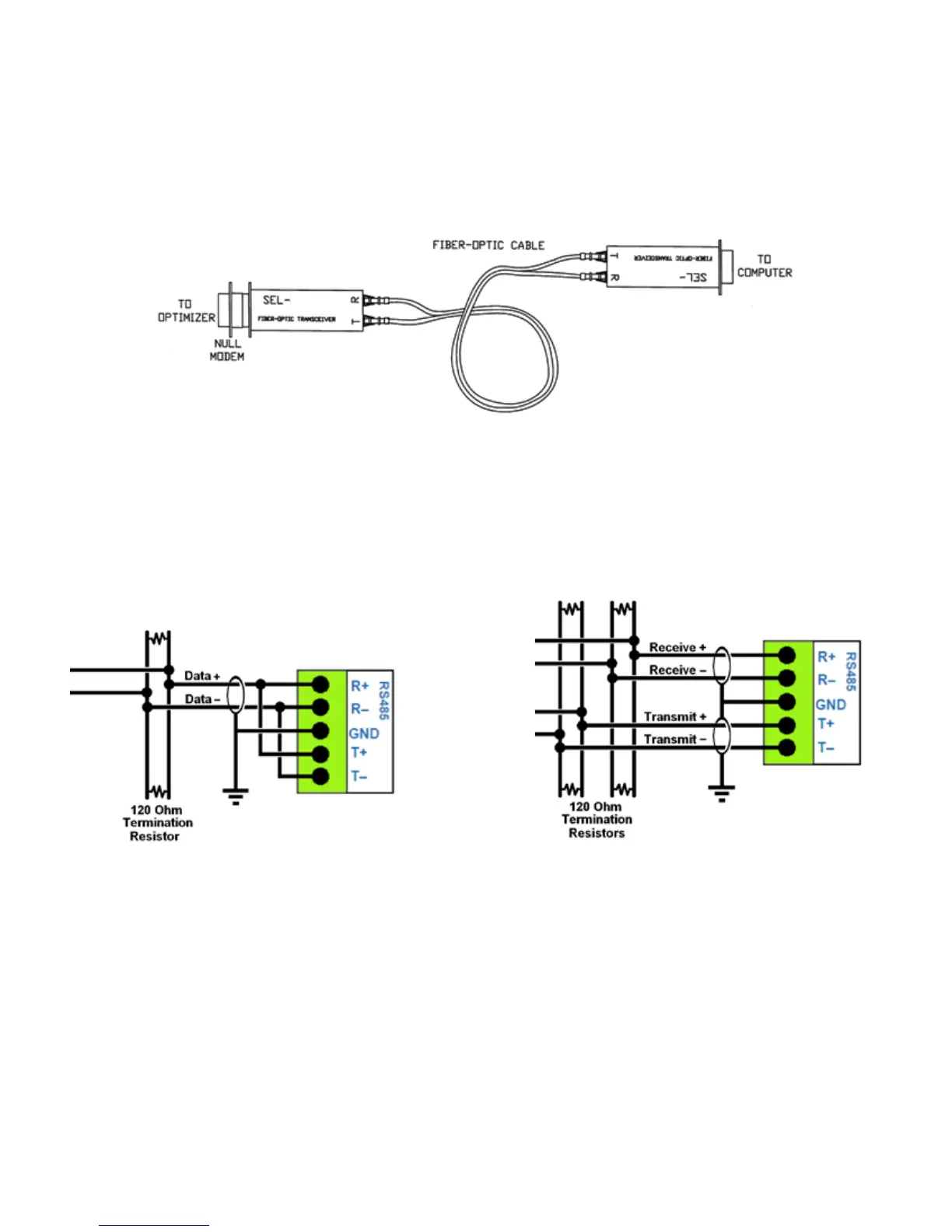
’s serial port is congured to support the use of Schweitzer ber-optic transceivers.
A 9-pin female null modem adaptor must be used between the OPTImizer
2
and the transceiver.
The transceiver will be powered directly from the OPTImizer
2
’s serial port’s CTS line. No other
programming is needed. The ber-optic connection labeled “T” on each transceiver should connect to
the ber-optic connection labeled “R” on the other transceiver.
2814 M
2814 F
TRANSCEIVER
TRANSCEIVER
Male End Female End
Figure 27: Schweitzer Fiber-Optic Interface
6.3 RS-485
The OPTImizer
2
employs full duplex RS-485 communications, but can be wired for half duplex
communication if needed. The same RS-232 port settings apply to the RS-485 port.
Figure 28: RS-485 Half-Duplex Wiring Figure 29: RS-485 Full-Duplex Wiring
6.4 Ethernet
The OPTImizer
2
uses a standard 10-Base T / 100-Base T Ethernet connector. A special “crossover
cable” is provided to facilitate connection directly to a computer’s RJ45 port. This cable may not be
suitable for connection to a router or other communication device.



 To Next Page