18 User Guide - v7
Ensure you remove the packing material from inside the camera before operating the camera.
Remove the Dome Bubble from by rotating it anti-clockwise to its end stop position and lift it
off. The remove the lens shroud.
Ensure the cover fixing screw is not fitted before attempting to remove the dome bubble.
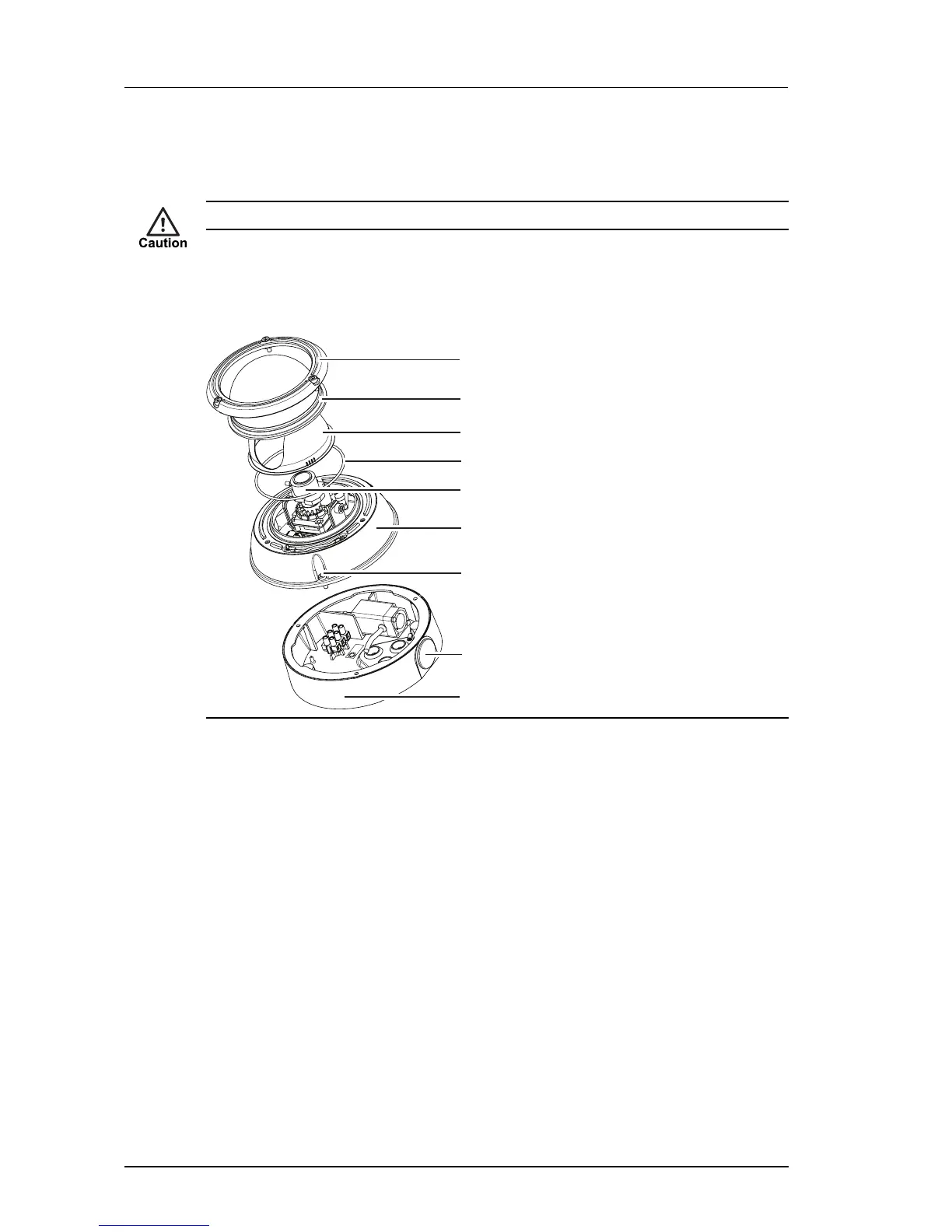
Standard Vandal Resistant variant
Figure 11: Vandal Resistant variant package contents
1. Bezel
2. Dome Bubble
3. Lens Shroud
4. Seal
5. Lens Assembly
6. Camera Assembly
7. Security Screw (x3)
8. Exit Hole
9. Exit Collar with sealing plugs and gasket
In addition to the camera, the following items are also provided:
• 1 x analog video cable
• 1 x Ethernet cable with grommet
• 1 x allen key
• 1 x torx bit
• 1 x desiccant bag
• 1 x spare grommet
• 1 x mini inline-coupler for Ethernet
3 Getting Started Enhanced SDFixed Dome - 9000 Range


 To Next Page