30
EASY MENU
Item Description
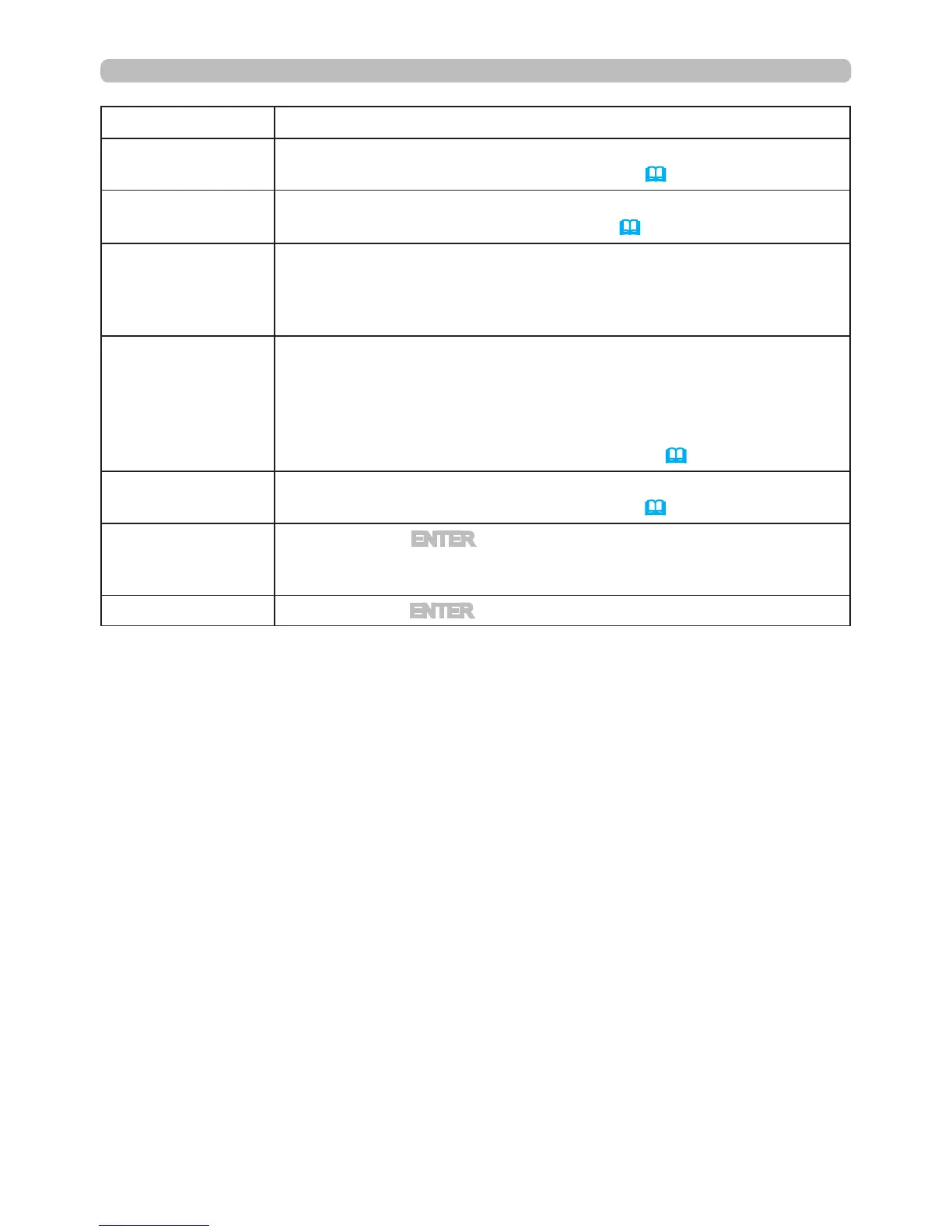
ECO MODE
Using the ◄/► buttons turns off/on the eco mode.
See the ECO MODE item in SETUP menu
(
41
).
MIRROR
Using the ◄/► buttons switches the mode for mirror status.
See the MIRROR item in SETUP menu
(
41
).
RESET
Resets all of the EASY MENU items except the FILTER TIME and
LANGUAGE to factory default settings.
A conrmation dialog is displayed. Selecting OK using the
►
button
performs resetting.
FILTER TIME
The usage time of the air lter is shown in the menu.
Performing this item resets the lter time which counts usage time
of the air lter.
A conrmation dialog is displayed. Selecting the OK using the
►
button performs resetting.
See the FILTER TIME item in OPTION menu
(
48
).
LANGUAGE
Using the ◄/► buttons changes the display language.
See the LANGUAGE item in SCREEN menu
(
42
).
ADVANCED MENU
Press the
►
or ENTER button to use the menu of PICTURE,
IMAGE, INPUT, SETUP, SCREEN, OPTION, NETWORK or
SECURITY.
EXIT
Press the
◄ or
ENTER
button to nish the OSD menu.



 To Next Page