72
Troubleshooting
Regarding the indicator lights
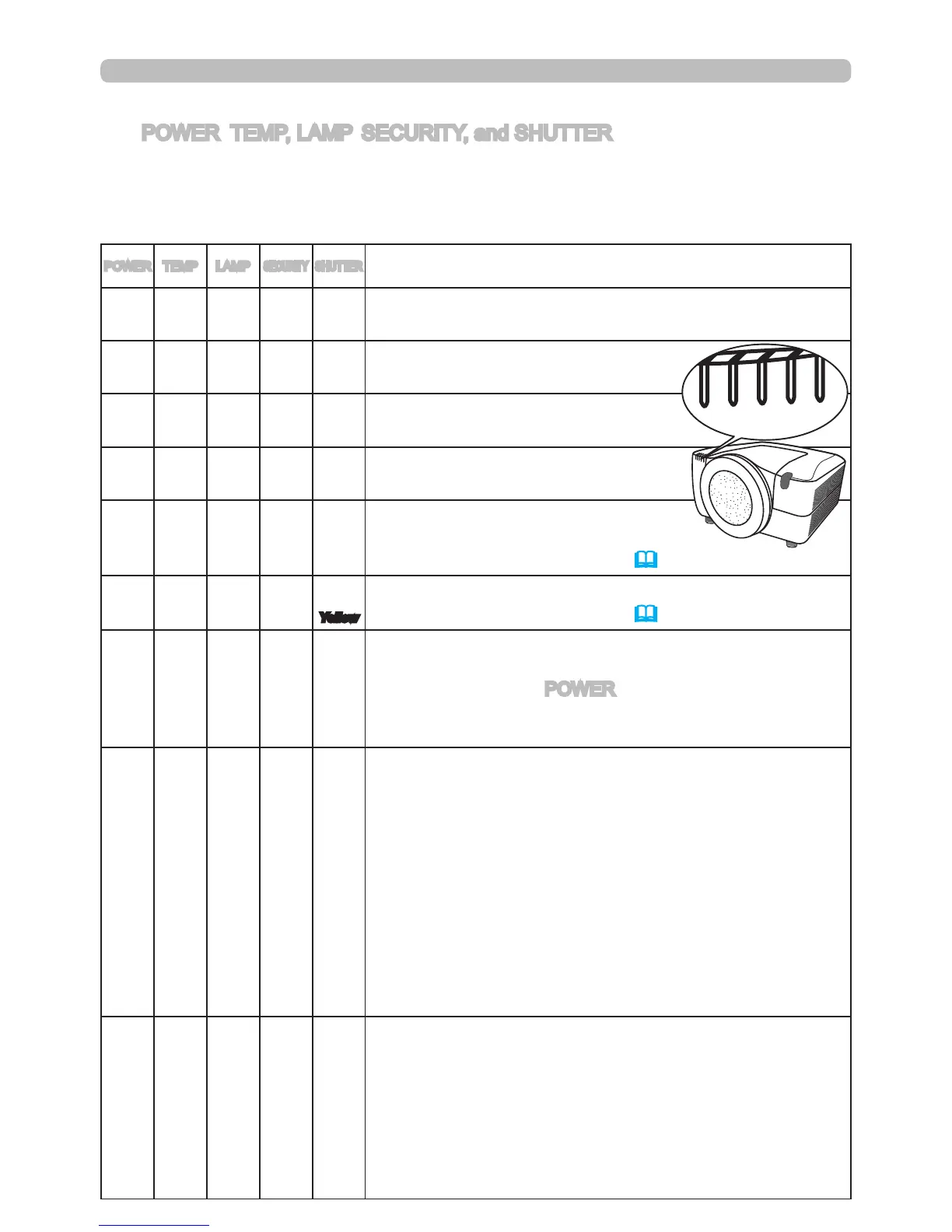
The POWER, TEMP, LAMP, SECURITY, and SHUTTER indicators have meanings
based on the solid and ashing patterns described in the table below. Please
follow the instructions within the table. If the indicators are still showing the same
pattern afterwards, or if an indication other than the following is displayed, please
contact your dealer or service company.
POWER
TEMP LAMP
SECURITY
SHUTTER
Description
Lighting
In
Orange
Turned
off
Turned
off
Turned
off
Turned
off
The projector is in a standby state.
Please refer to the section “Turning on/off”.
Blinking
In
Green
Turned
off
Turned
off
Turned
off
Turned
off
The projector is warming up.
Please wait.
Lighting
In
Green
Turned
off
Turned
off
Turned
off
Turned
off
The projector is in an on state.
Ordinary operations may be performed.
Blinking
In
Orange
Turned
off
Turned
off
Turned
off
Turned
off
The projector is cooling down.
Please wait.
Turned
off
Turned
off
Turned
off
Blinking
In
Red
Turned
off
The PIN Lock or (and)
TRANSITION DETECTOR is (are) on.
Please refer to the description
(63,64).
Turned
off
Turned
off
Turned
off
Turned
off
Blinking
In
Yellow
The SHUTTER is closed.
Please refer to the description
(26).
Blinking
In
Red
(discre-
tionary)
(discre-
tionary)
Turned
off
Turned
off
The projector is cooling down. A certain error has
been detected.
Please wait until the POWER indicator nishes blinking,
and then perform the proper measure using the item
descriptions below.
Blinking
In
Red
or
Lighting
In
Red
Turned
off
Lighting
In
Red
Turned
off
Turned
off
The lamp does not light, and the projector interior
may have become overheated.
Please turn the power off, and allow the projector to
cool down at least 20 minutes. After the projector has
sufciently cooled down, please conrm the following
items, and then turn the power on again.
• Is there blockage of the air passage aperture?
• Is the air lter dirty?
•
Does the peripheral temperature exceed 35°C?
If the indicators are still showing the same pattern
afterwards, please change the lamp referring to the section
“Lamp unit”.
Blinking
In
Red
or
Lighting
In
Red
Turned
off
Blinking
In
Red
Turned
off
Turned
off
The lamp cover has not been properly attached.
Please turn the power off, and allow the projector to
cool down at least 45 minutes. After the projector has
sufciently cooled down, please conrm that the lamp
cover is properly attached. After performing any needed
maintenance, turn the power on again. If the indicators
are still showing the same pattern afterwards, please
contact your dealer or service company.



 To Next Page