6
Part names
STANDBY/ON
MENU
LENS SHIFT
COMPUTER
ZOOM
VIDEO
FOCUS
DIGITAL
SHUTTER
I O
HDMI DVI-D
CONTROL IN CONTROL OUT
REMOTE
CONTROL
IN
OUT
S-VIDEO
COMPUTER IN2
COMPUTER IN1
VIDEO 1
BNC
R/Cr/Pr G/Y B/Cb/Pb H V VIDEO 2
Y
Cb/Pb
Cr/Pr
AC IN
LAN
MONITOR
OUT
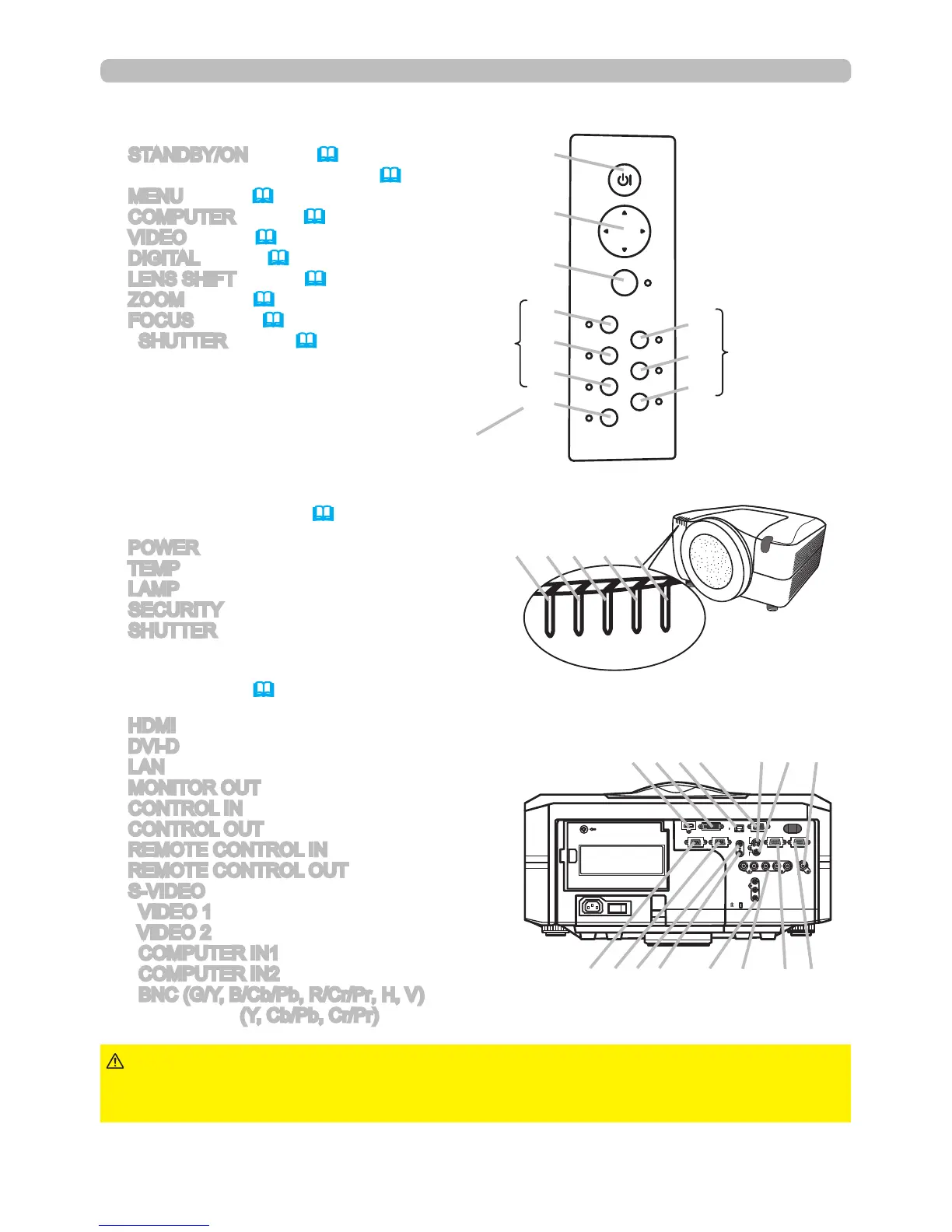
Control panel
(1) STANDBY/ON button (19,20)
(2) Cursor buttons ( ▲/▼/◄/► ) (28)
(3) MENU button (28)
(4) COMPUTER button (22)
(5) VIDEO button (22)
(6) DIGITAL button (22)
(7) LENS SHIFT button (21)
(8) ZOOM button (21)
(9) FOCUS button (21)
(10) SHUTTER button (26)
Rear panel(10)
(1) HDMI input
(2) DVI-D input
(3) LAN input
(4) MONITOR OUT output
(5) CONTROL IN input
(6) CONTROL OUT output
(7) REMOTE CONTROL IN input
(8) REMOTE CONTROL OUT output
(9) S-VIDEO input
(10) VIDEO 1 input
(11) VIDEO 2 input
(12) COMPUTER IN1 input
(13) COMPUTER IN2 input
(14) BNC (G/Y, B/Cb/Pb, R/Cr/Pr, H, V) inputs
(15) Component (Y, Cb/Pb, Cr/Pr) inputs
(6)
(5)
(4)
(1)
(2)
(3)
►Only use the reset switch when the projector will not turn off
normally, since pushing this switch stops projector operations without cooling it
down.
CAUTION
(1)
Indicator lamp (72)
(1) POWER indicator
(2) TEMP indicator
(3) LAMP indicator
(4) SECURITY indicator
(5) SHUTTER indicator



 To Next Page