67
Maintenance
Maintenance
A worn out lamp bulb could burn or burst. It is recommended to keep a spare
lamp unit on hand and to replace the lamp unit when the projected image darkens
or color reproduction becomes poor.
To purchase a spare, contact your dealer and tell the following type number.
Lamp unit
Optional lamp part number: SP-LAMP-079
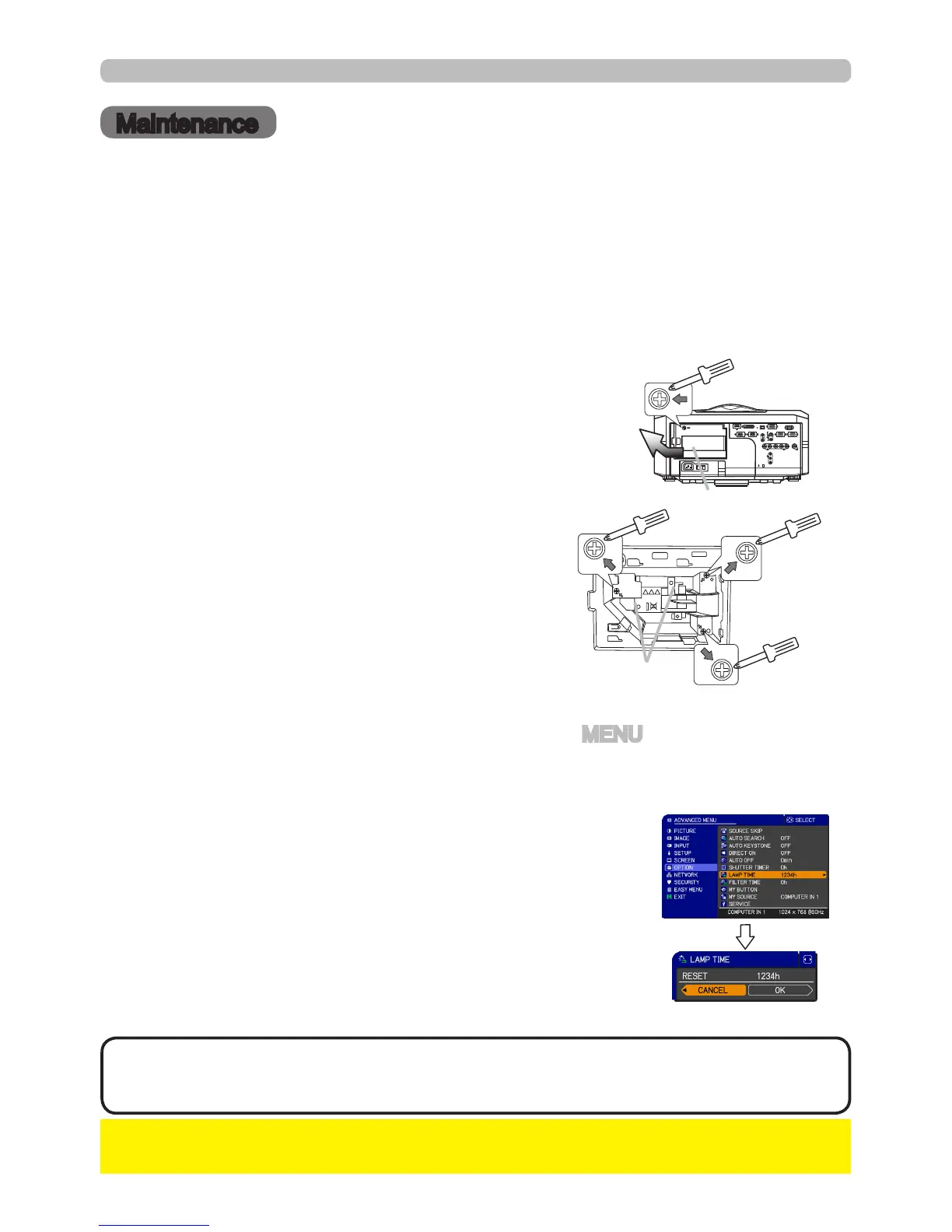
•The value shown on the OPTION menu as the LAMP TIME is the
amount of usage which has occurred since the last time the LAMP TIME was
reset. Refer to the value for proper maintenance.
NOTE
If the projector is installed in a special state such as ceiling mount, or if the lamp
bulb has broken, also ask the dealer to replace the lamp unit. Otherwise, follow
the procedure shown below to replace the lamp.
Make sure that the projector is unplugged and
cooled down.
1.
6.
To display the ADVANCED MENU, press the MENU button (on the control
panel or the remote control). On the EASY MENU, select the “ADVANCED
MENU” using the ▲/▼ cursor buttons, then press the ► cursor button.
To display the LAMP TIME dialog, select the
“LAMP TIME” using the ▲/▼ cursor buttons in
the right column, then press the ► cursor button.
Use the ► cursor button according to the dialog,
Selecting “OK” resets the LAMP TIME value.
(1)
(2)
(4)
(5)
Turn the projector on.
The lamp cover
The handles
Loosen the screw (marked by arrow) of the
lamp cover. Then slide and take it off.
2.
Loosen the 3 screws (marked by arrow) of the
lamp unit. Then picking the handles of the unit,
gently take it from the projector.
3.
Gently set the new lamp unit into place. Then
retighten the screws of the lamp unit.
4.
Put the lamp cover back into place, and
retighten the screw of the lamp cover.
5.
Reset the LAMP TIME value.
►Be sure to reset the LAMP TIME after you have replaced the lamp
unit.
NOTICE
To select the OPTION menu, select the
“OPTION” using the ▲/▼ cursor buttons in the
left column, then press the ► cursor button.
(3)



 To Next Page