NV11 Manual Set – Section 4 8
Copyright © Innovative Technology Ltd 2012 GA963-2
Check website for options.
There are many variants of bezel and cashbox type
available for the NV11 validator. Please check the ITL
website (www.innovative-technology.co.uk) for up to
date information on the options available.
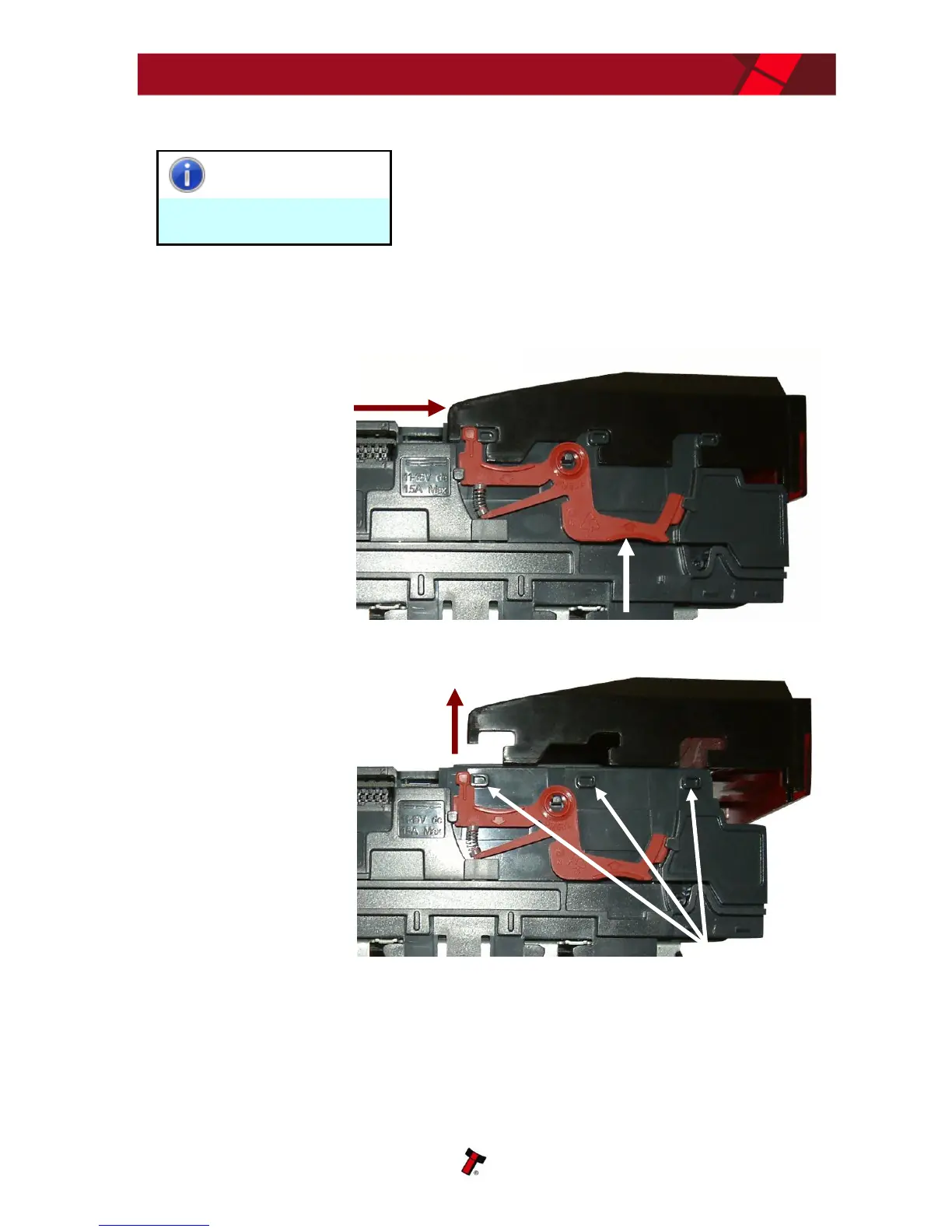
4.3 Bezel Removal and Refitting
The bezel is
removed by pushing
the red locking arms
on both sides of the
validator upwards,
and sliding the bezel
away from the
locking arms
Lift the bezel off
once the bezel has
been slid fully
across and is clear
of the locating pins
The bezel is refitted by pushing the bezel back onto the locating pins and sliding
backwards until all six pins are engaged in the slots. The locking arms will then spring
back and locate into the bezel.
a. Push locking arms upwards
b. Slide bezel away from
locking arms















 To Next Page